
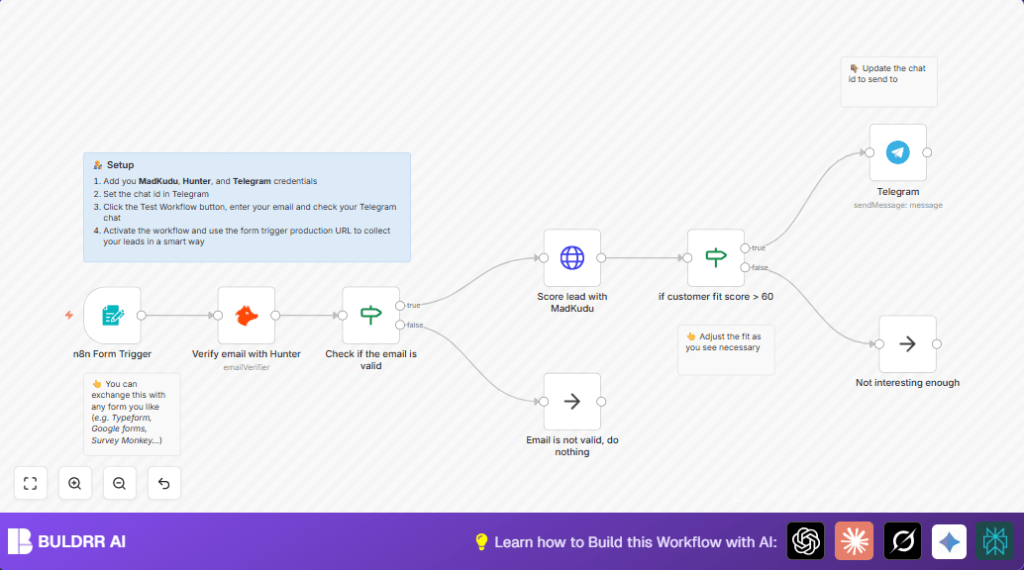

What this workflow does
This workflow checks if emails from a web form are real and good leads.
It uses Hunter API to see if emails can get messages.
It then scores these leads with MadKudu to find top clients.
If the lead score is high, it sends a note on Telegram to the sales team right away.
If the email is bad or score is low, it stops without bothering anyone.
This stops wasting time on bad emails and helps sales focus on best leads fast.
Who should use this workflow
Anyone who gets many contact emails but wants to save time by ignoring invalid or poor leads.
It helps sales managers and teams who want quick alerts for valuable prospects.
Also fits companies with forms that send emails to n8n and need instant lead quality checks.
Tools and services used
- Hunter API: Checks if email addresses are real and can receive emails.
- MadKudu API: Scores leads based on company and behavior data.
- Telegram Bot API: Sends instant messages to a team chat about good leads.
- n8n Form Trigger node: Starts workflow when someone submits an email through a form.
How this workflow works
Inputs
The workflow starts when a user fills a web form with their business email.
The email goes into the workflow through the Form Trigger node.
Processing Steps
- Email validation: The Hunter node checks if email is deliverable and not disposable.
- Email validity check: An IF node looks if Hunter says “valid” status.
- Lead scoring: For valid emails, the HTTP Request node calls MadKudu to get a lead score.
- Lead quality filtering: Another IF node checks if score is above 60.
- Notifications: If high score, the Telegram node sends a message with lead details.
- NoOp nodes: Low scores or invalid emails go to NoOp nodes to stop further action.
Outputs
Only real, high-score leads trigger Telegram notifications.
Invalid or low-score leads are discarded automatically.
Beginner step-by-step: How to use this workflow in n8n
Step 1: Import the workflow
- Download the workflow file using the Download button on this page.
- Open n8n editor where you want to use it.
- Click the menu, select “Import from File”, and upload the downloaded workflow.
Step 2: Configure credentials
- Add your Hunter API credentials in the Hunter node.
- Fill in your MadKudu API key in the HTTP Request node under headers.
- Set Telegram Bot token and chat ID in the Telegram node.
- Update the form fields or webhook path if needed based on your form setup.
Step 3: Test and activate
- Send a test form submission using a real business email.
- Check n8n execution to confirm Hunter API works and lead scores return.
- Verify Telegram notification arrives if lead score is above 60.
- If all works well, toggle the workflow ON to start production use.
- Use self-host n8n if you want full control over your data and environment.
Common inputs and outputs
Input: User’s business email from web form submission.
Processing: Email validation, lead scoring, and decision making based on scores.
Output: Either a Telegram alert for high-score lead or no action for invalid/low-score emails.
Common issues and edge cases
- If Hunter returns a status other than “valid”, the workflow stops without notification.
- A bad MadKudu API key causes authentication errors; update the key to fix.
- If Telegram messages do not send, check the chat ID and bot token are correct and bot permission allows sending.
- Too many API calls can hit limits; monitor your account usage for Hunter and MadKudu.
Customization ideas
- Switch the Form Trigger node for other forms like Typeform by using custom webhook nodes.
- Change lead score cutoff in the second IF node from 60 to any other number.
- Edit Telegram messages to add more lead info or different formatting.
- Add extra form fields like company size to improve MadKudu scoring.
- Save qualified leads in Google Sheets or CRM by adding more nodes.
Summary
✓ Automatically check if form emails are real and valid.
✓ Score leads and send alerts only for high-value contacts.
✓ Skip notifications for invalid or weak leads to save time.
✓ Keep sales teams focused on the best leads quickly.
→ This reduces manual work and missed opportunities.
