

What This Workflow Does
This workflow creates Arabic kids’ stories automatically.
It solves the problem of spending too much time making stories with text, images, and audio.
The result is ready stories with pictures and narration sent to a Telegram channel every 12 hours.
The workflow starts with no input and ends with a story posted on Telegram.
Who Should Use This Workflow
This is good for teachers and educators who want to share stories in Arabic.
Users with little time to create multimedia stories will find it helpful.
Also useful for those who want to automate sending stories with images and audio to kids.
Tools and Services Used
- OpenAI GPT-4 Turbo API: Generates and translates stories, creates image prompts, and produces audio narration.
- DALL-E (via OpenAI): Creates story illustrations based on text prompts.
- Telegram Bot API: Sends text, images, and audio files to a Telegram channel.
- n8n Automation Platform: Orchestrates the workflow schedule and integrations.
Inputs, Processing, and Outputs
Inputs
No manual input is needed once set up.
A schedule trigger automatically starts the workflow every 12 hours.
Processing
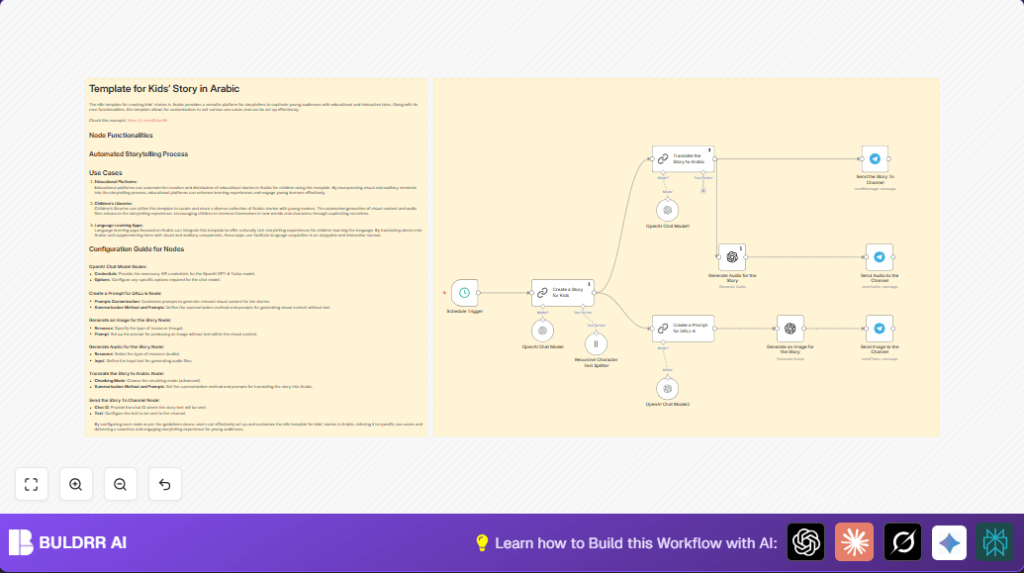
- Schedule trigger starts workflow twice daily.
- First OpenAI node generates a creative kids’ story in English.
- Second OpenAI node translates and simplifies story into easy Arabic.
- Another node creates a visual prompt from the Arabic story for image generation.
- DALL-E generates a picture of the story’s characters and scene without text.
- OpenAI generates an Arabic audio narration of the story.
- Telegram nodes send the story text, image, and audio to the target channel.
Outputs
Arabic story text message.
Illustration image.
Audio narration file.
Beginner Step-by-Step: How to Use This Workflow in n8n
Step 1: Import the Workflow
- Download the workflow file using the Download button on this page.
- Open n8n editor and click on “Import from File”.
- Choose the downloaded workflow JSON file and import it.
Step 2: Configure Credentials and IDs
- Add OpenAI API Key in the credentials manager.
- Add Telegram Bot API Key in Telegram credentials.
- Update Telegram chatId fields in all Telegram nodes with your channel’s chat ID.
- If present, update any prompt text or code in OpenAI nodes as needed.
Step 3: Test the Workflow
- Manually run the workflow once to check outputs.
- Look for the posted story, image, and audio in your Telegram channel.
Step 4: Activate for Production
- Turn on the schedule trigger node.
- The workflow will run every 12 hours automatically, posting new stories.
For users who want to run n8n on their own server, see self-host n8n resources.
Customization Ideas
- Change the story length or themes by editing the prompt text in the first OpenAI node.
- Update the Telegram chatId value to post to another channel or group.
- Edit audio captions in the Telegram audio send node for custom messages.
- Modify the visual prompt node to change the style or detail of story images.
- Adjust the schedule trigger interval for different posting frequencies.
Troubleshooting Common Issues
- OpenAI quota exceeded: Check API limits and lower usage or upgrade plan.
- Telegram unauthorized error: Verify bot token and channel admin rights.
- Image shows text: Make sure DALL-E prompt says “no text” clearly.
- Audio not working: Confirm audio format in OpenAI node and retry generation.
Pre-Production Checklist
- Verify OpenAI API keys are active.
- Test Telegram bot by manually sending messages.
- Run a manual workflow trigger and check all outputs.
- Make sure audio files play and images appear correctly in Telegram.
- Backup workflow JSON and prompts for future use.
Deployment Guide
After setup and testing, activate the schedule trigger to let stories post twice daily.
Monitor n8n workflow logs for errors.
Watch API usage limits on OpenAI to avoid hitting quotas.
The Telegram channel will receive regular new stories automatically.
Summary of Results
✓ Saves over 5 hours weekly by automating story creation.
✓ Delivers Arabic kid stories with matching images and audio.
✓ Sends finished content directly to Telegram channel easily.
✓ Keeps story quality consistent and age-appropriate without manual work.
→ Automates a complex multimedia task in a simple, scheduled n8n workflow.
