
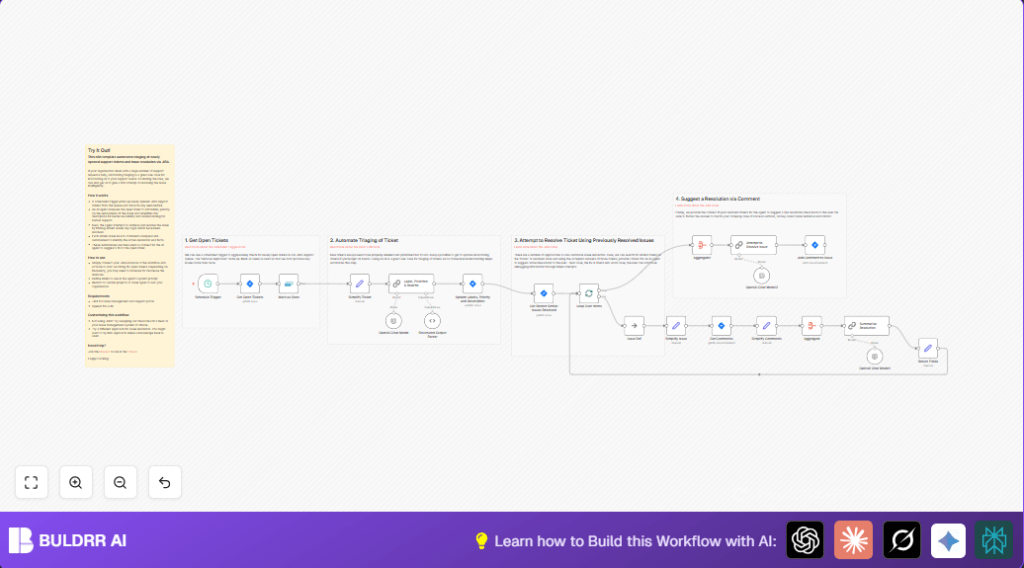

What This Workflow Does
This workflow checks JIRA often for new support tickets in the SUPPORT project with the status “To Do”.
It uses AI to label, set priority, and rewrite ticket summaries and descriptions.
It then finds similar resolved tickets and reads their comments.
The AI summarizes those resolutions and suggests a solution for the new ticket.
It posts this suggestion back to the JIRA ticket as a comment.
This saves time by automating the triage and first response steps.
Who Should Use This Workflow
This workflow fits teams managing many daily JIRA support tickets.
Users needing to cut time spent on ticket triage and classification will gain.
It helps lessen mistakes in labels and priorities.
It also gives fast, AI-based initial solutions for common issues.
Tools and Services Used
- JIRA Software Cloud API: Reads and updates tickets.
- OpenAI GPT-4o-mini via Langchain Chain LLM node: Analyzes tickets and writes summaries.
- n8n Workflow Automation: Organizes flow and nodes.
Beginner step-by-step: How to build this in n8n
Import the Workflow
- Download the workflow JSON file using the Download button on this page.
- Inside the n8n editor, go to “Import from File” and select the downloaded JSON.
Configure Credentials and Settings
- Add JIRA API credentials in n8n Credential settings.
- Add OpenAI API Key under credentials.
- Check nodes that use project IDs, emails, or channels and update if your environment differs.
- Copy and paste the exact system prompt into the Langchain Chain LLM node as shown below to guide AI accurately:
Your are JIRA triage assistant who's task is to
1) classify and label the given issue.
2) Prioritise the given issue.
3) Rewrite the issue summary and description.

## Labels
Use one or more. Use words wrapped in "[]" (square brackets):
* Technical
* Account
* Access
* Billing
* Product
* Training
* Feedback
* Complaints
* Security
* Privacy

## Priority
* 1 - highest
* 2 - high
* 3 - medium
* 4 - low
* 5 - lowest

## Rewriting Summary and Description
* Remove emotional and anedotal phrases or information
* Keep to the facts of the matter
* Highlight what was attempted and is/was failing
Test and Activate
- Run the workflow with a test ticket to confirm completion.
- Activate the workflow toggle to run it on schedule.
If you want more control or better data privacy, use self-host n8n.
Workflow Inputs, Processing Steps, and Outputs
Inputs
- New tickets from JIRA SUPPORT project with status “To Do”.
- API credentials for JIRA and OpenAI.
Processing Steps
- Fetch tickets every minute or set interval.
- Remove duplicate tickets already processed.
- Simplify ticket data to essential fields.
- Send ticket to AI for labeling, priority setting, and rewriting.
- Update ticket in JIRA with AI results.
- Search similar resolved tickets with matching labels.
- Fetch comments from those resolved tickets.
- Use AI to summarize resolutions from comments.
- Combine summaries to generate an AI proposed resolution for new ticket.
- Post this suggested solution back to the ticket as a comment.
Outputs
- JIRA tickets labeled, prioritized and summarized clearly.
- Suggested first resolution comments in each new ticket.
Customization Ideas
- Edit the system prompt labels to match organizational terms.
- Change JIRA project or issue status in JQL queries.
- Adjust ticket or comment fetch limits to control API use.
- Switch AI models if better ones are available.
- Modify scheduling frequency to balance responsiveness and quota.
Known Issues and Troubleshooting
- Problem: No tickets fetched from JIRA.
Cause: JQL query or permissions issue.
Fix: Check JQL syntax and API rights. - Problem: AI returns bad JSON output.
Cause: AI did not follow output format.
Fix: Improve prompt clarity and test with sample data. - Problem: Duplicate tickets processed repeatedly.
Cause: Deduplication misconfigured.
Fix: Set dedupe field to ticket key properly.
Deployment Guide
Turn the workflow on in n8n after testing.
Monitor logs for errors and confirm tickets are updated.
Start with frequent intervals to catch urgent tickets.
Adjust schedule as needed for API limits.
Ask support staff to review AI labels and priorities for first days.
Improve prompts based on feedback.
Summary
✓ Saves 10+ hours per week by automating ticket triage.
✓ Ensures consistent labeling and priority assignment.
✓ Suggests smart initial resolutions for faster fixes.
✓ Minimizes errors and manual effort.
✓ Easy to customize and deploy inside n8n.
