
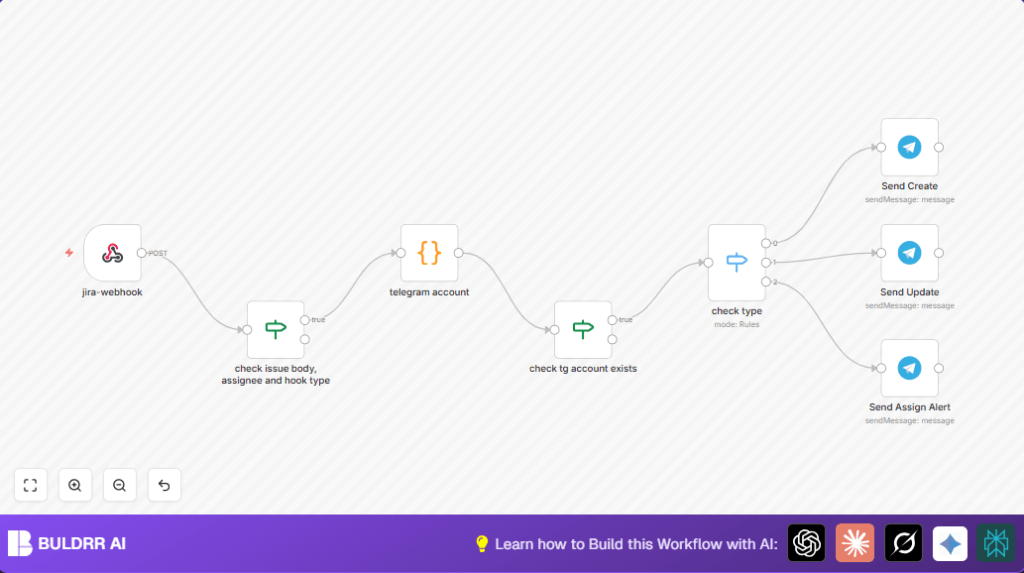

What This Automation Does
This workflow listens for Jira issue events, like when an issue is created, updated, or assigned to someone.
It looks up who the Jira assignee is and checks if they have a Telegram account linked.
If yes, it sends a notification message straight to their Telegram chat.
The messages change a bit depending on the type of Jira event, including info about the project, issue key, title, description, and creation time.
If no Telegram account is linked, no message is sent.
This helps teams get instant, clear updates in Telegram without checking Jira repeatedly.
Tools and Services Used
- Jira Webhook: Sends JSON event data when an issue changes.
- n8n Workflow: Orchestrates webhook reception, data checking, and notifications.
- Telegram Bot API: Sends messages to users via Telegram chats.
- Header Authentication: Secures Jira webhook endpoint.
- Code Node in n8n: Maps Jira user IDs to Telegram chat IDs.
How this Workflow Works (Input → Process → Output)
Input
- Jira webhook sends an event POST request when issue changes happen.
- The request contains issue details, the event type, and assignee information.
Processing Steps
- Webhook node captures the incoming webhook. It checks authentication and receives data.
- If node (check issue body, assignee and hook type) validates data presence. Only proceed if issue data and assignee exist.
- Code node (telegram account) runs JavaScript to get the Jira assignee’s accountId from the webhook JSON. It looks up this accountId in a mapping object to find the Telegram chat ID.
- If node (check tg account exists) checks if telegramChatId exists. Stops workflow if no Telegram ID found.
- Switch node (check type) routes work based on event type header. Cases for “created”, “updated”, and “change-assignee”.
- Corresponding Telegram nodes send formatted messages for each event type.
const accountId = $('jira-webhook').first().json.body.fields.assignee?.accountId;

const telegramAccounts = {
  "[jira account id]": 00000000, // telegram chat id
};

const telegramChatId = telegramAccounts[accountId];

return [{telegramChatId}];
Output
- Telegram messages sent to the right user with issue details.
- No messages sent if assignee does not have Telegram linked.
Beginner step-by-step: How to Use This Workflow in n8n
Importing the Workflow
- Download the workflow file using the Download button on this page.
- In the n8n editor, click the menu and choose “Import from File”.
- Select the downloaded workflow file and import it.
Configuring Credentials
- Add your Jira webhook authentication credentials in the existing header authentication node.
- Put your Telegram bot API token into all Telegram nodes.
Updating IDs and Mappings
- Open the telegram account code node.
- Replace placeholder Jira account IDs and Telegram chat IDs with actual values.
- Modify message templates in Telegram nodes if needed.
Testing and Activating
- Trigger Jira events like creating, updating, or re-assigning an issue.
- Check if notifications arrive in Telegram chats accordingly.
- If working as expected, set the workflow to “Active” in n8n to run continually.
Following these steps, users get real notifications in Telegram without building the workflow from scratch.
For running on self-hosted servers, refer to self-host n8n resources for extra help.
Customization Ideas
- Expand the telegram account code node mapping to add more Jira accounts and their Telegram chat IDs.
- Change the Telegram message templates to add more issue details or different wording.
- Add more Jira webhook event types to the check type switch node to send messages for comments or issue closes.
- Copy Telegram notification nodes and configure similar nodes for Slack or email alerts for multi-channel messages.
Troubleshooting
“Telegram chat ID is undefined”
The Jira assignee’s accountId is not found in the telegramAccounts mapping of the telegram account code node.
Update the code node with the correct Jira and Telegram IDs and test again.
“Webhook 401 Unauthorized”
This happens when the Jira webhook does not send the right Header Authentication credentials.
Make sure the HTTP Header Auth node in n8n matches credentials expected by Jira.
“No notification received on Telegram”
The Telegram chat ID check probably failed or the Telegram bot token is invalid.
Verify the Telegram bot token and chat IDs in n8n. Confirm the bot can message the user.
Pre-Production Checklist
- Confirm Webhook URL and Header Authentication credentials match exactly in Jira and n8n.
- Test Jira webhook triggers for creating, updating, and assigning issues.
- Check Telegram bot credentials in n8n are valid.
- Ensure all Jira assignees needing notifications are in the telegramAccounts mapping.
- Run the workflow in test mode and check logs.
Deployment Guide
After testing, activate the workflow in n8n by toggling it to “Active” and saving.
The webhook listens for Jira events continuously.
Watch workflow run history for errors or missed events.
Optionally, set up alerts for node failures.
Ensure the Telegram bot and Jira webhook respect rate limits.
Update the user mapping as team members change.
Summary
✓ The workflow sends real-time Jira updates to Telegram users directly.
✓ It filters for only assigned users with Telegram linked.
✓ Saves time by removing manual Jira checks and email overload.
✓ Easy to import and configure for any n8n user.
✓ Provides clear, role-specific notifications improving team communication.
