

What This Workflow Does
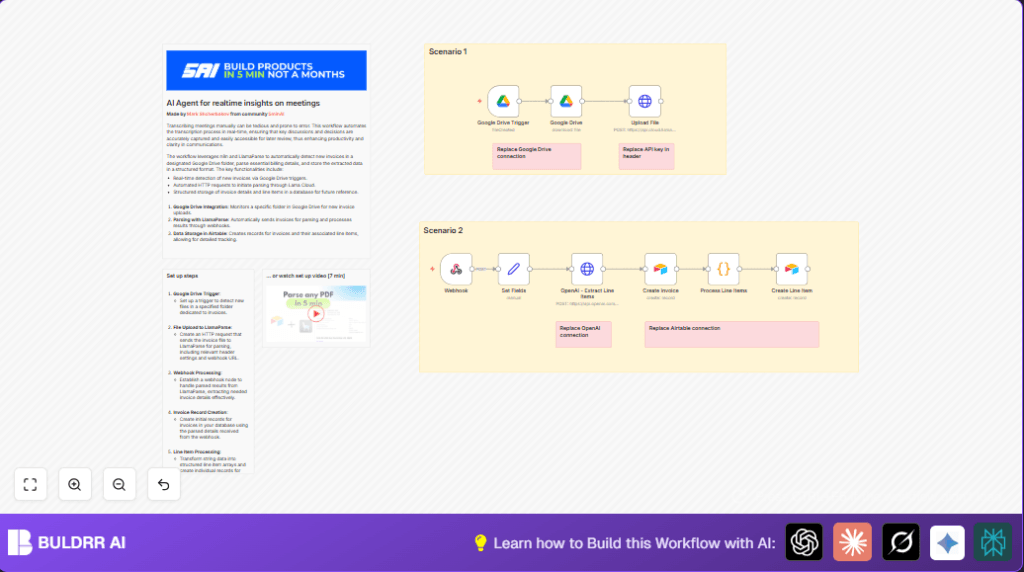
This workflow watches a Google Drive folder for new invoice PDF files. When new invoices arrive, it downloads them. It sends those files to LlamaParse, which reads the invoices and extracts line item details like names, quantities, and prices. Then, it gets the results via a webhook, cleans and structures the data using OpenAI’s GPT-4o-mini model, and finally saves both invoice headers and line items into Airtable. This process helps people save time and avoid mistakes by automating invoice data extraction and entry.
Who Should Use This Workflow
This workflow is useful for anyone who gets many invoices as separate PDF files and wants to avoid manual copying of line items. It fits users managing Google Drive invoice folders and who store data in Airtable. It suits freelancers, small businesses, or consultants needing simple, automated invoice processing to save time and reduce errors.
Tools and Services Used
- Google Drive: For storing original invoice files.
- LlamaParse API: For parsing PDF invoices to extract structured line item data.
- OpenAI GPT-4o-mini model: To clean and reformat extracted data into neat arrays.
- Airtable: To save invoice records and associated line items in a database.
- n8n Automation Platform: To run the entire workflow connecting all services.
How the Workflow Works (Input → Process → Output)
Inputs
- New PDF invoice files uploaded by clients into a specific Google Drive folder.
- API credentials for Google Drive, LlamaParse, OpenAI, and Airtable.
Processing Steps
- Google Drive Trigger watches the designated invoice folder for new files.
- Google Drive node downloads the new PDF invoice using the dynamic file ID.
- HTTP Request node uploads the PDF to LlamaParse’s API for parsing. The request includes a webhook URL to receive results.
- Webhook node listens for parsed invoice data sent back by LlamaParse.
- Set node prepares a prompt and JSON schema to instruct OpenAI GPT-4o-mini to clean and reformat the parsed data.
- HTTP Request node calls OpenAI API with this prompt and schema to get a structured array of line items.
- Code node extracts the line items array from OpenAI’s JSON response.
- Airtable node creates a new invoice record with main invoice data.
- Airtable node creates separate line item records linked to the invoice.
Outputs
- Airtable with new invoice records and linked line items made from extracted data.
Beginner Step-by-Step: How to Use This Workflow in n8n
Step 1: Import the Workflow
- Download the workflow file using the Download button on this page.
- In the n8n editor, use “Import from File” to load the workflow.
Step 2: Configure Credentials
- Add Google Drive OAuth2 credentials for folder access.
- Add LlamaParse API key in the HTTP Request node called “Upload File”.
- Add OpenAI API key in the OpenAI HTTP Request node.
- Add Airtable Personal Access Token in both Airtable nodes.
Step 3: Update IDs and URLs
- Replace the Google Drive folder ID in the trigger node with your own folder’s ID.
- Verify the webhook URL in the HTTP Request node matches the exact path of the Webhook node.
- Check Airtable base and table names in the Airtable nodes to match your setup.
Step 4: Test and Activate
- Upload a test invoice PDF into the watched Google Drive folder.
- Run the workflow once or manually to confirm it triggers and processes as expected.
- Activate the workflow in n8n to run automatically.
If hosting n8n yourself, ensure it runs continuously or use cron jobs. See self-host n8n for details.
Customization Ideas
- Change the Google Drive folder ID to watch a different folder.
- Edit the parsing instructions in the HTTP Request node to capture more invoice details like tax.
- Use a different OpenAI model by changing the model name in the OpenAI node.
- Expand Airtable tables with more fields and adjust the Airtable nodes to save those fields.
- Turn on OCR if invoices are scanned images by changing the upload node flags.
Common Problems and How to Fix Them
- Webhook not receiving data: Check that webhook URL path matches the path sent to LlamaParse, and webhook node is active.
- OpenAI API fails with invalid schema: Make sure JSON schema in the Set node is correct and free of syntax errors.
- Airtable errors on number fields: Confirm number fields are sent as numbers, not strings. Use code or node expressions to convert if needed.
Pre-Production Checklist
- Confirm Google Drive folder ID and access permissions.
- Test invoice file upload triggers the workflow.
- Verify LlamaParse API key is valid and has quota.
- Test the webhook with sample JSON.
- Check OpenAI API keys and available quota.
- Ensure Airtable base, tables, and API token are correct.
- Run full end-to-end test with an invoice PDF.
- Back up Airtable data before deploying in production.
Summary of Results
✓ Saves many hours weekly by automating invoice data extraction.
✓ Reduces manual input errors and financial inconsistencies.
✓ Inserts clean, structured invoice and line item data into Airtable automatically.
→ Makes invoice processing faster and more reliable.
