
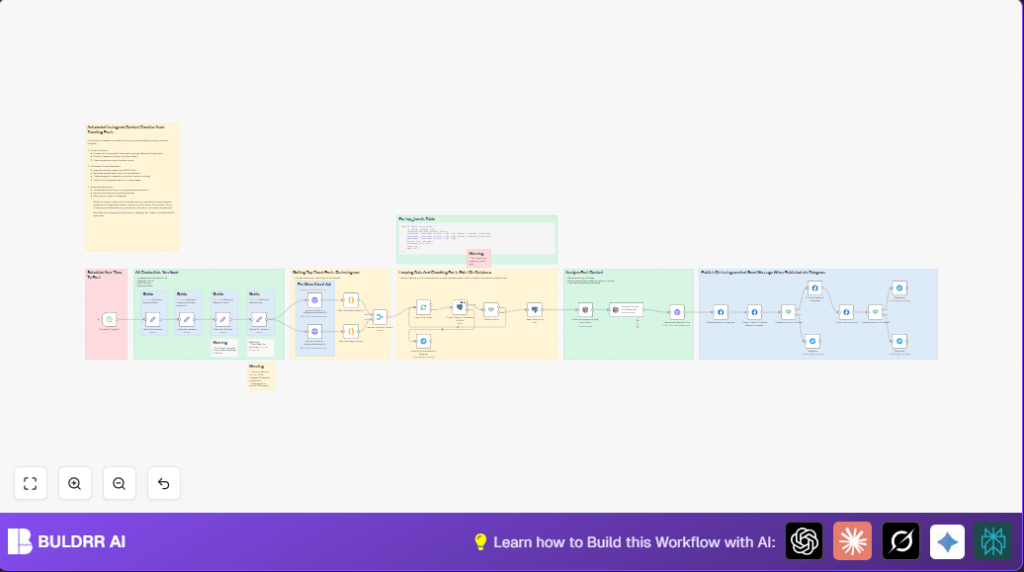

What This Automation Does
This workflow gets new trending Instagram image posts from #blender3d and #isometric hashtags.
It ignores videos and avoids reposting anything already shared by checking a database.
Then it uses AI to analyze images and generate new descriptions and captions.
Next, it creates a unique 3D-style image from that description with an AI image model.
Finally, it posts the AI-generated content to Instagram and sends status updates via Telegram.
This means the user saves time and keeps Instagram fresh with new trending-inspired posts automatically.
Who Should Use This Workflow
If a social media manager or content creator struggles to keep up with frequent Instagram posting, this flow helps.
Users who want regular new images and captions built around current trends will benefit most.
No complex manual searching or image editing needed, saving hours daily.
Tools and Services Used
- Instagram Business Account via Facebook Graph API: Posts content on Instagram.
- Telegram Bot API: Receives user notifications and errors.
- OpenAI GPT-4 Vision: Analyzes images and generates captions.
- Replicate API – Flux AI model: Creates new stylized 3D isometric images.
- RapidAPI Instagram Scraper: Fetches trending Instagram posts by hashtag.
- PostgreSQL Database: Stores posted content to prevent reposts.
Beginner Step-by-Step: How to Use This Workflow in n8n
Import Workflow
- Download the workflow file using the Download button on this page.
- Open n8n editor and click “Import from File” to upload the workflow.
Configure API Keys and IDs
- Enter the Instagram Business Account ID in the Instagram params node.
- Fill in the Telegram chat ID in the Telegram Params node.
- Paste RapidAPI Key in Rapid Api params node.
- Add Replicate API token in Replicate params node.
Database Setup
- Ensure PostgreSQL database with the table named
top_trendsexists as per schema below. - Verify connection credentials are correct in PostgreSQL nodes.
CREATE TABLE top_trends (
  id SERIAL PRIMARY KEY,
  isposted BOOLEAN DEFAULT false,
  createdat TIMESTAMP DEFAULT CURRENT_TIMESTAMP,
  prompt TEXT NOT NULL,
  thumbnail_url TEXT,
  code TEXT,
  tag TEXT
);
Test and Activate
- Manually run the workflow once to check that APIs respond and database updates.
- Check Telegram for notifications confirming success or errors.
- If all works, activate the workflow for scheduled runs.
- Adjust cron schedule in Schedule Trigger1 as needed.
Optionally, consider self-host n8n for better control and scalability.
Workflow Inputs, Processes, and Outputs
Inputs
- Trending media data for #blender3d and #isometric hashtags from RapidAPI Instagram scraper.
- Existing posted content records from PostgreSQL database.
- API Keys and tokens for OpenAI, Replicate, Facebook Graph API, Telegram, and RapidAPI.
Processing Steps
- Filter out video posts to focus on images only.
- Merge post lists from both hashtags into one data stream.
- Loop through each post, checking database for duplicate
content_code. - Insert new post data into database with
isposted= false. - Use GPT-4 Vision to analyze image and create a detailed prompt focusing on physical features.
- Generate an Instagram caption summarizing the description, including trending hashtags.
- Send the description prompt to Replicate Flux AI model to generate a unique 3D isometric image.
- Upload generated media and caption to Instagram Business Account using Facebook Graph API.
- Check upload status and post publishing status.
- Send success or error notifications to Telegram chat.
Outputs
- New, AI-enhanced, 3D-styled Instagram image posts published under Instagram Business Account.
- Updated PostgreSQL records marking posts as shared.
- Status messages received in Telegram chat.
Common Issues and How to Fix Them
- API Key Not Authorized: This happens if RapidAPI key is invalid or expired. Fix by updating key in Rapid Api params node and confirm subscription on RapidAPI dashboard.
- PostgreSQL Query Errors: Causes include wrong credentials or missing
top_trendstable. Ensure correct database connection and run the SQL schema from Sticky Note12 to create the table. - Instagram Media Upload Failures: Can stem from wrong image URLs or missing Facebook API permissions. Verify generated image URL is accessible. Check Instagram Business permissions. Review Telegram error alerts for clues.
Customization Tips
- Change hashtags in get top trends on instagram #blender3d and get top trends on instagram #isometric HTTP Request nodes to fit different niches.
- Edit JSON prompt in Generate image on flux node to tweak artistic style, materials, lighting, and resolution for consistent branding.
- Modify cron schedule in Schedule Trigger1 node for preferred posting times.
- Update hashtag list inside the OpenAI prompt in Analyze Content And Generate Instagram Caption node.
- Rename or change the PostgreSQL table/query in Check Data on Database Is Exist and insert data on db if using custom database schemas.
Summary of Results
✓ Saves hours by fully automating trending content discovery and posting.
✓ Prevents reposting already shared content using database checks.
✓ Produces unique, AI-generated 3D images with relevant captions automatically.
→ Ensures Instagram stays updated with relevant, high-quality posts.
→ Sends real-time success and error notifications through Telegram.
