

What This Automation Does
This workflow automates gathering company data from Indeed and summarizes it for easy review.
It stops you from doing copy-paste errors and saves hours of manual work.
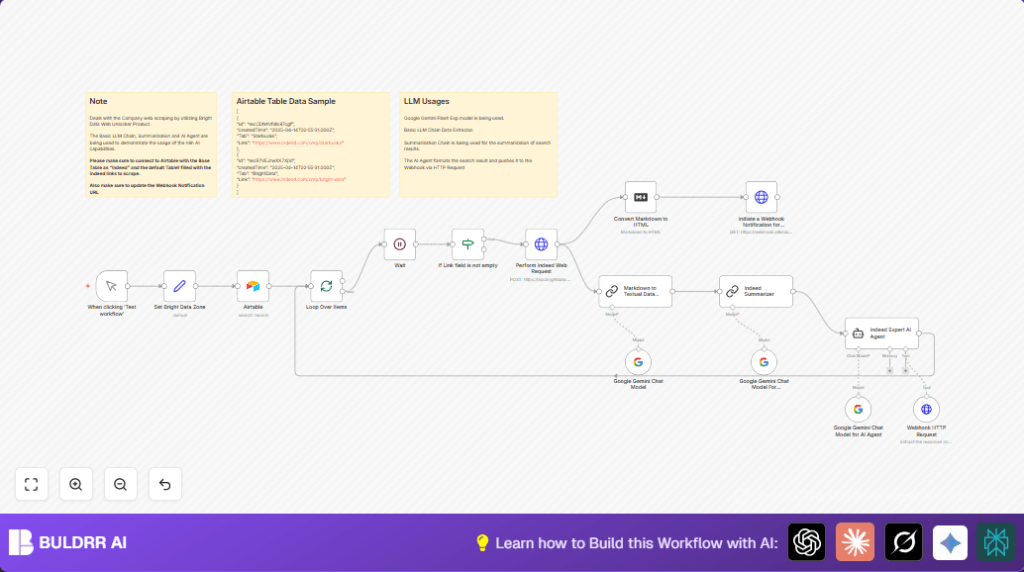
The workflow takes URLs from Airtable, scrapes Indeed via Bright Data, cleans text with AI, and summarizes it using Google Gemini.
The final info is sent to a webhook for alerts or further use.
You get structured, clear company summaries fast to help make better HR decisions.
Tools and Services Used
- n8n Automation Platform: Runs the workflow and nodes.
- Airtable: Stores Indeed company URLs.
- Bright Data Web Unlocker: Scrapes Indeed web data programmatically.
- Google Gemini PaLM API: Converts raw data into summaries.
- Webhook Service: Receives final summaries for notifications or integration.
Workflow Inputs, Process, and Outputs
Inputs – Company URLs
Company URL records are pulled from an Airtable base named “Indeed”.
The workflow checks each record to ensure the link is not empty.
Processing Steps
- Assign a Bright Data zone identifier.
- Use batching to process URLs one at a time, avoiding overload.
- Wait 10 seconds between each request to prevent rate limits.
- Send POST request to Bright Data API with the Indeed URL to scrape raw markdown data.
- Feed this markdown to an AI-powered Chain LLM node to extract clean text.
- Summarize this text data using Google Gemini’s large language model via the Chain Summarization node.
- Format and refine the summary with an expert AI prompt using a Langchain Agent specialized in Indeed data.
- Send the final structured summary JSON to a webhook URL.
Output – Structured Company Summaries
The output is JSON data with a clear, relevant summary for each company.
This data can trigger notifications or feed into other HR tools.
Who Should Use This Workflow
This is useful for HR analysts or recruiters who manually collect company info from Indeed and find it slow and error-prone.
Anyone needing fast, consistent company profiles without copying and pasting should use this.
Beginner Step-by-Step: How to Use This Workflow in n8n
Step 1: Import the Workflow
- Download the workflow file using the “Download” button on this page.
- Inside the n8n editor, go to “Import from File” and select the downloaded file.
Step 2: Configure Credentials and Settings
- Add your Airtable API Key and select the correct base and table for company URLs.
- Enter Bright Data HTTP Header Authentication keys in the HTTP request node.
- Attach Google Gemini (PaLM API) credentials in Langchain nodes.
- Update the webhook URL to the webhook service or your integration endpoint.
Step 3: Test the Workflow
- Click the Manual Trigger node and hit “Execute Node” to run the workflow once.
- Check the execution logs to verify each step runs without errors.
Step 4: Activate the Workflow
- Switch to “Active” mode in n8n to enable automatic or scheduled runs.
- If scheduling is needed, add a schedule trigger to run the workflow regularly.
Following these steps, you can start using the workflow to automate company data scraping and summarization quickly.
Consider checking self-host n8n if running the workflow on a personal server.
Common Issues and Fixes
Bright Data HTTP 403 Forbidden
Check if HTTP header authentication keys are correct and active.
Verify the “zone” variable matches an existing Bright Data zone.
Google Gemini API Fails or Empty Summary
Confirm API keys for Google Gemini are valid and linked in Langchain nodes.
Watch for rate limits or quota exceeded errors.
Airtable Returns No Records
Verify API Key, base ID, and table name are correct.
Make sure the “Link” column contains valid Indeed URLs.
Customization Ideas
- Change the Bright Data zone by updating the “Set Bright Data Zone” node value.
- Modify the wait time in the Wait node for faster or slower execution.
- Use another Airtable base or table for different URL lists.
- Switch Google Gemini with other AI chat models supported by Langchain nodes.
- Update webhook URL to integrate with CRMs, Slack, or dashboards.
Summary and Results
→ Automates Indeed company data scraping without manual steps.
→ Saves over 4 hours of weekly manual work for HR analysts.
✓ Reduces errors from copying and pasting.
✓ Provides structured, clear company summaries.
✓ Outputs data ready for notifications or system integration.
