
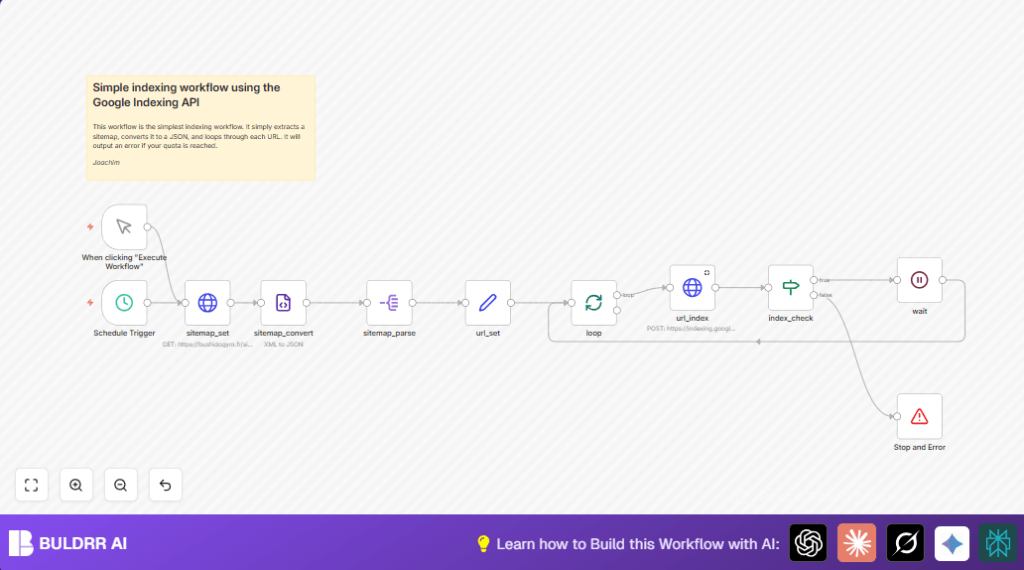

What This Workflow Does
This workflow takes a website sitemap and sends each URL to the Google Indexing API automatically.
It solves the problem of manually submitting URLs to Google, saves time, and avoids errors.
The result is that URLs get updated in Google’s index faster and without hitting API limits accidentally.
Who Should Use This Workflow
This workflow is for SEO specialists or website owners who update content often.
It’s good for anyone who wants to automate URL submissions to Google and avoid manual work.
Tools and Services Used
- n8n: for creating and running the automation workflow.
- Google Indexing API: to notify Google about URL updates.
- HTTP Request node: to get sitemap XML from the website.
- XML node: to convert sitemap from XML format to JSON.
- Split Out Items node: to separate each URL for individual processing.
- Set node: for preparing URL data to send to the API.
- If node: to check if API response shows success.
- Wait node: to pause between requests avoiding API limits.
- Stop and Error node: to stop workflow if API quota is exceeded.
Inputs, Processing Steps, and Output
Inputs
- Public sitemap XML URL (example: https://bushidogym.fr/sitemap.xml).
- Google API credentials with access to the Indexing API.
- Trigger to start the workflow: manual or scheduled.
Processing Steps
- Fetch sitemap XML with HTTP Request node.
- Convert XML sitemap to JSON with XML node.
- Split sitemap URL entries into single items with Split Out Items node.
- Clean and set each URL using Set node.
- Send each URL to Google using HTTP Request node configured for Indexing API.
- Check API response with If node to confirm success.
- Wait a few seconds with Wait node to avoid exceeding API quota.
- Stop workflow immediately if quota is exceeded using Stop and Error node.
Output
URLs submitted to Google Indexing API for update.
Workflow logs show success or errors for each URL.
User saves hours by automating sitemap URL submissions.
Beginner Step-by-Step: How to Use This Workflow in n8n
1. Import the Workflow
- Download the workflow file using the Download button on this page.
- Open your n8n editor.
- Click on “Import from File” in n8n and select the downloaded workflow.
2. Configure Credentials and Settings
- Upload Google API service account credentials with Indexing API access in the url_index node.
- Check the sitemap URL in the sitemap_set node and change if needed.
- Adjust schedule timing in the Schedule Trigger node if you want the workflow to run automatically at a different hour.
3. Test and Activate
- Run the workflow manually once using the Manual Trigger to confirm URLs are fetched and sent correctly.
- Check output for errors or quota issues.
- Activate the workflow for production by switching on the schedule trigger or running manual triggers as needed.
Note on Hosting
If running n8n locally or on a server, consider self-host n8n options for easier control.
Customization Ideas
- Change the sitemap URL in the sitemap_set node to work with any website.
- Adjust the schedule trigger’s run time to fit your workflow needs.
- Modify the wait time in the Wait node to handle different Google API quota limits.
- Add notification nodes like Slack after the Stop and Error node to alert if quota is reached.
- Process multiple URLs concurrently by increasing batch size in the splitting node but watch for quota.
Edge Cases and Errors
- “Invalid Credentials” error means Google API credentials are missing or wrong.
- No URLs submitted might mean JSON paths in Split Out Items or Set node are incorrect.
- Hitting Google API quota means wait time is too short or batch size too big.
- Workflow stops if quota exceeds, showing message about limit (default 200 URL updates per day).
Summary of Results
✓ Automates sitemap URL submissions directly to Google Indexing API.
✓ Saves time and reduces manual copy-paste errors.
✓ Respects Google API daily quota by waiting between requests.
✓ Provides clear stop and error message on quota limit.
✓ Easy to customize for other sitemaps and schedules.
