

What This Automation Does
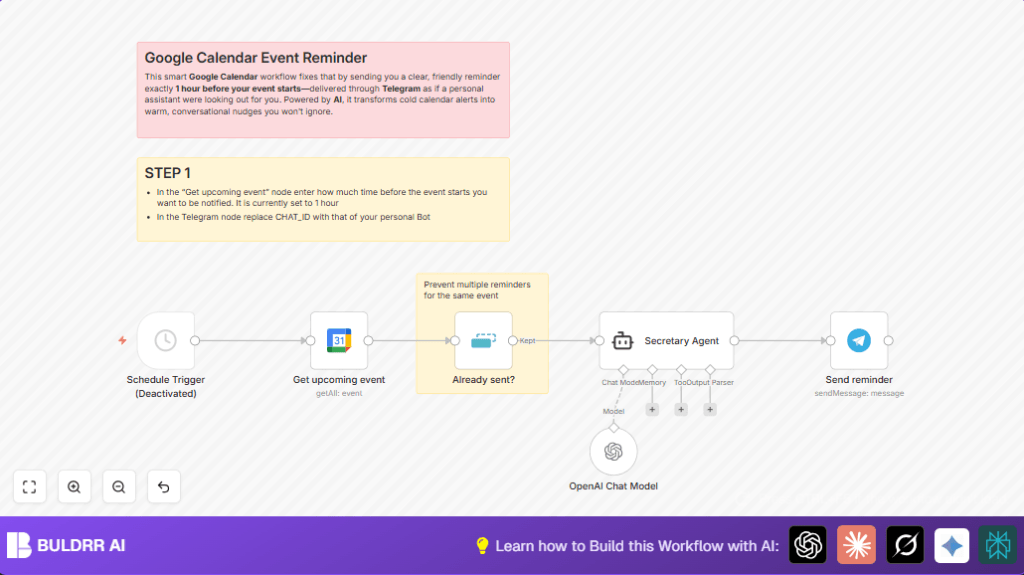
This workflow checks Google Calendar events starting in one hour.
It skips events it already reminded you about.
Then AI creates a warm reminder message for each event.
The message sends to your Telegram chat, almost like a friendly assistant.
This helps you notice upcoming events better and be on time.
Tools and Services Used
- Google Calendar account: For event data.
- Telegram Bot API: Sends messages to your chat.
- OpenAI API: Creates natural reminders using AI.
- n8n account: Runs the workflow automation.
- Optional self-host n8n: Hosting n8n yourself for more control.
Inputs, Processing Steps and Output
Inputs
- Your Google Calendar events for the next hour.
- API keys for Google, Telegram, and OpenAI.
Processing Steps
- The Google Calendar node fetches events happening 1 hour from now.
- Remove Duplicates node skips events already reminded about, using event IDs.
- LangChain Agent node uses GPT-4 to write a warm reminder message from event info.
- Telegram node sends the AI message to your chat.
Output
You get friendly, clear Telegram reminders for your upcoming events.
Who Should Use This Workflow
This workflow is good for people with busy calendars.
It helps anyone who wants friendlier, clearer reminders over cold alerts.
People who use Telegram and want AI-generated messages will find this useful.
Beginner Step-by-Step: How to Use This Workflow In n8n
Step 1: Import the Workflow
- Download the workflow file by clicking the Download button on this page.
- Open your n8n editor.
- Click “Import from File” and select the downloaded workflow file.
Step 2: Configure Credentials and Settings
- Add your Google Calendar API Key in the Google Calendar node.
- Enter your Telegram Bot API Key and Chat ID in the Telegram node.
- Set your OpenAI API Key in the LangChain Agent node.
- Check if any IDs, emails, or event filters need updating to match your info.
- Review the prompt text inside the LangChain node for event data formatting.
Step 3: Test the Workflow
- Run the workflow manually once to check if it grabs upcoming events and sends messages.
- Look for any error messages and fix credential or data problems.
Step 4: Activate for Production
- Enable the Schedule Trigger node to check every minute for events.
- Save and activate the workflow so it runs automatically.
- Monitor the execution logs inside n8n to confirm reminders are sent.
If hosting your n8n yourself, consider self-host n8n for full control.
Step-by-Step Guide to Building This Workflow
Step 1: Setting Up the Google Calendar Node
Add a Google Calendar node.
Choose your Google account credentials.
Set operation to “getAll” to fetch events.
Set timeMin to {{$now.plus({ hour: 1 })}} to start fetching events from 1 hour from now.
Set timeMax to {{$now.plus({ hour: 1, minute: 1 })}} to get events in the 1-minute window after 1 hour.
Limit results to 5 to avoid too many events.
Make sure time limits are set right or you may get no events or irrelevant ones.
Step 2: Avoiding Duplicate Reminders with Remove Duplicates Node
Add a Remove Duplicates node after the Google Calendar node.
Set operation to “removeItemsSeenInPreviousExecutions”.
Use the event’s ID as the unique value, {{$json.id}}.
This prevents sending repeat reminders.
Double-check the ID reference to avoid duplicates.
Step 3: Creating a Virtual Secretary with LangChain Agent Node
Add a LangChain Agent node named “Secretary Agent.
Give it event details: summary, description, location, start/end time, creator.
Use the system message to set assistant tone friendly and polite.
Model used is OpenAI GPT-4o-mini.
Generated output is a warm, human-like reminder.
Incorrect prompt or input link will cause bad messages.
Step 4: Setting Up Telegram Node to Send Messages
Add a Telegram node.
Put in your Telegram Bot API key and chat ID.
Set message text to {{$json.output}} from the LangChain node.
Turn off “append attribution” for clean messages.
Messages appear in your chat like a personal assistant’s notes.
Remember to replace placeholder chat ID with your real one.
Step 5: (Optional) Setting the Workflow Trigger
The workflow uses a Schedule Trigger node that runs every minute but is disabled by default.
Enable it to check for event reminders continuously.
Or run manually during testing.
Don’t forget to enable the trigger or workflow won’t run automatically.
Customizations ✏️
You can change when reminders send by adjusting timeMin and timeMax.
Try 30 minutes or 2 hours before events instead of 1 hour.
Replace the Telegram node with other messaging tools like Slack or email if preferred.
Filter events before reminders by adding an IF node to check for keywords in event summary or location.
Troubleshooting ????
Problem: No reminders sent
Check if the Schedule Trigger node is enabled.
Make sure Google Calendar search times find real future events.
Problem: Duplicate reminder messages
Check the Remove Duplicates node uses {{$json.id}} properly.
Confirm that dedupe data is saved across executions.
Pre-Production Checklist ✅
- Make sure Google Calendar node fetches real upcoming events.
- Send test Telegram messages to confirm messaging setup works.
- Verify Remove Duplicates node filters repeats by running it twice.
- Check Secretary Agent produces clear, friendly reminders from event data.
Deployment Guide
Turn on the Schedule Trigger node to run workflow automatically.
Activate workflow in n8n UI.
Watch logs for successful reminder sending.
Add alerts or monitoring if needed.
Use self-host n8n for more workflow control if desired.
Summary of Results
✓ Friendly AI-made event reminders in Telegram.
✓ No repeated messages for same events.
✓ More attention to upcoming appointments.
✓ Less time lost rescheduling missed meetings.
✓ Workflow runs easily inside n8n with schedule trigger.
