

What This Gong Call Processing Automation Does
This workflow gets Gong call data and transcripts automatically.
It fixes problems like missing details and hard-to-read transcripts.
You get clear call notes with sales info added from Salesforce.
This saves hours every week and helps sales teams work better.
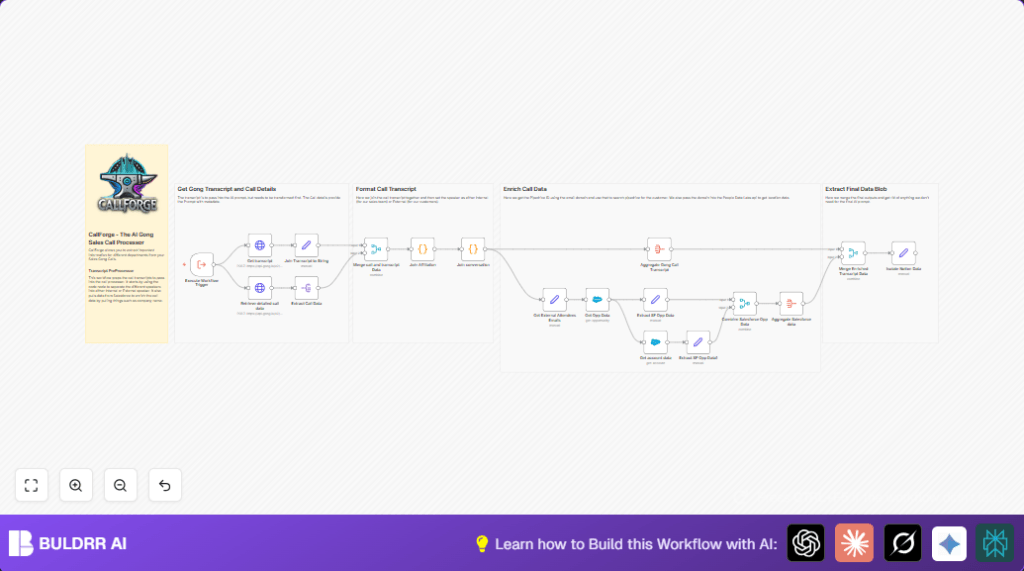
The workflow starts when a Gong call event happens.
It asks Gong’s API for call details and transcript.
Then, it joins transcript text and adds speaker info like Internal or External.
After that, it gets info about the opportunity and account from Salesforce.
It mixes everything into one clean report.
This report helps with sales planning and analysis.
Tools and Services Used
- Gong API: Provides call details and transcripts.
- Salesforce API: Supplies opportunity and account data.
- n8n Automations: Connects all steps and processes data.
Input, Process, and Output
Inputs
- Trigger event from Gong call completion.
- Gong call ID to fetch call and transcript data.
- Salesforce Opportunity ID linked to the call.
Processing Steps
- Send HTTP requests to Gong API for transcript and call info.
- Use code nodes to join transcript sentences and attach speaker roles.
- Retrieve Salesforce opportunity and account details.
- Combine and format all data into a unified structure.
Output
- Clean, readable transcript text with speaker affiliations.
- Enriched sales data ready for Notion or CRM tools.
- Faster, accurate sales insights without manual work.
Beginner Step-by-Step: How to Use This Workflow in n8n
1. Import Workflow
- Download the workflow file using the Download button on this page.
- Open the n8n editor.
- Use the Import from File option to load the workflow.
2. Configure Credentials and IDs
- Add Gong API credentials to the HTTP Request nodes.
- Add Salesforce OAuth2 credentials to the Salesforce node.
- Update any call IDs, emails, channels, or folder IDs as needed.
- Copy and paste the JavaScript code exactly as given in the Code nodes.
3. Test the Workflow
- Run a test execution in the editor.
- Check outputs for correct transcript and sales data.
4. Activate for Production
- Enable the workflow in n8n.
- Connect the Execute Workflow Trigger node to the Gong event source.
- Monitor executions and update credentials if expired.
If self-host n8n is preferred, see self-host n8n for setting it up.
Customization Ideas
- Add more Gong call metadata like sentiment scores or competitor mentions by changing HTTP Request JSON.
- Change the speaker affiliation rules in the Code node to classify speakers in new ways.
- Include other CRMs like Pipedrive or HubSpot to get extra sales data.
Troubleshooting
- 401 Unauthorized on HTTP Request
Cause: Wrong or expired API keys.
Fix: Update Gong or Salesforce API credentials in n8n. - Empty Conversation in Code Node
Cause: Wrong JSON path or Gong API changed response.
Fix: Check API response in Postman and update parsing logic.
Pre-Production Checklist
- Test API access with Gong and Salesforce using sample calls.
- Confirm call IDs move correctly from the trigger to HTTP requests.
- Make sure joining transcript and affiliations works before live use.
- Check final data for accuracy and missing fields.
Summary of Benefits
✓ Saves 3-5 hours weekly by automating Gong call data processing.
✓ Improves sales data quality by including Salesforce details.
✓ Makes call transcripts easier to read with speaker affiliations.
→ Speeds up sales forecast and analytics tasks.
→ Helps sales teams focus on selling, not manual data work.
