
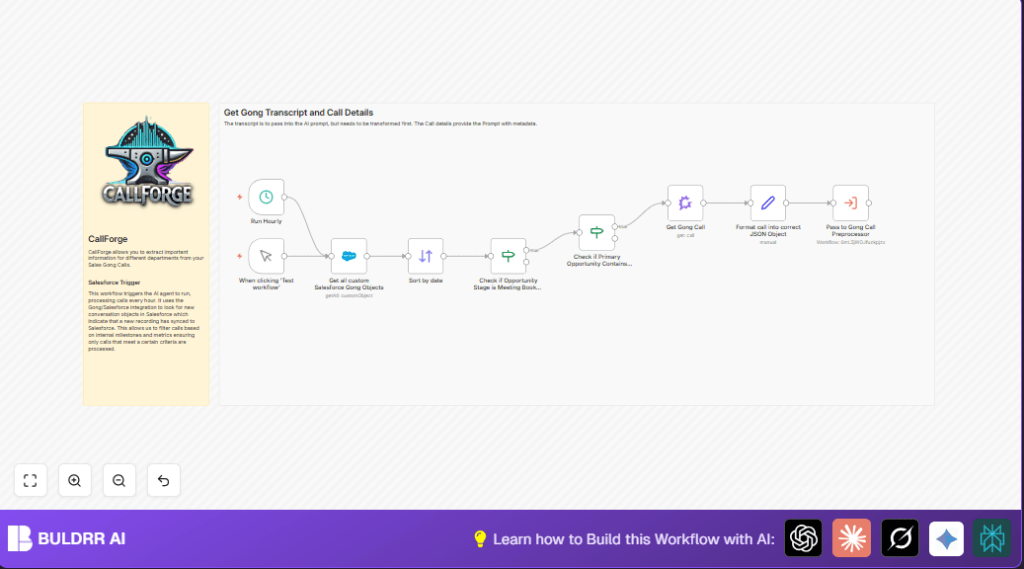

What this workflow does
This workflow finds new Gong sales calls in Salesforce from the last 4 hours.
It filters calls only in the “Meeting Booked” or “Discovery” sales stages and which are linked to a Primary Opportunity.
Then, it fetches full call data from Gong and formats it for deeper analysis in another workflow.
This saves workers hours of manual checking and improves accuracy in sales call prioritization.
Who should use this workflow
This is good for sales operations teams or managers who have Gong calls synced to Salesforce.
Anyone who wants to stop manually searching calls and focus quickly on key sales stages will find it helpful.
The workflow works if Salesforce has correct Gong call objects and Gong API access is set.
Tools and services used
- n8n: Runs the automation workflow.
- Salesforce: Holds Gong call data as custom objects for querying.
- Gong API: Provides detailed call info and transcripts.
- Secondary workflow (Gong Call Preprocessor): Receives formatted calls for advanced processing.
How this workflow works (Inputs → Process → Output)
Inputs
- Salesforce Gong call records from the last 4 hours.
- Gong API credentials to get full call details.
Processing steps
- Schedule Trigger: Runs every hour to start the workflow.
- Salesforce node: Queries “Gong__Gong_Call__c” objects filtered by creation time.
- Sort node: Orders calls by the newest first based on “CreatedDate”.
- First If node: Filters calls where Opportunity stage is exactly “Meeting Booked” or “Discovery”.
- Second If node: Checks that the call is linked to a Primary Opportunity (field not empty).
- Gong node: Uses Gong API and call ID from Salesforce to get full call metadata and transcript.
- Set node: Formats call data into JSON with fields like id, url, title, timing, user info, and Opportunity link.
- Execute Workflow node: Sends the formatted call data to a sub-workflow for more analysis.
Output
Clean, filtered call data ready for analysis in downstream workflows.
Beginner step-by-step: How to use this workflow in n8n
Step 1: Import the workflow
- Download the workflow file using the “Download” button on this page.
- Inside the n8n editor, click “Import from File” and select the downloaded file.
Step 2: Provide credentials
- Add Salesforce OAuth credentials with permission to read Gong call objects.
- Add Gong API credentials in the Gong node settings.
Step 3: Update IDs and fields if needed
- Check the Schedule Trigger node is set to run every 1 hour.
- Verify the sub-workflow ID used in the Execute Workflow node is correct and accessible.
- Change any Opportunity stage names in the first If node if your sales stages are named differently.
Step 4: Test the workflow
- Run the workflow manually once to confirm calls are fetched and processed properly.
Step 5: Activate for production
- Enable the workflow to run automatically every hour.
- Monitor execution for errors or missed data and adjust filters as needed.
For hosting n8n on a server, consider using self-host n8n.
Customization ideas
- Change the time window by updating the Salesforce node date filter expression
{{$now.minus(4, 'hours')}}to suit data arrival frequency.
- Add more Opportunity stages inside the first If node to include other sales phases like “Proposal” or “Negotiation”.
- Include extra Gong call metadata such as call quality or sentiment in the Set node for richer JSON output.
- Replace the Schedule Trigger with a Webhook node to react instantly to Gong call sync events.
- Modify the secondary workflow to add AI insights, export data to other CRMs, or alert teams.
Handling errors and edge cases
- Issue: No data from Salesforce query.
Reason: Date filter may exclude all calls or API permission issue.
Fix: Check date filter expression and test Salesforce OAuth credentials. - Issue: Gong API fetch failed.
Reason: Invalid Gong API key or wrong Call ID.
Fix: Confirm API key validity and correct Call ID mapping. - Issue: Workflow doesn’t trigger on schedule.
Reason: Workflow is not activated or schedule misconfigured.
Fix: Activate workflow and verify Schedule Trigger runs every hour.
Summary of results
✓ Saves hours of manual work filtering Gong sales calls in Salesforce.
✓ Focuses only on calls in key sales stages linked to Primary Opportunities.
✓ Produces clean, structured call data for deeper analysis.
→ Improves accuracy and speed of sales call follow-ups.
→ Enables automation of sales insights and AI analysis.
