
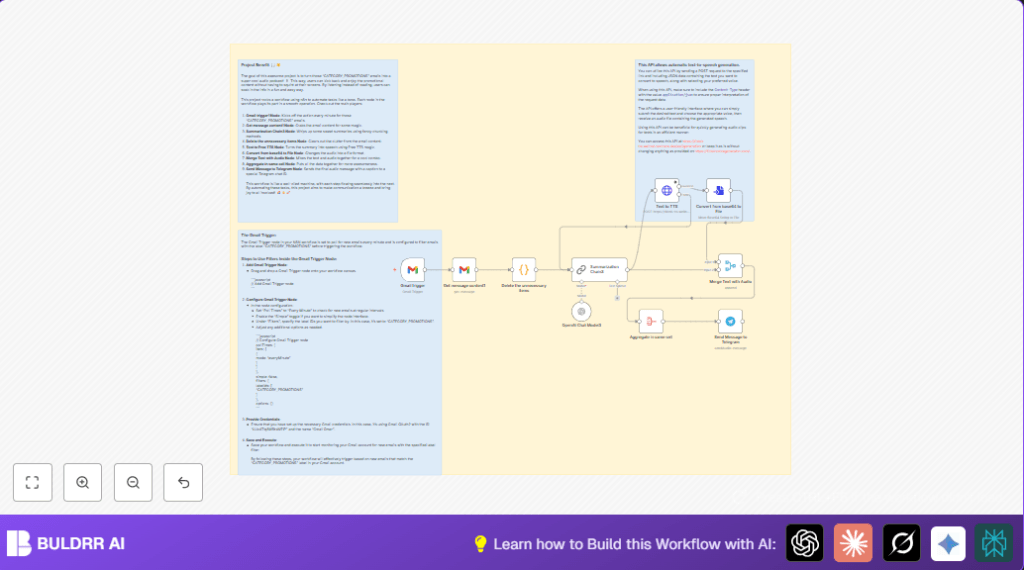

What this workflow does
This workflow watches a Gmail inbox for new emails labeled as promotional. It then gets the full email content, cleans unneeded data, and sends a short summary as a spoken audio message to a Telegram chat. This helps save time reading many promotional emails by turning text into easy-to-listen podcasts.
Who should use this workflow
This setup is useful for anyone who gets many promotional emails and wants to avoid reading them all. It is good for busy people who like to listen to information instead of reading it. It is also for those who want to get summaries with emojis and quick highlights without missing key offers.
Tools and services used
- Gmail API: To watch and read promotional emails from Gmail.
- OpenAI via LangChain Summarization node: To generate short, emoji-enhanced summaries of promotional content.
- Free Text-to-Speech HTTP API: To turn the summary text into natural-sounding audio.
- Telegram Bot API: To send the final audio podcasts with captions to a Telegram chat.
Inputs, Processing Steps, and Output
Inputs
- New promotional emails from Gmail inbox labeled CATEGORY_PROMOTIONS.
Processing Steps
- The Gmail Trigger node checks every minute for new labeled emails.
- The Gmail node fetches full content of each new email by ID.
- The Code node deletes unnecessary email details like headers and metadata.
- The LangChain Summarization Chain3 node creates a concise summary under 247 characters, adding emojis.
- The HTTP Request node sends the summary text to a text-to-speech API to get audio in base64 format.
- The next node converts this base64 audio into a binary file suitable for Telegram.
- The Merge and Aggregate nodes combine the summary text and audio binary into one output.
- The Telegram node sends the audio file with the summary as a caption to a Telegram chat.
Output
Audio podcast-style messages with summary captions delivered to a Telegram chat for easy listening.
Beginner step-by-step: How to use this workflow in n8n
Import and Setup
- Download the workflow file using the Download button on this page.
- Inside the n8n editor, click on the menu and select “Import from File”.
- Choose the downloaded workflow file to add it to n8n.
Configure Credentials and IDs
- Add your Gmail OAuth2 credentials to the Gmail Trigger and Gmail nodes.
- Insert your OpenAI API Key inside the LangChain Summarization node.
- If needed, update the Gmail label ID for promotional emails to match your account.
- Check the Telegram bot token and chat ID in the Telegram node.
- Verify the HTTP Request Text to TTS node has the correct API URL and JSON body:
{
  "text": "{{ $json.response.text }}",
  "voice": "en_us_001"
}
Test and Activate
- Run the workflow once to test if it fetches promotional emails, summarizes, generates audio, and sends to Telegram.
- If all works well, activate the workflow in n8n to run automatically every minute.
Note: For self hosting n8n or VPS setups, consider secure network settings and monitor API limits.
Common edge cases and failures
- If the Gmail Trigger node does not find new emails, check the label ID. It must exactly match the promotional label in Gmail.
- If the HTTP Request TTS node returns errors, confirm the API URL is live and required headers like Content-Type are set.
- If the Telegram node fails to send audio, verify the binary data property is correct and audio format is supported by Telegram.
Ideas for customization
- Change the Gmail label filter to other categories like Social or Updates to create different audio streams.
- Edit the LangChain node prompt to shift the tone or focus summaries only on deals.
- Use different voice options in the text-to-speech API by changing the voice parameter.
- Send podcasts to multiple Telegram chats by duplicating and modifying the Telegram node.
- Add the email subject line to the Telegram message caption for more context.
Summary
✓ Converts promotional emails into short audio summaries.
✓ Saves hours by letting users listen instead of read.
✓ Sends audio podcasts directly to a Telegram chat.
→ Keeps users updated on important deals with clear, quick audio.
