
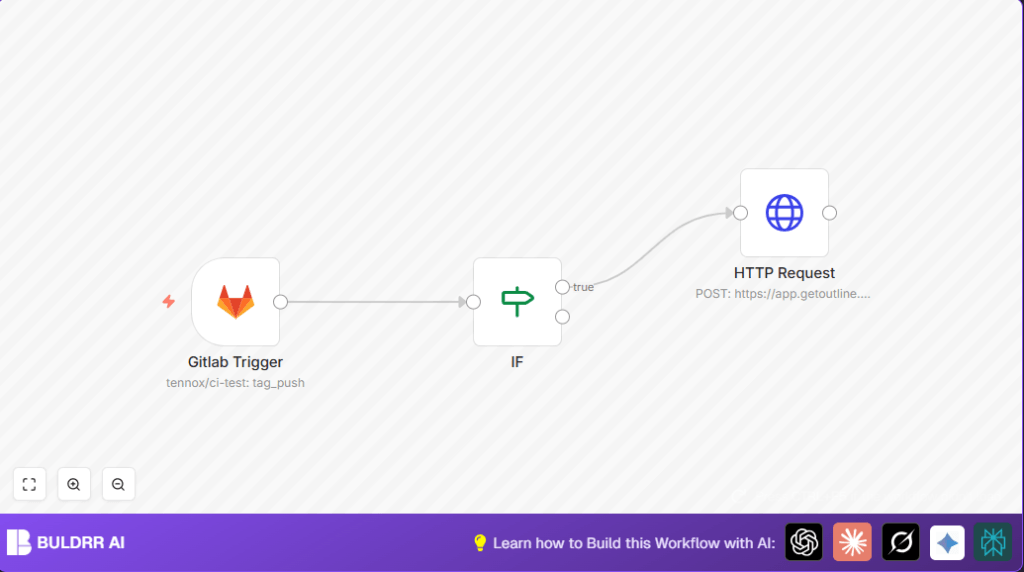

What This Workflow Does
This workflow listens for new tags pushed in a GitLab repository and automatically creates release notes as documents in an Outline workspace.
It saves time by removing the need to write release notes by hand.
The output is a new Outline document with the release title, description, and a link to the GitLab release.
Who Should Use This Workflow
This is useful for software teams managing projects on GitLab.
It helps those who want to avoid manual release note writing.
The workflow suits teams wanting up-to-date and accurate release information in Outline.
Tools and Services Used
- n8n: Workflow automation platform to build and run the automation.
- GitLab: Source code repository used to monitor tag push events.
- Outline API: Receives requests to create and publish release note documents.
Input, Processing, and Output
Inputs
- GitLab webhook payload on tag_push event including tag name, description, and URL.
Processing Steps
- Listen only to tag_push events from GitLab repository.
- Check if the event is a release by filtering
$json.body.object_kindequalsrelease. - If true, send a POST request to Outline API to create a release document.
- Fill the Outline document title with
Release {tag name}. - Put release description and a link to GitLab release in document body.
- Publish the document immediately in specified Outline collection and folder.
Output
- A published Outline document named after the GitLab release tag.
- Clear and consistent release notes accessible by all team members.
Beginner Step-by-Step: How to Use This Workflow in n8n
Step 1: Import Workflow
- Download the workflow file using the Download button on this page.
- Open the n8n editor.
- Click on “Import from File” and select the downloaded workflow.
Step 2: Add Credentials
- Go to the GitLab Trigger node and add GitLab credentials to allow webhook access.
- Open the HTTP Request node and add Outline API authentication using an API Key via header authentication.
Step 3: Update IDs
- In the HTTP Request node, replace
PLACEHOLDER_COLLECTION_IDandPLACEHOLDER_PARENT_IDwith your actual Outline collection and parent document IDs.
Step 4: Test the Workflow
- Save the workflow.
- Activate it by toggling the active switch.
- Create a new tag in your GitLab repository to trigger a release event.
- Check if the new document appears in your Outline workspace.
Step 5: Go Live
- Keep the workflow active in n8n so it monitors future tag pushes.
- If running n8n on a server, ensure the URL is accessible from GitLab webhooks.
Customization Ideas
- Change
collectionIdto save release notes in different Outline collections. - Use
parentDocumentIdto group release notes under a main project page. - Add more release details like author or date inside the document content.
- Adjust the IF node to respond to other GitLab events.
- Add notification nodes (Email, Slack) for team alerts on new releases.
Common Errors and Troubleshooting
- Error 401 Unauthorized: This happens when the Outline API Key is missing or invalid.
Fix by updating the key in the HTTP Request node authentication header. - Workflow not triggering on tag push: GitLab webhook might not be set correctly.
Check webhook URL in GitLab repository settings and confirm tag_push event is selected. - Filtering fails in IF node: This occurs if the JSON path or condition value is wrong.
Verify$json.body.object_kindis compared toreleasecorrectly.
Summary
✓ This workflow saves hours by automating GitLab release notes writing.
✓ It ensures release information is accurate and consistent.
→ A new release document appears in Outline on each GitLab tag push.
→ Entire teams get fast access to up-to-date release details.
