
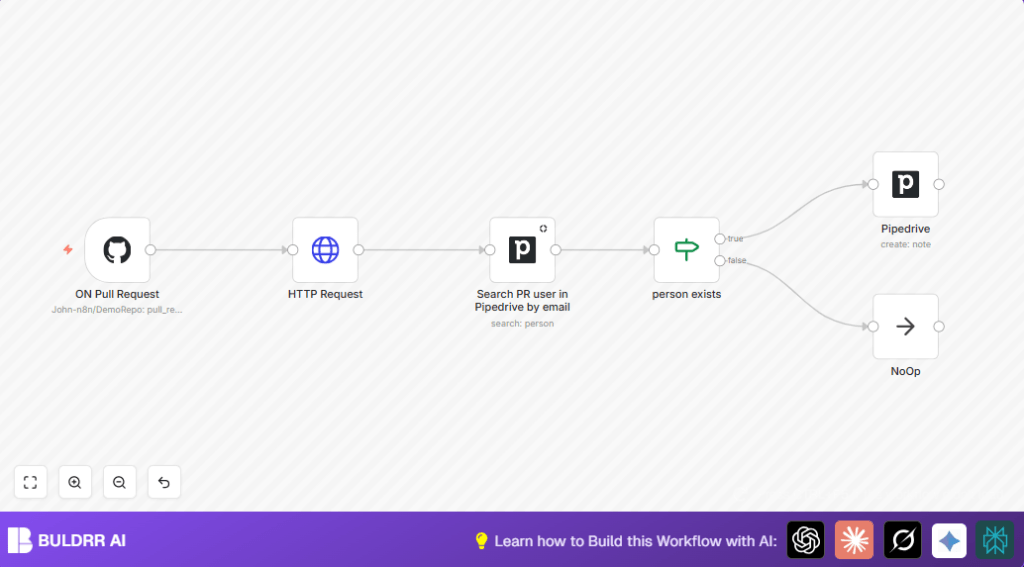

What This Workflow Does
This workflow connects GitHub pull requests to Pipedrive contacts automatically.
It solves the problem of spending many hours manually updating CRM with PR info.
When a pull request is created, a note gets added to the correct Pipedrive person by matching the email.
This saves time and stops mistakes in communication between teams.
How This Workflow Works
Input: The workflow receives data from GitHub when a new pull request is made.
The main input is a webhook event triggered by GitHub.
Processing Steps: The workflow gets the PR creator’s URL from the webhook payload.
It then calls GitHub API to get detailed user info, including email.
Next, it searches Pipedrive for a contact matching the email.
If a contact exists, the workflow adds a note to that person’s profile with a PR link.
If no match is found, the workflow stops without adding a note.
Output: A new note added to a Pipedrive contact with the PR link if the contact email matches.
No output if no matching contact exists.
Who Should Use This Workflow
This fits product managers, sales teams, or anyone tracking developer pull requests in Pipedrive.
Users who want to avoid manual work linking GitHub PR authors to CRM contacts will benefit.
Tools & Services Used
- n8n platform: For automation and workflow editing.
- GitHub API: Provides pull request events and user info.
- Pipedrive API: Searches persons and adds notes in Pipedrive.
Beginner Step-by-Step: How to Use This Workflow in n8n
Step 1: Import the Workflow
- Download the workflow file using the Download button on this page.
- Open n8n editor and use Import from File option to load the workflow.
Step 2: Configure Credentials and Settings
- Add or update your GitHub API Key in the workflow nodes that use GitHub.
- Set up your Pipedrive API Key in the Pipedrive nodes.
- Check the repository owner and name in the GitHub Trigger node; update if needed.
- Update any email or person ID hardcoded in the nodes if required for your Pipedrive account.
Step 3: Test the Workflow
- Create a test pull request in the configured GitHub repo.
- Watch the workflow execution in n8n to confirm data flows correctly from GitHub to Pipedrive.
- Verify that a note appears in the corresponding Pipedrive contact.
Step 4: Activate the Workflow
- Once tests pass, activate the workflow using the activate button.
- Make sure n8n keeps running continuously. If self hosting n8n, refer to self-host n8n resources.
Inputs, Processing, and Outputs
Inputs
- GitHub webhook for pull_request events.
Processing Steps
- Extract PR creator URL from webhook payload.
- Call GitHub API to get user email.
- Search Pipedrive contact by email.
- Check if contact exists with If node.
- If contact found, add note with PR link in Pipedrive.
- If no contact found, do nothing.
Outputs
- New note linked to the Pipedrive contact showing the PR URL.
- No output if no matching email is found.
Common Edge Cases and Failures
- PR creator email missing from GitHub API response leads to failure to match.
- Person not found in Pipedrive causes workflow to add no note, keeping data clean.
- Incorrect webhook URL or missing webhook setup stops workflow trigger.
Customization Ideas
- Add support for multiple repos by duplicating or editing GitHub triggers.
- Notify team via Slack or email if no matching contact is found.
- Add more PR details in Pipedrive note like title or labels.
- Use a database node to cache matched email and person IDs for faster lookups.
- Add Slack or Teams notifications for new PRs to sales teams.
Troubleshooting Tips
“Cannot read property ’email’ of undefined” in HTTP Request Node
This means email is missing or the webhook payload path is wrong.
Check webhook data in n8n and confirm body.sender.url is correct.
No matching person found in Pipedrive even if email exists
Email is case sensitive or formatted wrongly.
Check the exact emails and use lowercase or trimming logic if needed.
Workflow not triggered when creating PR
Webhook not set up or URL not registered in the GitHub repo settings.
Verify webhook delivery in GitHub and GitHub Trigger node credentials.
Pre-Production Checklist
- GitHub webhook is active and firing for pull_request events.
- GitHub API keys are correct in n8n nodes.
- Pipedrive API keys allow searching and adding notes.
- Run test PR and observe data flow in n8n executions.
- If node branches correctly on contact presence.
- Notes appear in the right Pipedrive person profile.
Deployment Guide
Click “Activate” in n8n to run workflow continuously.
Keep n8n running on your server or use self-host n8n services.
Check n8n executions regularly to spot errors or API limits.
Update API Keys if tokens expire.
Summary
✓ Saves hours weekly by automating GitHub PR to Pipedrive updates.
✓ Reduces errors by linking PR creators to correct contacts using email.
✓ Improves team communication by keeping CRM notes fresh with PR info.
✓ Keeps workflow clean by ignoring PRs from unregistered emails.
✓ Easy to test, configure, and activate inside n8n.
