
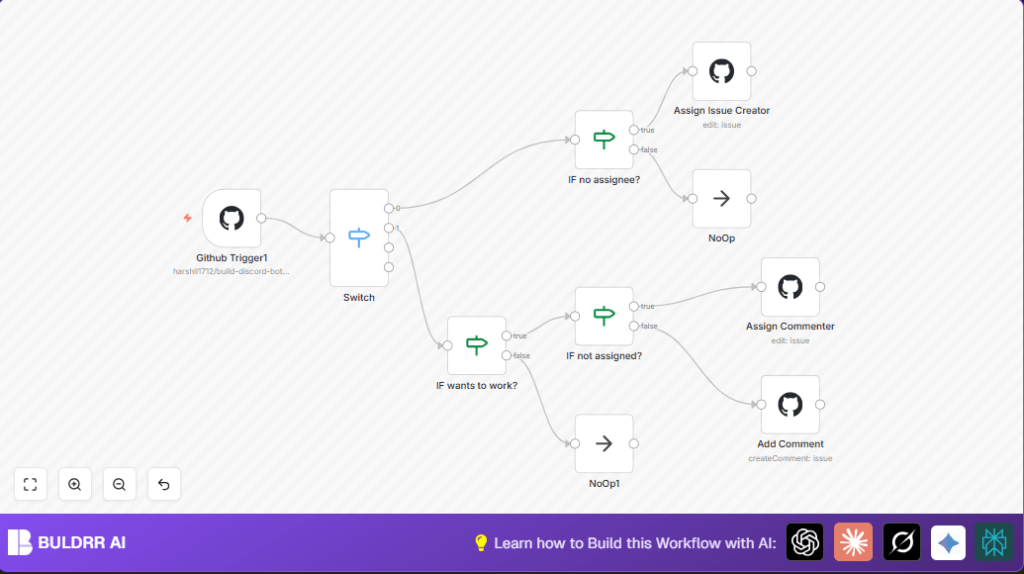

What This Workflow Does
This workflow automatically assigns GitHub issues when they are created or when someone comments asking to be assigned. It checks if the issue has no one assigned. If it is free, it assigns the issue to the creator or the commenter who says “assign me”. If the issue is already assigned, it leaves a polite reply saying who owns it. It also adds an “assigned” label to help track the issue.
This saves time by removing manual steps. It stops mistakes like missed assignments or slow answers. Contributors get quick feedback, helping teamwork run better.
Who Should Use This Workflow
This is for GitHub project maintainers who handle many issues and want to assign them fast and clearly. It helps open-source projects or teams where volunteers ask to help by commenting. If manual assignment feels slow or confusing, this workflow suits you.
Tools and Services Used
- n8n: Automation platform to build and run the workflow.
- GitHub API: Listens for issue events and manages issue assignees and comments.
- GitHub OAuth2 Credentials: Authentication for API access with permission to edit issues.
How the Workflow Works (Input → Process → Output)
Inputs
- Events from GitHub when issues open or comments are made.
- Issue or comment data including author, assignees, and content.
Processing Steps
- Detect if event is a new issue opening or a new comment.
- For new issues, check if no one is assigned. If free, assign the creator.
- For comments, check if “assign me” phrase (case-insensitive) is present.
- If commenter requests assignment and issue is free, assign commenter.
- If issue already assigned, post a polite comment naming the current assignee.
- Always add a label “assigned” to assigned issues.
Outputs
- GitHub issues updated with assignees and labels.
- Comments added for assignment responses when needed.
Beginner Step-by-Step: Using This Workflow in n8n
1. Import the Workflow
- Inside the n8n editor, click the “Import” button from the menu.
- Select the workflow file from this page using the Download button.
2. Configure Credentials
- In n8n, go to Credentials and add your GitHub OAuth2 credentials with repo write access.
- Assign those credentials to the Webhook node and any GitHub nodes.
3. Update Repository Info if Needed
- Check the repository owner and name fields in GitHub nodes.
- Change if your repository is different from the default.
4. Test the Workflow
- Create a new issue on the repo with no assignee to check if it assigns the creator.
- Add a comment on any issue with “assign me” to test assignment or polite reply.
5. Activate for Production
- Turn the workflow ON in the n8n editor to start listening and reacting to events.
- Make sure webhooks in your GitHub repo are active and linked to n8n.
If you want to run this workflow on your own server, consider self-host n8n setup for more control and uptime.
Customization Ideas
- You can change the phrase that triggers assignments by editing the regex in the check nodes for comments and issues.
- Assign issues automatically to multiple users or a team by adding more assignees in the assignment nodes.
- Modify labels added to issues to fit your project tracking style.
- Change the comment text that informs users about current assignees to be more friendly or detailed.
Edge Cases and Troubleshooting
- If authentication fails, check your OAuth2 token has correct scopes and refresh if expired.
- If issues are not assigned after “assign me” comments, test and correct the regex patterns in the workflow.
- If workflow triggers do not occur, verify GitHub webhooks settings include both issues and issue_comment events and correct URLs.
- Use NoOp nodes to handle branches without action to avoid workflow errors.
Summary
✓ Automatically assign new GitHub issues to creators when unassigned.
✓ Assign interested commenters after “assign me” phrase detected.
✓ Add clear labels “assigned” for tracking.
✓ Post polite replies if issues already have assignees.
✓ Reduce manual work and improve response time for contributors.
