

What This Workflow Does
This workflow gets the daily Euro exchange rates automatically and sends them back when asked through a webhook.
It stops the user from searching for data manually and makes sure the data is fresh and correct every time.
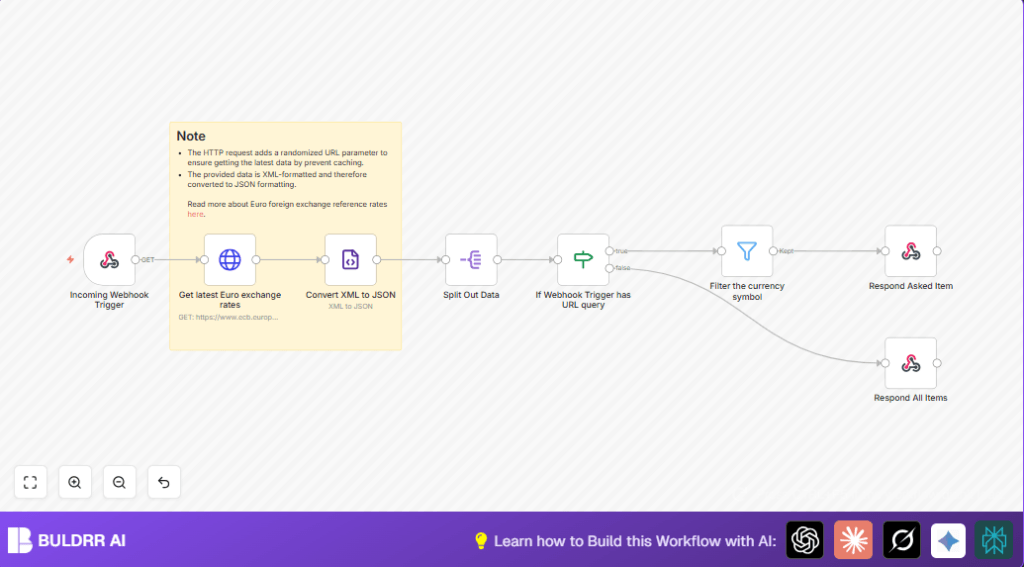
The workflow pulls XML data from the European Central Bank, changes it into JSON, and then finds the right currency data if the user asks for one.
Users get either one currency’s rate or all rates in a neat JSON format fast.
Who Should Use This Workflow
This is made for finance people who need daily updated Euro exchange rates fast without mistakes.
It is good for teams or clients who want easy access to currency rates through an API call.
It works well for those using n8n in the cloud or self-host n8n.
Tools and Services Used
- European Central Bank (ECB): Provides free daily updated currency rates in XML.
- n8n Automation Platform: Handles HTTP requests, data conversion, filters, and webhook responses.
- Webhook API: Receives requests and delivers the exchange rate data back.
Beginner Step-by-Step: How to Use This Workflow in Production
Step 1: Import the Workflow
- Download the workflow file using the Download button on this page.
- Open the n8n editor where you want to use the workflow.
- Use the menu option “Import from File” to load the workflow JSON.
Step 2: Configure the Workflow
- Add any needed credentials for HTTP requests if asked.
- Check the webhook path in the Webhook node is set as you want it.
- Look at any IDs, emails, URLs, or folder names in the nodes and change them if needed for your setup.
Step 3: Test the Workflow
- Run the workflow once by calling the webhook URL from a browser or tool.
- Test with and without currency query parameters to see the right data returned.
Step 4: Activate the Workflow for Production
- Toggle the workflow ON in n8n editor so it runs when the webhook is called.
- Share the webhook URL with your team or systems that need currency rates.
Inputs, Processing Steps, and Output
Inputs
- A webhook HTTP request, optionally with a currency code query parameter named foreign.
- Data URL to fetch today’s currency rates from ECB, with a random number to avoid caching.
Processing Steps
- The Webhook node waits for a request.
- HTTP Request node fetches ECB’s XML data for exchange rates.
- XML node converts the XML response to JSON format.
- Split Out node breaks JSON data into separate items for each currency.
- IF node checks if the currency query is present.
- If true, Filter node keeps only the requested currency’s info.
- Respond to Webhook node sends filtered or full data back to user.
Output
- JSON data sent back to the caller showing either all currency rates or only the one asked for.
Customizations
- Enable multiple currency queries in the IF node to support several currencies at once.
- Add a delay node before fetching to reduce frequent data requests for easier caching.
- Use Function or Code nodes to change JSON layout for better use by clients.
- Include error handling with Switch or IF nodes to return clear errors if rates are missing.
- Replace ECB URL and XML processing with other exchange rate APIs if preferred.
Edge Cases and Failures
- Missing random parameter in the HTTP URL can cause stale or no data from ECB.
- XML node misconfigured leads to empty or invalid JSON outputs.
- Bad query parameter spelling causes Filter node to find no matching currency.
- Webhook response nodes not connected properly lead to no data sent back.
Pre-Production Testing Checklist
- Call webhook with and without query to check responses.
- Confirm HTTP request gets fresh XML from ECB.
- Validate XML node outputs well-formed JSON.
- Check Split Out node turns array into individual currency items.
- Test IF node logic for both query present and absent.
- Verify that response nodes return accurate JSON results.
Deployment Guide
Turn the workflow ON in the n8n editor to make it live.
Share webhook URL with anyone who needs Euro exchange info.
Watch executions in n8n to catch errors or performance issues.
Use webhook in apps, dashboards, or tools to get up-to-date currency rates fast.
Summary of Results
✓ Saves time by automating Euro exchange rate fetching.
✓ Stops errors from copying data manually.
✓ Sends fresh, filtered currency info on request via webhook.
→ Provides easy API style access to daily updated currency rates.
