
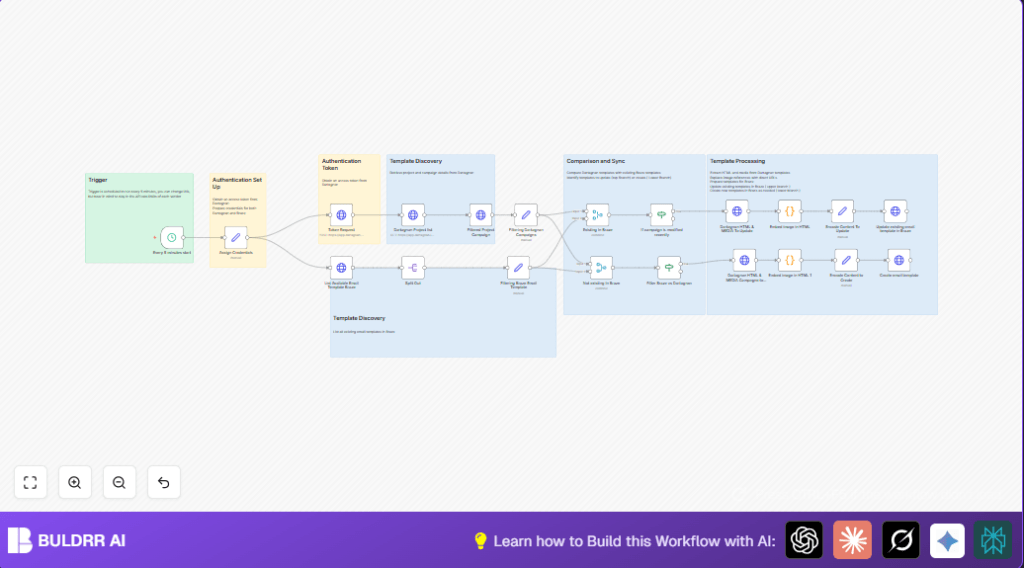

What This Workflow Does
This workflow keeps email templates in Dartagnan and Braze in sync. It fixes the problem of missed or old content updates by checking campaigns and templates. The result is consistent emails and saved time by running every 5 minutes automatically.
It logs into Dartagnan using OAuth2 and gets the access token. Then it gets the list of projects and their campaigns. Next, it checks Braze for email templates already there. It compares campaign and template names to find matches or new items.
Updated campaigns have their images fixed and HTML prepared, then the workflow updates Braze templates. New campaigns get created as new templates in Braze. This way, the two platforms stay up to date without manual work.
Tools and Services Used
- n8n Workflow Automation: Runs and schedules the automation.
- Dartagnan API: Provides marketing projects and campaigns with OAuth2 authentication.
- Braze API: Manages email templates with REST calls and API key authentication.
Inputs, Processing, and Outputs
Inputs
- Dartagnan
client_idandclient_secretfor OAuth2 login. - Braze
instance_urlandapi_keyto access email templates.
Processing Steps
- Request access token from Dartagnan using OAuth2.
- Fetch current projects from Dartagnan.
- Get campaign details for each project.
- Extract core campaign info and unify naming format.
- Retrieve all Braze email templates.
- Match Dartagnan campaigns to Braze templates by unified name.
- For matched templates, check if Dartagnan content is newer.
- If newer, download Dartagnan HTML and media URLs.
- Replace campaign image URLs in HTML for Braze compatibility.
- Update the existing Braze template with new content.
- For Dartagnan campaigns not in Braze, fetch content and create new templates.
Outputs
- Updated Braze email templates matching Dartagnan campaigns.
- New Braze email templates for new Dartagnan campaigns.
- Reduced manual errors and saved synchronization time.
Who Should Use This Workflow
This workflow fits marketing managers who handle many email campaigns in both Dartagnan and Braze. It suits users wanting to stop manual sync errors and save hours weekly. Also, it’s helpful for teams using Braze email platforms and Dartagnan campaign tools together.
Users with some n8n familiarity benefit most. It works well for companies needing frequent template updates without mistakes. People who want to automate marketing email updates will find this workflow useful.
Beginner Step-by-Step: How to Use This Workflow in n8n
Step 1: Import the Workflow
- Download the workflow file with the Download button on this page.
- Open your n8n editor where you want to add the automation.
- Click “Import from File” in n8n and select the downloaded workflow JSON file.
- The workflow will appear on the canvas ready to configure.
Step 2: Configure Credentials and Settings
- Find the Assign Credentials node and enter your Dartagnan
client_idandclient_secret. - Enter your Braze
instance_urlandapi_keyin the same node. - Review any IDs, folder names, emails, or channels that may be in other nodes and update if needed to match your accounts.
Step 3: Test the Workflow
- Run the workflow manually once using the n8n run button.
- Check outputs to confirm the flow fetches tokens, projects, campaigns, and Braze templates correctly.
- Look for any errors in logs and fix credential or URL issues if needed.
Step 4: Activate for Production
- Switch the activation toggle in n8n to enable this workflow runs automatically on schedule.
- The workflow will now sync every 5 minutes or as scheduled.
- Monitor execution logs regularly to catch any API errors or failures early.
- You may consider adding notifications or alerts for failures.
For users wanting more control or private hosting, consider setting up self-host n8n to run on a private server.
Customization Ideas
- Change the Schedule Trigger node frequency to run the workflow less or more often according to your team needs.
- Modify the campaign filter logic to handle multiple campaigns per project, using n8n nodes like SplitInBatches.
- Edit the email subject lines in the update and create HTTP nodes to add new marketing text or variables.
- Add alert nodes like Slack or email to notify the team if an error occurs during sync.
- Improve the Embed image in HTML code node to handle different media types such as videos or gifs.
Troubleshooting Common Issues
- 401 Unauthorized Errors
Make sure Dartagnan and Braze credentials are correct in the Assign Credentials node and tokens refresh properly. - No Data or Empty API Responses
Check all API URLs in HTTP Request nodes match Dartagnan and Braze latest documentation. - Templates Not Updating
Verify the update check compares timestamps correctly and uses exact JSON paths. - Image URLs Not Replacing
Edit the JavaScript regex in the Embed image in HTML code node to match all supported image formats.
Pre-Production Checklist
- Confirm Dartagnan API credentials and Braze API key are entered exactly as required.
- Test each HTTP Request node alone to verify correct data retrieval.
- Check the Token Request node outputs a fresh access token before running other steps.
- Ensure the schedule trigger fires on your desired timing.
- Run a manual test sync with recent Dartagnan campaigns to confirm Braze templates update properly.
- Backup existing Braze email templates before enabling automation to allow rollback.
Summary of Results
✓ Saves 3-4 manual work hours weekly by automating synchronization.
✓ Improves branding consistency by removing template update errors.
→ Keeps Dartagnan campaign data and Braze email templates matched up every 5 minutes.
→ Enables marketing teams to focus on creative tasks instead of repetitive syncing.
