
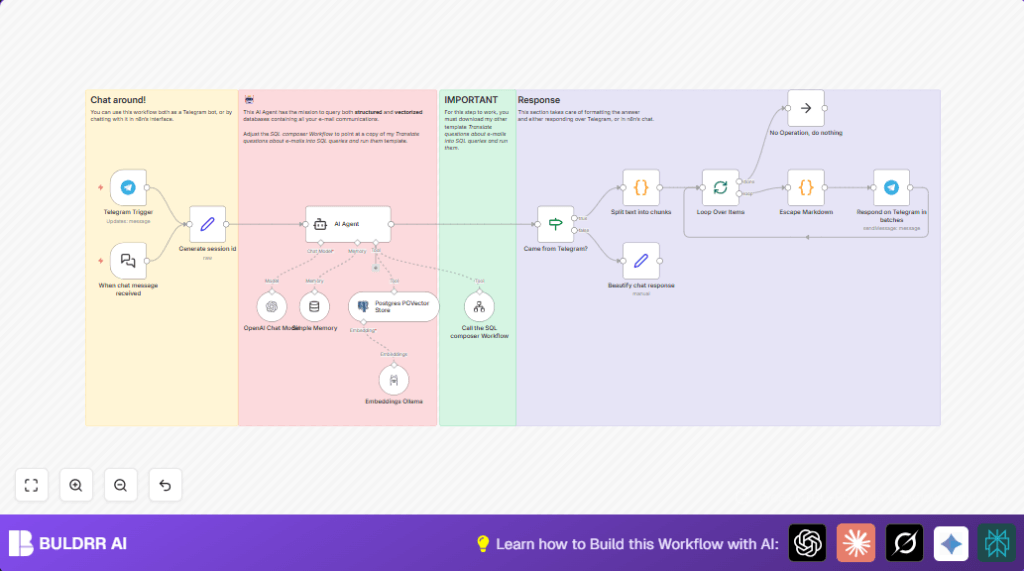

What this workflow does
This workflow builds an AI email assistant inside n8n that users chat with on Telegram.
It solves the problem of slow manual email searches by understanding natural language questions and finding exact emails quickly.
The workflow uses vector search to find related emails and runs SQL queries for exact data.
The user asks questions naturally on Telegram and gets clear answers fast.
Tools and services used
- Telegram Bot API: Receives user messages.
- PostgreSQL with Pgvector extension: Stores email text embeddings and supports semantic search.
- n8n automation platform: Orchestrates the workflow and connects components.
- Ollama API: Generates vector embeddings from email text.
- OpenAI API or compatible LLM: Interprets user questions and builds SQL queries.
- SQL composer workflow: Dynamically generates and runs SQL queries on email data.
Who should use this workflow
People managing many emails and needing fast answers.
Teams looking to avoid manual email searches.
Anyone wanting to ask natural language questions about email details via chat.
What is the input → processing → output flow?
Inputs
- User sends a question to the Telegram bot.
- Question text and chat context are captured by n8n.
Processing
- Generate a session ID to track chat context.
- Use embeddings from Ollama to convert question to vector.
- Run Pgvector semantic search in Postgres for similar emails.
- Pass user question to AI Agent that calls SQL composer for exact info.
- Manage conversation memory to keep context.
- Split and escape responses for Telegram markdown formatting.
Output
- Send formatted answer back to the user via Telegram messages.
Beginner step-by-step: How to build this in n8n
Download and import
- Download the workflow using the Download button on this page.
- Inside n8n editor, choose “Import from File” and select the downloaded workflow file.
Configure credentials
- Set the Telegram Bot API credentials in the Telegram Trigger and Telegram nodes.
- Enter PostgreSQL connection details with Pgvector enabled in the Postgres PGVector Store node.
- Fill in Ollama API keys in the Embeddings Ollama node.
- Input OpenAI or compatible LLM API info in the LangChain OpenAI Chat Model node.
Update workflow data
- Change allowed Telegram chat IDs to match your chat to keep it secure.
- Modify email database table or folder names in nodes if different.
- Configure system prompt text in the AI Agent node to reflect email database schema.
- Link the SQL composer workflow in the Tool Workflow node by pasting its workflow ID after import.
Test and activate
- Send a test message on Telegram to the bot to verify response.
- Check for correct session handling, message formatting, and email search results.
- Activate the workflow to run continuously in n8n for production use.
For privacy and reliability, consider self-host n8n.
Customization ideas
- Switch Telegram nodes to Slack or WhatsApp to chat there instead.
- Adjust “topK” in the Postgres PGVector Store node to get more or fewer search results.
- Edit the system prompt in the AI Agent node to focus answers on certain email folders.
- Change the Ollama embedding model for better results in specific email types.
- Modify chunk sizes for splitting messages in the Code node to match platform limits.
Typical errors and fixes
Telegram workflow not triggered
Cause: Bot not in correct chat or chat ID in Telegram Trigger is wrong.
Fix: Check chat ID and add bot to chat with right permissions.
SQL composer returns no data
Cause: SQL workflow not imported or linked properly.
Fix: Import the SQL composer template and update the Tool Workflow node with its ID.
Broken markdown in Telegram messages
Cause: Special characters in reply not escaped.
Fix: Confirm the Escape Markdown code node runs after splitting before sending.
Pre-production checklist
- Confirm Telegram Bot API keys are valid and bot is added to correct chat.
- Check PostgreSQL database has Pgvector and email embeddings loaded.
- Verify Ollama and OpenAI API keys are active and linked.
- Test SQL composer separately to ensure it returns data.
- Run a test question and validate Telegram replies are formatted well and complete.
Deployment notes
Turn on the workflow in n8n after confirming everything works well.
Watch workflow execution logs for errors in Telegram or database connections.
Keep fresh backups of the email data and embedding database.
Hosting the workflow on your own server or cloud VM gives better control and privacy.
Consider self-host n8n for best privacy.
Summary of benefits
✓ Save hours by searching emails fast using natural language.
✓ Get accurate answers combining semantic and structured search.
✓ Chat using Telegram with simple questions.
✓ Keep conversation history with memory nodes.
✓ Flexible and customizable for other platforms and databases.
