
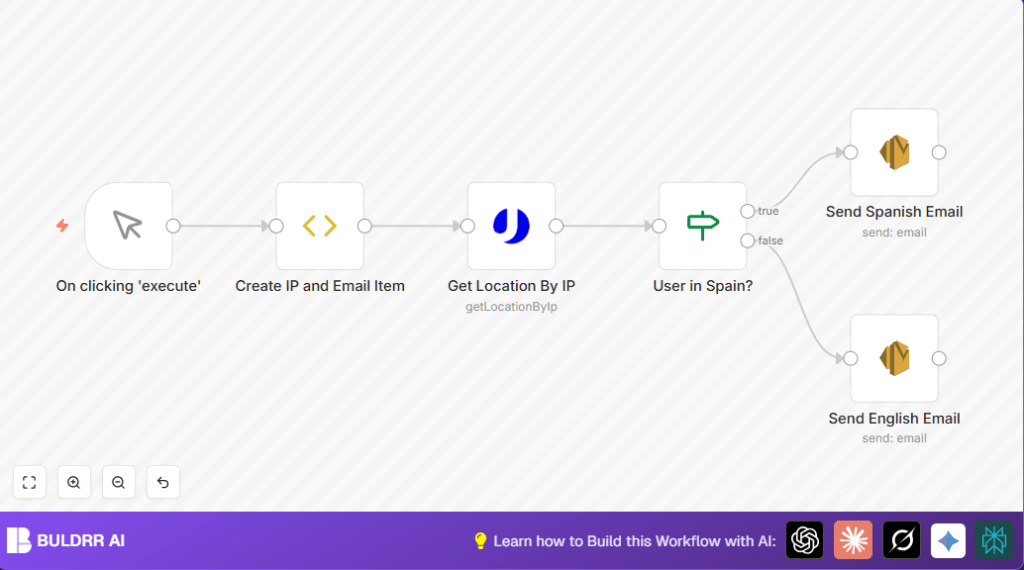

What This Workflow Does
This workflow finds out where a user is by their IP address and sends them a welcome email in Spanish or English automatically.
It solves the problem of sending wrong language emails and saves many hours of manual work every week.
The result is faster, accurate emails sent without mistakes.
Who Should Use This Workflow
This is for anyone who wants to send welcome emails based on user location without manual checks.
It fits well for SaaS owners or teams who want to reduce errors and save time.
Tools and Services Used
- n8n: For creating and running the workflow.
- Uproc API: For getting location details from the IP address.
- AWS Simple Email Service (SES): To send the localized emails.
Inputs, Processing Steps, and Output
Inputs
- User’s IP address (hardcoded example or dynamic input).
- User’s email address (hardcoded example or dynamic input).
Processing Steps
- The workflow first sets the test IP and email inside a FunctionItem node.
- It uses the Uproc node to get location info from the IP.
- An If node checks if the country code matches Spain (“ES”).
- Depending on the result, it chooses to send a Spanish or English email.
- Emails are sent using AWS SES nodes configured with language-specific content.
Output
The user receives a welcome email in Spanish if their IP shows Spain or in English otherwise.
Beginner Step-by-Step: How to Deploy This Workflow in n8n
Step 1: Import the Workflow
- Use the Download button on this page to save the workflow file.
- Open n8n editor and click “Import from File” to load the workflow.
Step 2: Configure Credentials
- Add your Uproc API Key in the Uproc node credentials setting.
- Add your AWS SES credentials to the AWS SES nodes.
- Update the From email address in both AWS SES nodes to a verified SES sender.
Step 3: Optional Adjustments
- You can replace the hardcoded test IP and email in the FunctionItem with dynamic inputs if needed.
- Check and adjust any email addresses or subjects as needed.
Step 4: Test the Workflow
- Manually run the workflow using the Manual Trigger.
- Check if emails are sent correctly based on location.
Step 5: Activate for Production
- Toggle the workflow switch to “Active” to run automatically when triggered.
- Link to real triggers like a Webhook node to automate on actual user signups.
- For more control and security, consider self-host n8n deployment options.
Customization Ideas
- Add more branches in the If node for other countries and languages.
- Use a Webhook node to accept live user data instead of fixed test input.
- Improve email appearance with HTML templates inside AWS SES nodes.
- Log IP and location info for reports by adding a Set node or a spreadsheet node.
Handling Errors and Edge Cases
If the Uproc node fails to return data, check the API Key and validate the IP format. Invalid IPs cause lookup errors.
If emails fail to send via AWS SES, verify the sender email is confirmed and check sending limits.
Make sure all connections between nodes are correct so data flows properly.
Summary of Results
✓ User location detected automatically by IP.
✓ Accurate email language sent: Spanish for Spain, English otherwise.
✓ Manual effort cut from hours weekly to zero after setup.
✓ Improved user experience with fast, correct localized emails.
