
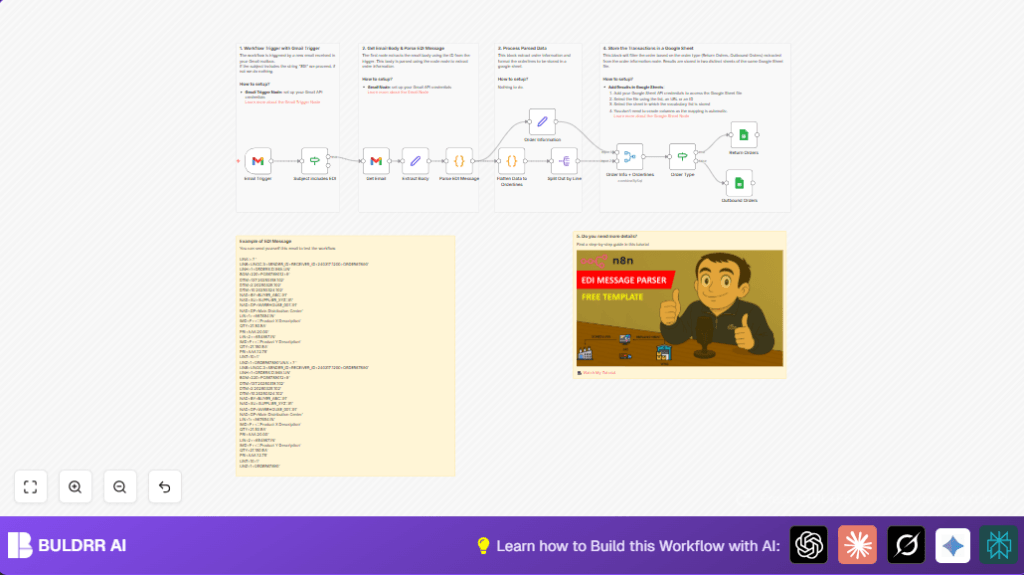

What this workflow does
This workflow helps read emails with “EDI” in the subject from Gmail. It takes the complex EDI message inside the email, breaks it down, and gets order details like order types, dates, parties, and line items. Then, it puts return orders and outbound orders in separate tabs in Google Sheets. This saves hours from manually copying data and avoids mistakes.
Who should use this workflow
Any business handling many EDI orders by email who wants to stop manual data entry for orders. It is good for people who want to easily check and organize order data. Users should have basic access to Gmail and Google Sheets and want automation for better accuracy and speed.
Tools and services used
- Gmail API: To watch for new emails and get full email content.
- n8n Workflow Automation: To build the automated process connecting Gmail, parsing, and Google Sheets.
- Google Sheets API: To add parsed order lines to specific spreadsheet tabs.
- JavaScript Code Nodes: To interpret EDI format messages inside emails and flatten data.
Inputs, processing steps, and outputs
Inputs
- Emails in Gmail inbox with “EDI” in subject line.
- Raw EDI message inside the email plain text body.
Processing steps
- Check Gmail every minute for new emails matching “EDI” subject filter.
- Download full email content including plain text body.
- Clean and extract the EDI message text from email body.
- Use JavaScript to parse EDI segments: UNB (envelope), UNH (header), BGM (document info), DTM (dates), NAD (parties), LIN and related nodes (order lines).
- Flatten nested parsed data into rows combining document header with each order line.
- Split orders by document type into Return Orders or Outbound Orders branch.
- Append data rows to two separate Google Sheets tabs dedicated to returns and outbound orders.
Outputs
- Return order details saved as rows in “Return Orders” Google Sheet tab.
- Outbound order details saved as rows in “Outbound Orders” Google Sheet tab.
Beginner step-by-step: How to build this workflow in n8n
Importing and setup
- Inside the n8n editor, click the Download button on this page and save the workflow file to your computer.
- In n8n, use the “Import from File” function to upload the downloaded workflow file.
- Open the imported workflow. Add your Gmail and Google Sheets API credentials if not already done.
- Check each node needing setting, update email filters, spreadsheet IDs, sheet names, or other values to match your environment.
- If there is JavaScript code node for parsing, verify no changes needed unless your EDI format differs.
Testing and activation
- Run the workflow once manually with a test email containing an EDI message to confirm parsing and sheet updates work as expected.
- After successful test, toggle the workflow from inactive to active to let it run automatically.
- The workflow will now check Gmail every minute, parse incoming EDI emails, and update Google Sheets without manual work.
For setups running n8n on your own server, explore self-host n8n for full control.
Common issues and fixes
- Emails not triggering workflow: Check Gmail API credentials are valid and polling is enabled.
- EDI parsing errors: Confirm the raw email body text is captured correctly in the “Extract Body” node.
- Google Sheets writing fails: Ensure Google Sheets node credentials and sheet/tab names are correct and access is allowed.
Customization ideas
- Add filters by sender email to only process trusted partners.
- Expand JavaScript parser code to extract more EDI fields like tax or discounts if needed.
- Use different Google spreadsheets for return and outbound orders by adjusting spreadsheet IDs.
- Add messaging platforms like Slack to notify teams when new orders arrive.
- Set workflow to run only during work hours by adding a Cron node before Gmail trigger.
Summary of benefits and results
✓ Time saved from manual data entry—more than 3 hours daily.
✓ Fewer errors by automating EDI parsing and data logging.
✓ Clear separation of return and outbound orders in Google Sheets.
✓ Better order visibility and faster processing.
✓ Easy to test and activate inside n8n with basic setup steps.
