

What This Workflow Does
This workflow turns DOCX files into PDFs automatically using the ConvertAPI service.
It solves the problem of slow and error-prone manual conversions.
Users get a PDF file saved on local disk with the click of a button.
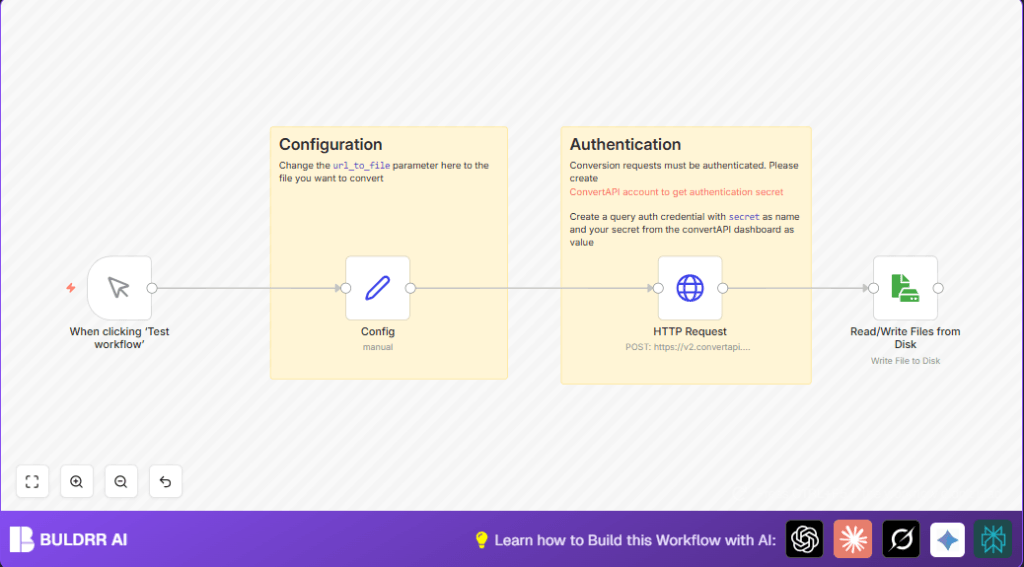
The workflow pulls a DOCX file from a set web address.
It sends the file to ConvertAPI, asking to make a PDF.
The API sends back the PDF file.
The workflow saves the PDF on your local machine with a simple name like “document.pdf”.
You can swap input files easily by changing just one URL in a Config node.
Security is handled by attaching ConvertAPI secrets safely with every request.
Tools and Services Used
- n8n automation platform: Runs the workflow and connects nodes.
- ConvertAPI service: Converts DOCX files to PDF securely.
- HTTP Request node with Query Auth: Sends files and attaches secret keys.
- Read/Write Files from Disk node: Saves the final PDF on your machine.
Inputs, Processing Steps, and Output
Inputs
- DOCX file located at a public URL set in the Config node.
- User triggers workflow manually or by events in n8n.
Processing Steps
- Start with the Manual Trigger node.
- Use the Config node to hold the URL of the DOCX file.
- Pass the URL to HTTP Request node that calls ConvertAPI to convert DOCX to PDF with authentication.
- Receive the converted PDF in binary form from the HTTP Request node.
- Write the PDF file to local disk using the Read/Write Files from Disk node.
Output
A PDF file called “document.pdf” saved on the local disk of the machine running n8n.
Who Should Use This Workflow
This workflow is best for people needing fast and reliable DOCX to PDF conversion.
Non-technical users can change the file link without code.
Anyone with a ConvertAPI account and local disk writing ability benefits.
Self-host n8n users can find help at self-host n8n.
Beginner Step-by-Step: How to Use This Workflow in Production Inside n8n
Step 1: Download the Workflow File
- Click the Download button on this page to save the workflow JSON file.
Step 2: Import Workflow Into n8n
- Open your n8n editor.
- Use the “Import from File” option to upload the downloaded JSON.
Step 3: Configure Workflow Details
- Open the Config node and change the url_to_file value to your DOCX file’s URL.
- In the HTTP Request node, add your ConvertAPI secret in the Query Auth credentials.
- If needed, update file names or paths in the Read/Write Files from Disk node.
Step 4: Test the Workflow
- Click “Execute Workflow” to run once and check if PDF file saves correctly.
Step 5: Activate Workflow for Regular Use
- Toggle the workflow’s Active switch to “On”.
- Set a trigger if desired or run manually as needed.
Common Failures and Troubleshooting
- 401 Unauthorized Error
Cause: Wrong or missing ConvertAPI secret.
Fix: Check Query Auth credentials in n8n and update API Key. - Broken or Missing PDF File
Cause: Invalid DOCX file URL or no file at URL.
Fix: Verify URL is correct and publicly accessible by opening in a browser. - File Not Saved to Disk
Cause: Wrong binary data property set in Read/Write Files node.
Fix: ConfirmdataPropertyNamematches output binary property from HTTP Request (usually “data”).
Customization Ideas
- Change url_to_file inside the Config node to convert different DOCX files.
- Rename the saved PDF by changing
fileNamein Read/Write Files from Disk. - Convert other file types by editing the HTTP Request URL, e.g., PPTX to PDF.
- Add error handling nodes like Function or IF after HTTP Request for smooth failure response.
- Use cloud storage nodes instead of local file writing to save PDFs online.
Summary and Result
By running this workflow, users:
✓ Save time converting DOCX to PDF files.
✓ Reduce human errors in file management.
✓ Easily update input files without code.
✓ Generate consistently formatted PDF reports.
✓ Automate a repetitive manual process with little effort.
