

Automate Document Summaries in n8n with Google Drive & OpenAI

This n8n workflow automates extracting and summarizing content from Google Drive documents using OpenAI’s GPT model. It saves hours spent manually reviewing large files, streamlining your document analysis process effectively.
googleDrive
chainSummarization
lmChatOpenAi
+3
Workflow Identifier: 1471
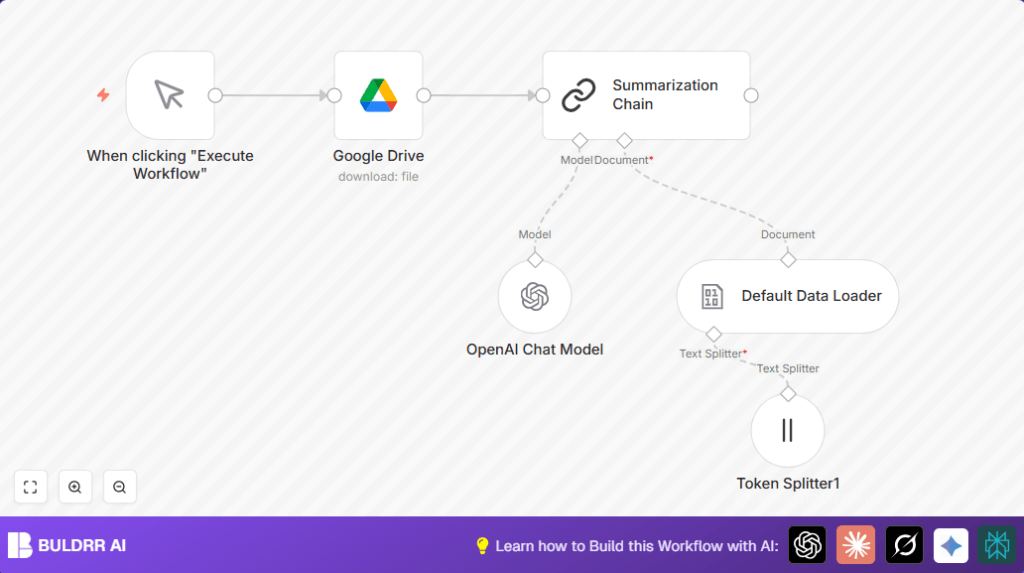
NODES in Use: Manual Trigger, Google Drive, Summarization Chain, Token Splitter, Default Data Loader, OpenAI Chat Model
Automate document summaries with n8n and OpenAI

Press CTRL+F5 if the workflow didn't load.

Learn how to Build this Workflow with AI:

What this workflow does

This workflow helps you download a document from Google Drive and automatically make a short summary using OpenAI. It stops you from reading long files by hand and saves a lot of time.

It works by getting a file from Google Drive, breaking the content into smaller parts, then sending those parts to the GPT-4o-mini model to create a fast summary.

Who should use this workflow

This is for anyone who has many big documents on Google Drive and wants quick summaries.

Users who dislike reading long texts or want their reports faster find this helpful.

Tools and services used

  • n8n: The automation platform where the workflow runs.
  • Google Drive: The place where documents are stored and downloaded.
  • OpenAI GPT-4o-mini model: The AI that creates the summaries.

Inputs, processing steps, and outputs

Inputs

  • A Google Drive file URL or file ID from which to download the document.
  • OAuth2 credentials for Google Drive and OpenAI API keys.

Processing Steps

  • The workflow starts when the user clicks the manual trigger in n8n.
  • The Google Drive node downloads the chosen file as binary data.
  • The data goes to the Summarization Chain node, which controls the next steps.
  • The content passes through a Token Splitter node that breaks text into parts of 3000 tokens each.
  • The Default Data Loader node reads these chunks preparing the text for the AI.
  • The OpenAI Chat Model node, set to GPT-4o-mini, makes a short summary of the text chunks.

Output

The workflow produces a brief summary of the document, making long files easier to understand quickly.

Beginner step-by-step: How to use this workflow in n8n

1. Import the workflow

  1. Download the workflow file using the Download button on this page.
  2. Open the n8n editor where you want to use the workflow.
  3. Click “Import from File” and select the downloaded workflow file.

2. Configure the workflow

  1. Add your Google Drive OAuth2 credentials in n8n to allow file access.
  2. Add your OpenAI API key to the OpenAI Chat Model node for summarization permission.
  3. Change the Google Drive file ID to match the exact file you want to summarize.

3. Test and activate

  1. Run the workflow once by clicking the manual trigger to check if it downloads and summarizes correctly.
  2. If the test works, activate the workflow to use it anytime.

For more privacy or server control, consider running self-host n8n.

Common errors and solutions

  • File not found error in Google Drive node
    Means wrong file ID or missing permission.
    Check the file ID carefully and make sure your Google Drive credentials can access the file.
  • Authentication error in OpenAI Chat Model node
    Means the API key is wrong or expired.
    Update the API key in the credentials section and reauthorize.

Customization ideas

  • Change the AI model in the OpenAI Chat Model node from “gpt-4o-mini” to names like “gpt-3.5-turbo” for different style or cost.
  • Adjust the chunk size in the Token Splitter node to make summaries more detailed or faster.
  • Swap the manual trigger for a Cron trigger to run the workflow on a schedule.
  • Add a Google Drive List Files node to process many documents one by one automatically.

Summary of benefits

✓ Saves hours by automating document reading.

✓ Helps get summaries without reading whole files.

✓ Improves accuracy by reducing human error.

→ Produces quick, concise summaries ready for reports.


Automate document summaries with n8n and OpenAI

Visit through Desktop to Interact with the Workflow.

Frequently Asked Questions

Open the n8n editor, go to credentials section, and provide your Google Drive OAuth2 and OpenAI API Key.
Use the file ID found in the Google Drive URL. It looks like a long string after “/d/” in the file link.
Verify the file ID is correct and check that Google Drive OAuth credentials have permission to access the file.
Yes, replace the manual trigger with a Cron node to schedule automatic runs.

Promoted by BULDRR AI

Related Workflows

Automate Twist Channel Creation and Messaging with n8n

This workflow automates creating and updating a channel in Twist and sending a personalized message to specific users. It eliminates manual setup errors and saves time managing Twist communications.

Automate Ideogram Image Generation with Google Sheets & Gmail

This workflow automates graphic design image generation via Ideogram AI, storing image data in Google Sheets and Google Drive, with email alerts via Gmail. It saves designers hours by automating image creation, remixing, review, and record-keeping.

Automate IT Support with Slack and OpenAI in n8n

Streamline IT support by automating Slack message handling using n8n and OpenAI. This workflow handles Slack DMs, filters bots, queries a Confluence knowledge base, and delivers AI-generated responses, improving support efficiency and response time.

Automate Crypto Analysis with CoinMarketCap & n8n AI Agent

Discover how this unique n8n workflow leverages CoinMarketCap’s multi-agent AI to deliver precise, real-time cryptocurrency insights directly via Telegram. Manage crypto data analysis efficiently with automated multi-source API integration.

Automate Gumroad to Beehiiv Subscriber Sync with n8n

Learn how to automatically add new Gumroad sales customers as Beehiiv newsletter subscribers using n8n automation. This workflow saves time by syncing sales data to Google Sheets CRM and notifying your Telegram channel instantly.

Generate On-Brand Blog Articles Using n8n and OpenAI

This workflow automates the creation of on-brand blog articles by analyzing existing company content using n8n and OpenAI. It extracts article structures and brand voice to produce consistent draft articles, saving significant content creation time.
1:1 Free Strategy Session
Your competitors are already automating. Are you still paying for it manually?

Do you want to adopt AI Automation?

Every hour your team does repetitive work, you're burning real money.
While you wait, faster businesses are cutting costs and moving quicker.
AI and automations aren't the future anymore — they're the present.

Book a live 1-on-1 session where we show you exactly which of your daily tasks can be automated — and what it’s costing you not to.