

Automate Document Insertion and Retrieval with n8n & Milvus

Discover how this n8n workflow scrapes Paul Graham’s essays, loads them into the Milvus vector store, and enables AI-powered document retrieval with citations. Save hours by automating data preparation and querying your knowledge base with AI accuracy.
manualTrigger
httpRequest
vectorStoreMilvus
+11
Workflow Identifier: 2185
NODES in Use: Manual Trigger, HTTP Request, HTML Extract, SplitOut, Limit, Set, Code, Sticky Note, LangChain Text Splitter Recursive Character Text Splitter, LangChain Embeddings OpenAI, LangChain Vector Store Milvus, LangChain Chat Trigger, LangChain Information Extractor, LangChain Language Model Chat OpenAI
Automate document retrieval with n8n and Milvus

Press CTRL+F5 if the workflow didn't load.

Learn how to Build this Workflow with AI:

What This Automation Does ⚙️

This workflow collects and reads many essays from a website automatically.

It breaks the essays into smaller reading parts, finding their meaning with AI,

and saves these meanings into a special database for fast searching.

Then it lets you ask questions in chat, answering clearly based on the essays.

This saves you many hours of hard manual work and gives precise answers with links to the essay parts.


Who Should Use This Workflow

This is for anyone who needs to search and understand many essays easily.

If you want to avoid copying text manually, mixing notes, or losing time, this helps.

It fits researchers, students, or anyone wanting clear answers backed by real essays.


Tools and Services Used

  • n8n automation platform: Runs the workflow and manages steps.
  • Milvus vector database: Stores the essay text in searchable AI numeric form.
  • OpenAI API: Creates meaning vectors and generates AI answers.
  • Paul Graham website: Source of essay articles to read and analyze.

Beginner Step-by-Step: How to Use This Workflow in n8n

1. Import the Workflow

  1. Download the workflow file using the Download button on this page.
  2. Inside the n8n editor, click Import from File.
  3. Select and load the downloaded workflow file.

2. Add Credentials and API Keys

  1. Enter OpenAI API Key credentials in the credential manager.
  2. Configure connection settings for the Milvus server, including collection name my_collection.
  3. Make sure any email, channel, or URL settings match your environment.

3. Test the Workflow

  1. Run the workflow manually by clicking the Manual Trigger.
  2. Check logs and outputs for successful essay scraping and loading.

4. Activate for Production

  1. Turn on the workflow to start automatic fetching and enable the chat trigger.
  2. Use the chat interface to ask questions and get answers with citations.

For better control and security, consider self-host n8n on your own server if needed.


How the Workflow Works: Inputs, Processing, Output

Inputs

  • Website URL of the essay list from the source.
  • User questions via chat interface.

Processing Steps

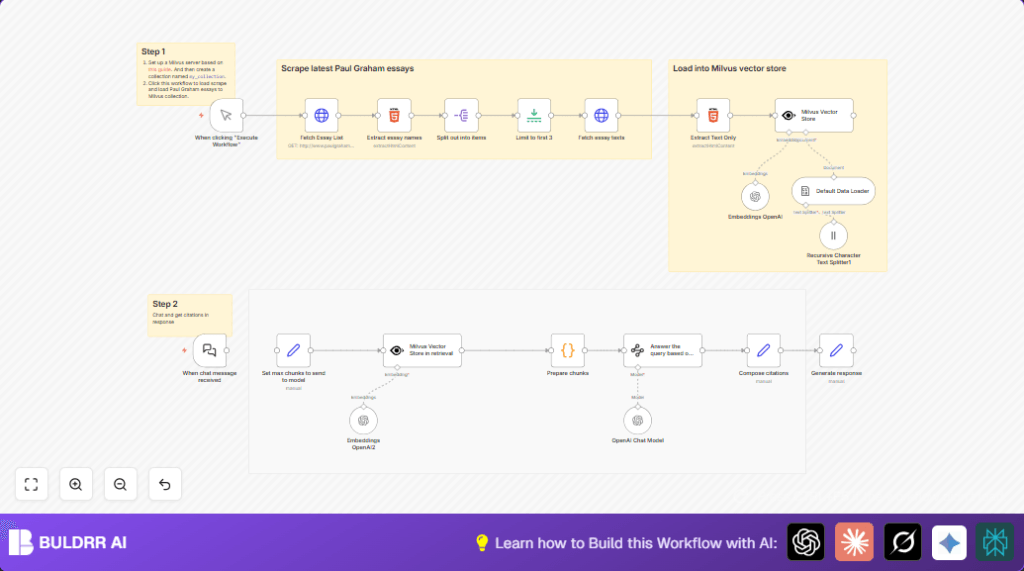
  • The workflow fetches the HTML list and extracts essay links.
  • It then downloads full texts of each essay.
  • Text is cleaned and split into smaller chunks for AI processing.
  • Chunks are converted into numeric vectors with OpenAI’s embedding model.
  • Vectors are inserted into the Milvus vector database, replacing old data.
  • When a user asks a question, the workflow turns the question into a vector.
  • The vector database finds the closest matching essay pieces.
  • AI generates an answer from those pieces with clear citations included.

Output

  • Clean, relevant answer text on the user’s question.
  • Detailed citation links to source essay chunks.

Inputs and Outputs Explained

Inputs come from the essay website and from user chat messages.

The output is a text response giving a clear answer and showing exactly where information came from.


Common Issues and How to Fix Them

  • Failed to fetch essay list: Check the URL and verify website structure has not changed.
  • Milvus insertion errors: Confirm Milvus server is running and collection my_collection exists.
  • OpenAI API problems: Double-check API Key validity and watch for usage limits.

Ideas to Customize the Workflow

  • Change how many essays you scrape by adjusting the limit node.
  • Tweak chunk size for embedding to better fit your needs.
  • Use a different OpenAI AI model for answering questions.
  • Replace essay source URL to load documents from other websites.
  • Add more details to citations like date or author in the composing node.

Summary and Results

✓ Saves many hours of manual scraping and reading.

✓ Gives fast, clear answers linked to exact essay sections.

→ Lets anyone explore a large collection of texts easily.

→ Works inside n8n and OpenAI with common tools and database.


Automate document retrieval with n8n and Milvus

Visit through Desktop to Interact with the Workflow.

Author
Written By
Vikash Kumar
Building AI agents, n8n workflows and end-to-end automation for 30+ Brands across India, the US, Europe, Dubai & Australia. 7+ years of Experience saving founders real hours every week - no code required.
Author
Written By
Vikash Kumar
Building AI agents, n8n workflows and end-to-end automation for 30+ Brands across India, the US, Europe, Dubai & Australia. 7+ years of Experience saving founders real hours every week - no code required.

Frequently Asked Questions

The workflow uses an HTTP request to download the essay list page, then extracts each essay’s URL and fetches full text automatically.
Milvus stores the essay text as numeric vectors for fast searching by meaning during query time.
Yes, you can change the AI model in the LangChain node to use another compatible OpenAI GPT version.
Check the API key validity in credentials, watch usage quotas, and update keys if expired or blocked.

Related Workflows

Automate Twist Channel Creation and Messaging with n8n

This workflow automates creating and updating a channel in Twist and sending a personalized message to specific users. It eliminates manual setup errors and saves time managing Twist communications.

Automate Ideogram Image Generation with Google Sheets & Gmail

This workflow automates graphic design image generation via Ideogram AI, storing image data in Google Sheets and Google Drive, with email alerts via Gmail. It saves designers hours by automating image creation, remixing, review, and record-keeping.

Automate IT Support with Slack and OpenAI in n8n

Streamline IT support by automating Slack message handling using n8n and OpenAI. This workflow handles Slack DMs, filters bots, queries a Confluence knowledge base, and delivers AI-generated responses, improving support efficiency and response time.

Automate Crypto Analysis with CoinMarketCap & n8n AI Agent

Discover how this unique n8n workflow leverages CoinMarketCap’s multi-agent AI to deliver precise, real-time cryptocurrency insights directly via Telegram. Manage crypto data analysis efficiently with automated multi-source API integration.

Automate Gumroad to Beehiiv Subscriber Sync with n8n

Learn how to automatically add new Gumroad sales customers as Beehiiv newsletter subscribers using n8n automation. This workflow saves time by syncing sales data to Google Sheets CRM and notifying your Telegram channel instantly.

Generate On-Brand Blog Articles Using n8n and OpenAI

This workflow automates the creation of on-brand blog articles by analyzing existing company content using n8n and OpenAI. It extracts article structures and brand voice to produce consistent draft articles, saving significant content creation time.
1:1 Free Strategy Session
Your competitors are already automating. Are you still paying for it manually?

Do you want to adopt AI Automation?

Every hour your team does repetitive work, you're burning real money.
While you wait, faster businesses are cutting costs and moving quicker.
AI and automations aren't the future anymore — they're the present.

Book a live 1-on-1 session where we show you exactly which of your daily tasks can be automated — and what it’s costing you not to.