
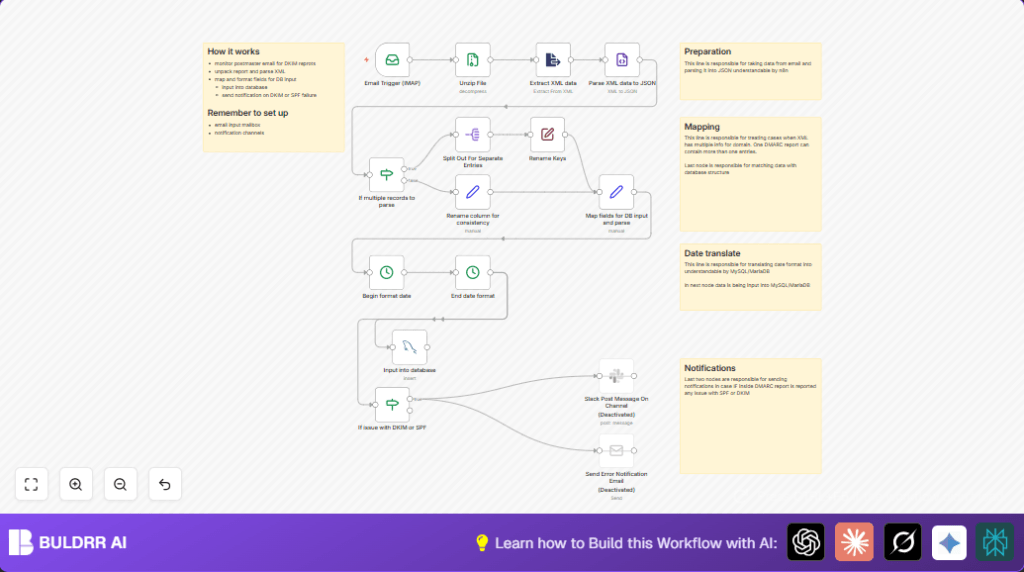

What This Automation Does
This workflow checks your email for DMARC reports. It finds zipped XML files attached to emails. Then, it opens and reads these files to get the data inside. The data is changed to a simple JSON form. It looks for reports that have many domain entries and splits them. The workflow works out the needed fields to save in a MySQL database. Date information is made easy to store in the database. If the DKIM or SPF parts fail, it sends messages to notify the team. This saves time and helps catch email security problems fast.
Who Should Use This Workflow
The workflow is good for security people who get DMARC report emails often. It helps if you want to stop errors or spend less time doing manual work. If you have a database to keep report details and use Slack or email for alerts, this fits well. You do not need to be a coding expert to use it, but some n8n basics help.
Tools and Services Used
- IMAP Email: Receives DMARC report emails with zipped XML files.
- Unzip Node: Extracts XML files from zipped attachments.
- XML Parser: Converts XML data to JSON format.
- If Node: Checks if there are multiple reports inside one XML.
- Rename Keys Node: Simplifies JSON data keys for easy access.
- Set Node: Maps the DMARC data into a format ready for database storage.
- DateTime Format Node: Changes timestamp formats to MySQL date/time strings.
- MySQL Node: Inserts data into the DMARC database table.
- Slack Node: Sends alerts if DKIM or SPF checks fail.
- Email Node: Optionally sends error emails to the security team.
You can use the self-host n8n to run this workflow on your own server setup.
Inputs, Processing Steps, and Output
Inputs
- New DMARC report email arrives in an IMAP inbox with zipped XML attachments.
Processing Steps
- Download attachment zip files.
- Unzip first attachment and extract XML file.
- Parse XML content and convert it to JSON.
- Check if multiple domain records exist; split if yes.
- Rename JSON keys for easier mapping.
- Map all necessary DMARC data fields into a clean JSON object formatted for database insertion.
- Format date fields to MySQL datetime strings.
- Insert data into the MySQL DMARC reports table.
- Check if DKIM or SPF authentication failed. If yes, send Slack and/or email alerts.
Output
- Structured DMARC data saved to database.
- Prompt alerts for email authentication failures.
Beginner step-by-step: How to Use This Workflow in n8n
Step 1: Import Workflow
- Download the workflow file using the Download button on this page.
- Open your n8n editor where you want to use this workflow.
- Use the “Import from File” option to bring the downloaded workflow inside n8n.
Step 2: Configure Credentials and Settings
- Add the IMAP email credentials you use to receive DMARC reports.
- Add your MySQL database credentials and check the correct table name (usually “dmarc”).
- Set up Slack OAuth2 credentials if you want Slack alerts.
- Configure Email Sending credentials if you want email notifications.
- If needed, update IDs, email addresses, channel names, folder paths, or database table names inside the nodes.
Step 3: Test the Workflow
- Run the workflow manually or wait for a test DMARC email to arrive.
- Check if the attachments download and parse correctly.
- Verify if data inserts into your MySQL database properly.
- Make sure Slack or email notifications work if a DKIM or SPF failure exists.
Step 4: Activate for Production
- Once tests pass, activate the workflow by toggling it to active.
- Monitor workflow runs from the n8n dashboard.
- Keep your credentials up to date to avoid connection failures.
Common Edge Cases and Failures
Case: No Attachments Found
Make sure the Email Trigger node has “Download Attachments” turned on. Verify emails have zipped XML files attached.
Case: XML Parsing Errors
Check if the Unzip node outputs the binary property with the correct name like “file_0”. Use debug mode to confirm XML contents before parsing.
Case: Database Insert Fails
Match database column names exactly with mapped fields. Confirm date fields are formatted like “yyyy-MM-dd hh:mm:ss”.
Customization Ideas
- Add more notification methods like Microsoft Teams or SMS nodes after the DKIM/SPF check.
- Change date formats in DateTime Format nodes to fit other systems.
- Point MySQL node to different schemas or tables if you want to store data elsewhere.
- Update Unzip node to handle more attachments if emails send multiple zipped reports.
- Filter emails by subject to process only those with “DMARC report” using an If node.
Summary of Benefits
✓ Saves over 10 hours weekly by automating manual DMARC report handling.
✓ Turns complex XML reports into easy-to-use database records.
✓ Sends quick notifications on email authentication problems.
✓ Makes email security monitoring reliable and less error-prone.
✓ Fits users without deep coding skills but with basic n8n knowledge.
