

What This Automation Does
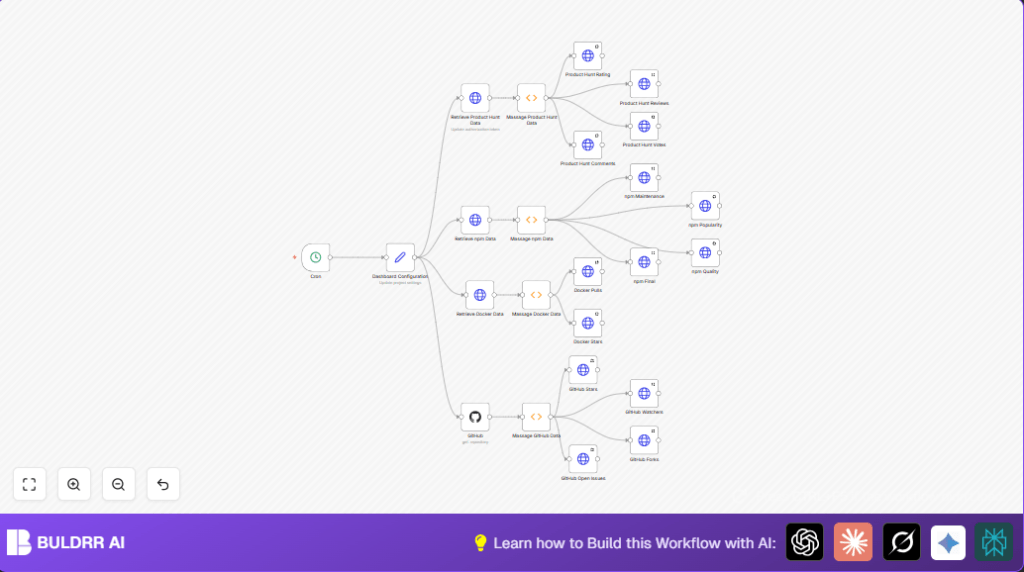
This workflow collects important project data from DockerHub, GitHub, npm, and Product Hunt automatically. It solves the problem of spending hours every week gathering this data manually and making errors. The result is up-to-date project metrics posted to a dashboard fast and error-free.
It fetches stars, pulls, forks, watchers, scores, and reviews, then formats numbers nice and posts them safely with tokens.
Tools and Services Used
- DockerHub API: Gets stars and pulls for repositories.
- GitHub API: Fetches stars, forks, watchers, and open issues for repos.
- npm API: Provides package quality and popularity scores.
- Product Hunt GraphQL API: Retrieves votes, comments, reviews, and ratings.
- Dashboard REST API: Receives and displays posted metrics securely.
- n8n Workflow Automation: Runs all API calls, formatting, and posting regularly.
Inputs, Processing, and Outputs
Inputs
- Dashboard configuration data with API URLs and tokens.
- Repository and package names or IDs for DockerHub, GitHub, npm, and Product Hunt.
Processing Steps
- Trigger workflow every minute by cron node.
- Fetch DockerStar and Pull counts via HTTP requests.
- Format numbers from Docker data to readable strings.
- Post Docker metrics securely to dashboard API.
- Fetch npm package scores using HTTP requests.
- Round npm scores to two decimals for display.
- Post all npm scores securely to dashboard endpoints.
- Use GitHub node to get repo stats.
- Format GitHub stats with commas.
- Post them to dashboard API to update respective widgets.
- Call Product Hunt GraphQL API for post data.
- Format Product Hunt numbers.
- Post Product Hunt data to dashboard using HTTP requests.
Outputs
- Dashboard updates with latest stars, pulls, forks, watches, npm scores, and Product Hunt feedback.
- Readably formatted numeric data shown in dashboard widgets.
- Reduced manual work and errors, fresh data every minute.
Beginner Step-by-Step: How to Use This Workflow in n8n
1. Download and Import
- Download the workflow file using the Download button on this page.
- Open n8n editor, click Import from File.
- Select the downloaded workflow JSON to import.
2. Configure API Credentials
- Go to the Dashboard Configuration Set node.
- Update dashboard API URL and auth token.
- Enter exact DockerHub repo names, GitHub owner and repo, npm package name, and Product Hunt post ID values.
- Go to GitHub node, add or link API credentials with repo read access.
- Configure Product Hunt HTTP Request node with the correct API key in headers.
3. Test the Workflow Once
- Run the workflow manually using the Cron node trigger.
- Check execution to confirm data fetching and posting works without errors.
- Look at outputs in your dashboard to verify updated metrics format properly.
4. Activate for Production Use
- Turn the workflow to Active in n8n.
- Workflow runs every minute capturing fresh data continuously.
- Monitor API limits to avoid overuse; adjust Cron frequency if needed.
- Consider self-host n8n for better control and security when running this workflow on a server or VPS.
Common Edge Cases and Failures
Problem: Receiving HTTP 401 when posting to the dashboard.
Cause: The authentication token is wrong or missing.
Fix: Confirm the token in the Dashboard Configuration node exactly matches what the dashboard expects. No extra spaces allowed.
Problem: HTTP 404 errors when calling DockerHub or GitHub APIs.
Cause: Incorrect repository or package names in config.
Fix: Double-check the exact spellings for Docker repository, GitHub owner and repo, npm package, and Product Hunt post ID.
Customization Ideas
- Change Frequency
Adjust the Cron node to run hourly or daily if per-minute updates aren’t needed. - Add More Metrics
Duplicate HTTP Request nodes to pull extra data like GitHub releases, npm downloads, or other social signals. - Modify Dashboard API Calls
Update URLs and payloads in HTTP Request nodes if the dashboard expects different data formats. - Improve Formatting
Edit Function nodes to add other formatting styles or calculate new stats before posting.
Summary and Outcome
✓ Save hours weekly by automating data fetching and posting.
✓ Avoid errors by removing manual copying and pasting.
✓ Get fresh, formatted project stats from multiple services every minute.
➔ Real-time, trustworthy dashboard insights improve project decisions.
➔ A solid, easy-to-use workflow fits most project setups with room to expand.
