

What This Automation Does
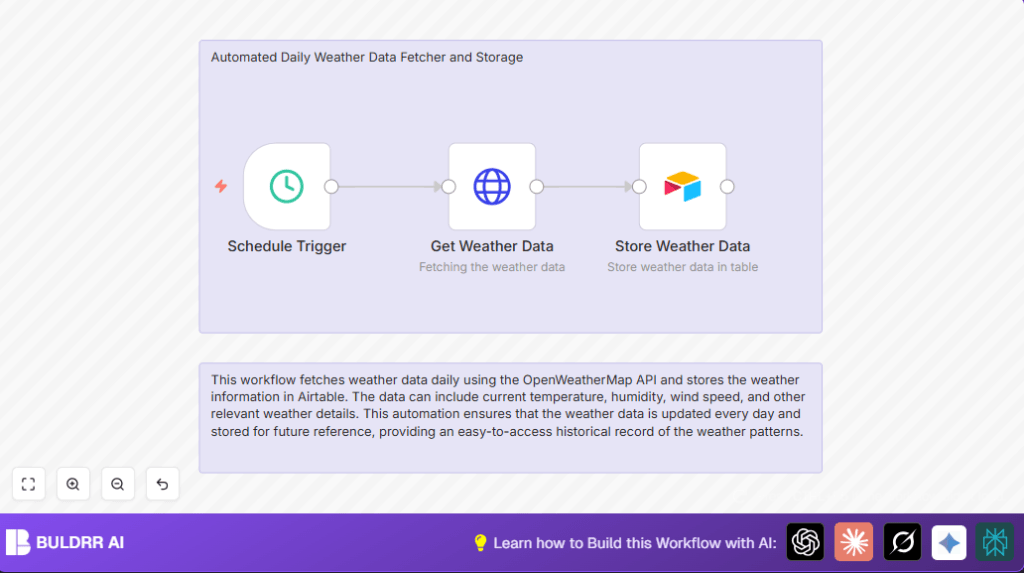
This workflow runs every day at 10 AM India Standard Time and fetches weather data for Ahmedabad using OpenWeatherMap API.
It automatically saves temperature, humidity, wind speed, location, and timezone in Airtable.
This stops manual work and avoids mistakes in daily weather recording.
The weather history is organized and easy to check anytime.
Beginner Step-by-Step: How to Use This Workflow in Production
Import the Workflow
- Download the workflow file using the Download button on this page.
- Open n8n editor and select Import from File.
- Choose the downloaded file to import.
Configure Credentials and Settings
- Add your OpenWeatherMap API key in HTTP Request node’s authentication setup.
- Enter your Airtable API token in the Airtable node credentials.
- Check and update the Airtable base and table names if needed.
- If you want different location data, update latitude and longitude in the HTTP Request node.
Test and Activate
- Run the workflow once manually using the Execute button in n8n to verify data is fetched and stored.
- Look into Airtable to see if a new weather record appears.
- If all works, toggle the workflow to active mode for it to run daily automatically.
- Make sure n8n’s time zone matches your local time (IST) so the schedule triggers correctly.
The workflow is now ready to save daily weather data without extra steps.
Inputs, Processing Steps, and Output
Input: Scheduled daily trigger at 10 AM IST.
Processing Steps:
1. The Schedule Trigger node fires.
2. The HTTP Request node sends a query to OpenWeatherMap with given coordinates and API key.
3. The API responds with current weather data in JSON.
4. The Airtable node takes this data and creates a new record, filling columns with temperature, humidity, wind speed, location name, and timezone.
Output: A new row in Airtable with organized daily weather info.
Tools / Services Used
- OpenWeatherMap API: Get live weather data with API key authentication.
- Airtable: Store weather data in a structured base and table.
- n8n: Automate the data fetching and storing workflow.
- HTTP Query Authentication in n8n: Secure API key setup for OpenWeatherMap.
- Airtable API Token: Manage access to Airtable base.
Customizations
- Change latitude and longitude in the HTTP Request node to fetch weather for any place.
- Add other weather data fields like pressure or visibility to Airtable by editing data mapping.
- Adjust the scheduled trigger hour to pick any time for data collection.
- Use multiple HTTP Request and Airtable nodes to log weather from several cities.
Troubleshooting
- 401 Unauthorized in HTTP Request:
The API key is wrong or expired.
Fix by verifying and updating OpenWeatherMap API Key in n8n. - No data in Airtable:
Check Airtable API token and field mappings.
Make sure Airtable base and table exist and match workflow. - Schedule Trigger does not run:
Workflow might be inactive or time zones mismatch.
Activate workflow and confirm n8n is set to IST.
Pre-Production Checklist
- Test OpenWeatherMap API call alone using the HTTP Request node.
- Confirm Airtable columns fit the data fields mapped.
- Run manual execution to check end-to-end data flow.
- Backup Airtable data often to avoid losing records.
Deployment Guide
Switch the workflow active toggle on in n8n to run automatically.
Check logs on n8n execution page to watch daily runs.
For users self hosting n8n, see self-host n8n for setup.
Setup alerts in n8n or external tools to catch errors early.
This workflow runs well on n8n cloud or server.
Summary
✓ Automates daily weather fetching and storing in Airtable.
✓ Saves time and stops manual errors.
✓ Collects temperature, humidity, wind speed, location, and timezone.
✓ Runs every day at configured time without input.
✓ Makes weather history easy to access and analyze.
