

What this workflow does
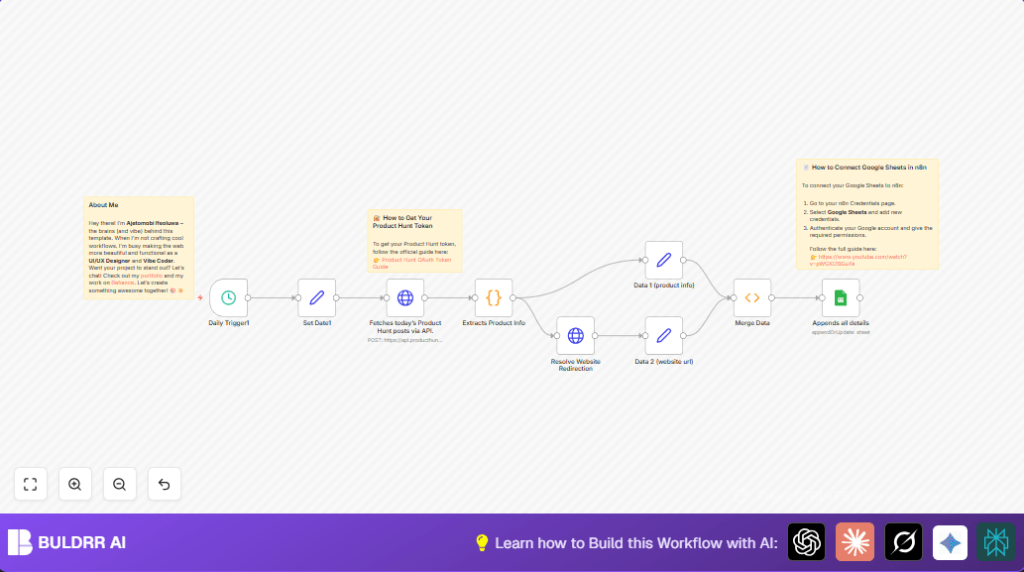
This workflow gets new products launched on Product Hunt every day. It runs once daily at midnight. It collects product names, taglines, descriptions, and website URLs. It then checks if the websites redirect to another URL and cleans those links. Finally, it updates or adds this information automatically into a Google Sheet. This saves lots of time and prevents errors from manual data entry.
Who should use this workflow
People who want daily updates on new products from Product Hunt. Especially product managers or teams tracking product launches. It helps avoid copying data manually. It also improves data accuracy and gives quick access to product info in Google Sheets.
Tools and services used
- n8n Workflow Editor: For building and running the workflow.
- Product Hunt API: To get daily new product posts via GraphQL.
- Google Sheets API: To save or update product data automatically.
How the workflow works (Inputs → Process → Output)
Inputs
- Schedule trigger set to run once daily.
- Current date in YYYY-MM-DD format from a Set node.
- Valid Product Hunt API Key set as a Bearer token.
- Configured Google Sheets spreadsheet and worksheet.
Processing Steps
- Trigger activates at midnight to start the flow.
- Send a POST request to Product Hunt GraphQL API asking for posts from today.
- Parse the JSON response to extract name, tagline, description, and website.
- For each product, do an HTTP request to its website URL without following redirects.
- Grab redirect URL from the response headers if there is one.
- Clean redirect URLs to remove unwanted query strings like ‘?ref=producthunt’.
- Merge product data with cleaned website URL.
- Append or update this merged data in the chosen Google Sheet.
Output
The master Google Sheet contains new product launches daily. Each row has product name, tagline, description, and the final website URL.
Step-by-step: How to use this workflow in n8n (for beginners)
Import the workflow
- Download the workflow file using the Download button on this page.
- Open the n8n editor you already have.
- Click the menu and select “Import from File”.
- Choose the downloaded file and import it.
Set credentials and parameters
- Set the Product Hunt API Key in the HTTP Request node headers.
- Configure Google Sheets node with the correct spreadsheet and worksheet.
- Add Google Sheets credentials using service account authentication.
- Check if any URLs, IDs, or channels need updating.
Test and activate
- Run the workflow once manually to check if data is fetched and stored.
- Verify results inside the Google Sheet.
- If all is fine, activate the workflow to run daily automatically.
You now have an automated system in n8n that saves you time and keeps your product data up to date.
Common edge cases and failure points
- Missing or wrong Product Hunt API Key causes authorization errors.
- HTTP request nodes with follow redirects enabled hide redirect URLs.
- Wrong Google Sheets document ID or sheet name leads to update failures.
- Some product websites may not redirect, returning null redirect URLs.
- Network issues or API limits could cause occasional request failures.
Customization ideas
- Change Schedule Trigger node interval to run at different times.
- Include more product details like upvotes or comments in the GraphQL query.
- Add Slack node after Google Sheets to send notifications on new entries.
- Filter products by category in the Product Hunt API request.
- Save data as CSV files instead of Google Sheets if preferred.
Summary of results
✓ Automates daily fetching of new Product Hunt launches.
✓ Cleans website URLs for clarity.
✓ Updates product info automatically in Google Sheets.
✓ Saves hours weekly by removing manual copying work.
✓ Improves accuracy and team access to product data.
