
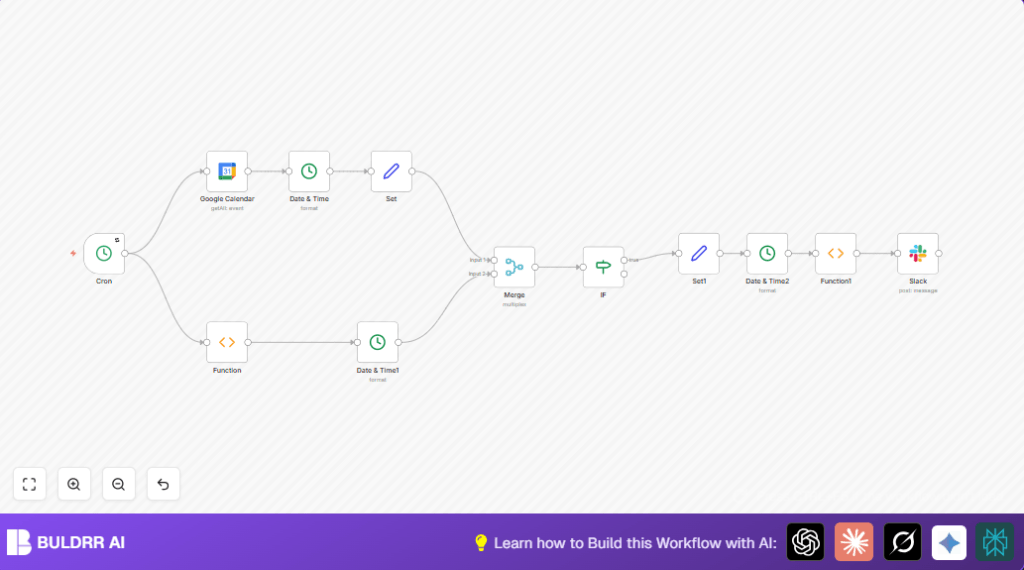

1. What This Workflow Does ⚙️
This workflow runs every day at 6 AM. It fetches all events scheduled for the day from a Google Calendar. It changes event times to a local timezone (Asia/Qatar). Then, it picks only the events happening today. After that, it makes a short, clear message listing all meetings. Finally, it sends this message to a Slack channel.
This helps save time and prevents missing meetings by showing the daily schedule automatically in Slack.
2. Who Should Use This Workflow
This workflow is for busy people with many meetings. It is helpful if meetings happen in different time zones. It fits team managers, assistants, or anyone needing daily meeting summaries quickly.
The workflow helps users keep track of their day easily and share meeting info with a team in Slack.
3. Tools and Services Used
- Google Calendar Account: To get events from the calendar.
- Slack Workspace: To send messages with the meeting list.
- n8n Automation Tool: To connect Google Calendar and Slack and run the workflow.
- OAuth2 Credentials: For secure access to Google Calendar and Slack.
4. Beginner Step-by-Step: How to Use This Workflow in n8n
Step 1: Get the Workflow File
- Click the Download button on this page to save the workflow JSON file.
Step 2: Import the Workflow into n8n
- Open the n8n editor where workflows are managed.
- Choose “Import from File” and select the JSON you downloaded.
Step 3: Configure Credentials and IDs
- Add your Google Calendar OAuth2 credentials in n8n.
- Check and update the Google Calendar email ID to your actual calendar email.
- Add Slack API credentials and set the Slack channel name for posting messages.
- Review timezone settings in Date & Time nodes, change if you are outside Asia/Qatar.
Step 4: Run a Test
- Manually run the workflow in n8n to check if events are fetched and the message is formatted.
- Check Slack channel to see if the message posts correctly.
Step 5: Activate for Daily Use
- Make sure the Cron node is enabled and set to 6 AM daily.
- Activate the workflow so it automatically runs every day.
- Monitor the first few runs for any errors.
For self-hosted or server users, see self-host n8n to keep the workflow running reliably.
5. How the Workflow Works: Inputs → Process → Output
Inputs
- Trigger from Cron node running daily at 6 AM.
- Google Calendar events access via OAuth2 with the calendar email specified.
Processing Steps
- Google Calendar node gets all events.
- Date & Time nodes convert event start times to Asia/Qatar timezone and format dates.
- Function node adds today’s date and weekday name.
- Merge node joins event data with today’s date information.
- IF node filters only events for today by comparing dates.
- Set node prepares clean event fields (name, time, URL) for message.
- Date & Time node formats start time as HH:mm.
- Function node creates a formatted message text listing events.
Output
- Slack node sends the composed message to a specified channel.
- Slack channel shows the daily meeting summary automatically at 6 AM.
6. Customization Ideas ✏️
- Change the Cron node time to send summaries at any hour.
- Add event location in the Set node and include location in Slack messages.
- Refine IF node to filter by keywords in event titles for specific notifications.
- Change timezone in all Date & Time nodes to fit other regions.
- Add event descriptions in the message for more details.
7. Troubleshooting ????
Google Calendar node fetches no events
Cause: Calendar ID or credentials invalid or expired.
Solution: Recheck the Google Calendar OAuth2 credentials and calendar email.
Slack message not sending or empty message
Cause: Slack API credentials or channel name incorrect; function node message field missing.
Solution: Verify Slack credentials and channel. Test function node output has message.
Timezone mismatch causes wrong event times
Cause: Wrong timezone set in Date & Time nodes.
Solution: Set correct timezone (Asia/Qatar or own zone) in all Date & Time nodes.
8. Pre-Production Checklist ✅
- Confirm Google Calendar credentials and calendar ID.
- Check Slack API credentials and channel name.
- Test workflow manually for correct event fetching and message formatting.
- Ensure all Date & Time nodes have consistent timezone settings.
- Backup workflow JSON before going live.
9. Deployment
After testing, enable the Cron node so the workflow runs every day automatically.
Monitor early runs for message delivery and use n8n logs to fix any errors fast.
10. Summary
✓ Saves around 30 minutes daily by automating morning calendar checks.
✓ Provides a clear, formatted daily meeting list sent automatically into Slack.
✓ Helps never miss meetings by showing all events for the day in one place.
→ Makes team communication easier with centralized meeting info.
→ You can customize notification time, timezone, and event details.
