

What This Automation Does
This workflow sends a journal reminder message on Telegram every day at 6 AM.
It reminds the user to write about what they did the day before.
This helps users keep a daily journaling habit without needing to remember themselves.
The result is better self-awareness and productivity through consistent reflection.
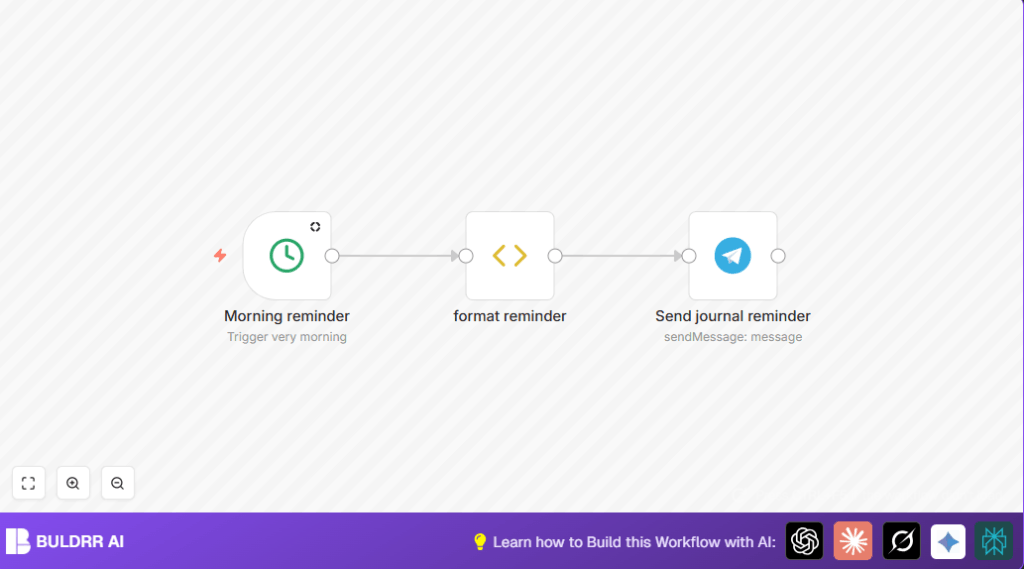
The workflow starts from a timed trigger.
It makes a message with yesterday’s date.
Then it sends the message via Telegram to the chosen chat.
This simple automation removes the problem of forgetting to journal.
Who Should Use This Workflow
This workflow fits users who want a gentle daily reminder to journal.
It works well for beginners at automation and for anyone using Telegram messenger.
It is useful if the user often forgets to write their thoughts about the previous day.
Users who want mental clarity and better focus will find this helpful.
Tools and Services
- n8n: To create and run the automation workflow.
- Telegram Bot API: To send messages through a Telegram bot.
- Telegram Messenger: To receive the daily reminders.
- Optional: self-host n8n for private control.
How This Workflow Works: Inputs, Process, and Output
Inputs
- Timed trigger at 6 AM every day from Cron node.
- User’s Telegram bot token and chat ID.
Processing Steps
- Cron node fires at 6 AM.
- Function Item node generates a message string like “What did you do: YYYY-MM-DD” using yesterday’s date.
- Telegram node sends the formatted message to the user’s Telegram chat.
Output
User receives a Telegram message every morning reminding journaling for the day before.
Beginner Step-by-Step: How to Use This Workflow in n8n Production
Importing the Workflow
- Click the Download button on this page to save the workflow JSON file.
- Open your n8n editor where you want to run the workflow.
- Choose Import from File and select the saved JSON file.
Configuring the Workflow
- Go to the Telegram node and enter the Telegram bot API credentials.
- Update the chat ID field to your Telegram chat’s numeric ID.
- If needed, adjust the message text code inside the Function Item node to customize the prompt.
Testing and Activating
- Run a manual test by executing the workflow in n8n to see if the Telegram message sends.
- Check your Telegram messenger for the reminder message.
- When ready, turn on the workflow toggle to activate daily automation.
- The next reminder will send automatically at 6 AM every day.
For those interested in privacy or more control, consider self-host n8n on a private server.
Customization Ideas
- Change the reminder time in the Cron node parameter.
- Edit the message format in the Function Item node to add more details or questions.
- Add multiple Telegram nodes or loops to send reminders to more users.
Troubleshooting
Problem: Telegram node does not send messages.
Cause: Wrong bot API Key or chat ID.
Fix: Check credentials and confirm chat ID is numeric.
Problem: Cron trigger fires at wrong time.
Cause: Time zone differences or wrong hour set.
Fix: Verify n8n time zone and Cron hour settings.
Pre-Production Checklist
- Test the Telegram bot token and chat ID for validity.
- Confirm the Cron node triggers at the correct time.
- Check that the Function Item node produces the right reminder message.
- Do a full test run to verify messages arrive on Telegram.
Deployment Guide
Activate the workflow for continuous use once testing is successful.
Watch executions for the first few days to confirm timing and delivery.
Review logs in n8n if any issue appears.
Summary and Results
✓ Sends daily Telegram journal reminders at set time.
✓ Removes the worry of forgetting journaling.
✓ Builds user habit for daily reflection smoothly.
✓ Saves mental effort for maintaining routines.
✓ Easy to customize time and message content.
→ Daily reminders encourage self-reflection.
→ Habit builds naturally with automation.
→ User gains better productivity and mental clarity.
Code Used in This Workflow
The following JavaScript in the Function Item node creates a message which uses yesterday’s date formatted as YYYY-MM-DD.
const today = new Date();
const yesterday = new Date(today);
yesterday.setDate(yesterday.getDate() - 1);
const message = `What did you do: ${yesterday.toISOString().split('T')[0]}`;
return { message };
