
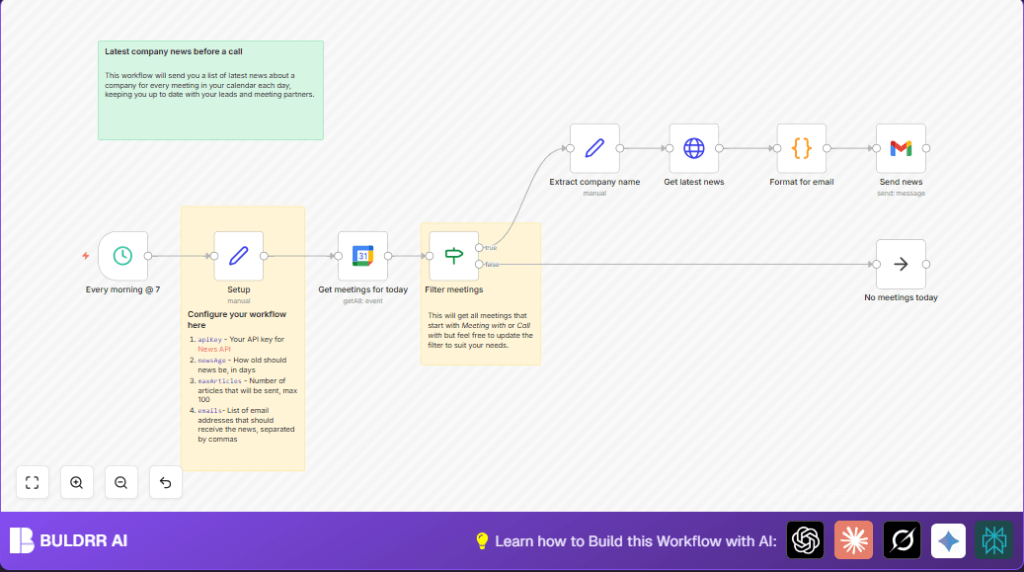

What This Workflow Does
This workflow finds today’s meetings from Google Calendar that start with “meeting with” or “call with”.
It then gets recent news about the companies from those meetings.
The workflow sends an email with this news to selected people every morning at 7 AM.
The goal is to save time by giving up-to-date news before meetings start.
It solves the problem of spending many minutes looking up company news before calls.
It helps users walk into meetings better prepared without last-minute stress.
How the Workflow Works: Inputs, Processing, and Output
Inputs
- Google Calendar: Today’s events with titles starting with “meeting with” or “call with”.
- News API: Company news articles filtered by time and article count.
- Setup Node: Configuration data like API key, emails, and news age.
Processing Steps
- Trigger runs daily at 7 AM.
- Fetch today’s Google Calendar events.
- Filter events whose titles start with “meeting with” or “call with”, case-insensitive.
- Extract company names by removing those prefixes and trimming spaces.
- Use News API to get recent English articles about each company limited by max age and count.
- Format news articles into a styled HTML snippet with clickable titles and descriptions.
- Send email with the compiled news to the configured recipients.
Output
Users receive a clean, easy-to-read email each morning with fresh news about their meeting companies.
This helps in quick preparation and confident conversations.
Who Should Use This Workflow
People with many daily meetings involving company calls.
Sales teams, client managers, or anyone needing quick news updates before meetings.
This workflow suits users who want to reduce time spent searching news.
Users with Google Calendar and News API accounts benefit most.
Tools and Services Needed
- Google Calendar API: To get today’s event list.
- News API (newsapi.org): To search for news articles.
- Gmail (OAuth2): To send emails with news content.
- n8n Workflow Automation Platform: To build and run the workflow.
Beginner Step-by-Step: How to Use This Workflow in n8n
Download and Import Workflow
- Click the Download button on this page to get the workflow file.
- Open the n8n editor (either cloud or self-host n8n setup).
- Use the Import from File option in n8n to load the workflow.
Configure Credentials and Parameters
- Add Google Calendar credentials connected to your account.
- Insert your News API API Key in the Set node labeled “Setup”.
- Set the
newsAge,maxArticles, and recipientemailsfields in “Setup” node. - Connect your Gmail OAuth2 credentials to the Gmail node.
- If your calendar or email needs specific IDs or details, update them in corresponding nodes.
Test and Activate
- Run the workflow manually once to check for errors and confirm emails send correctly.
- Review the formatted email in your inbox to verify news content and links.
- Activate the workflow by toggling the active switch in n8n.
- The workflow will now run daily at 7 AM, sending news before meetings.
Inputs → Processing → Output Summary
Inputs: Today’s Google Calendar events filtered by title; configuration data from the setup node; News API API key.
Processing: Filter meetings with specific prefixes; extract company name; request news articles matching the company; format content into HTML;
send email to recipients.
Output: A well-formatted email sent to one or more recipients with the latest news on the meeting companies.
Customizations Ideas
- Change
newsAgein the Setup node to control how fresh news is. - Add more filters in the “Filter meetings” If node to cover other event prefixes.
- Add multiple email addresses separated by commas to notify wider teams.
- Edit the “Format for email” Code node to change HTML style or add dates and logos.
Common Problems and Fixes
- No meetings found: Titles may not match filter words exactly. Update filter or confirm event summaries.
- News API errors 429: You hit API quota limits. Lower article count or upgrade subscription.
- Emails not formatted: Check Gmail node to ensure HTML email sending is enabled.
Pre-Production Checklist
- Verify Google Calendar credentials work and fetch events.
- Confirm your News API key is active with quota left.
- Test that the schedule trigger runs at 7 AM.
- Check event titles in Google Calendar use correct prefixes.
- Send a test email to self to verify news formatting.
- Backup existing workflows before activating changes.
Deployment Guide
After confirming the workflow works, activate it in n8n.
It will run daily at 7 AM automatically.
Monitor logs for errors or misses.
Adjust filters or API limits if needed.
Summary
✓ Saves hours weekly by automating news search.
✓ Sends up-to-date news before meetings.
✓ Helps users prepare confidently.
✓ Easy to set up and adapt in n8n.
