
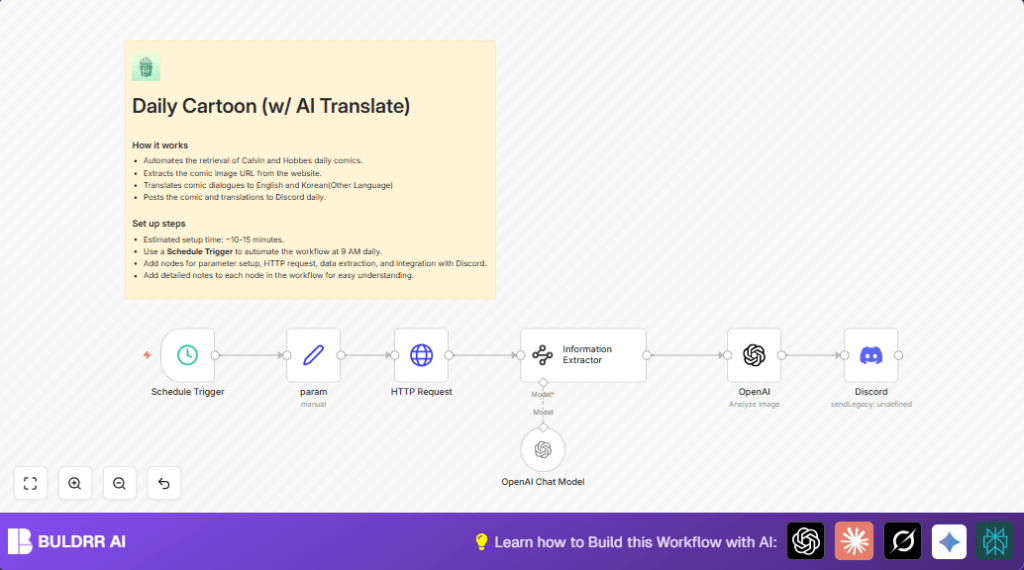

What This Workflow Does
This workflow runs every day at 9 AM to get the latest Calvin and Hobbes comic from the official site.
It finds the comic image URL from the webpage and translates the comic’s dialogues from English to Korean or other languages.
Finally, it sends the comic image and translated texts to a chosen Discord channel automatically.
This saves time by removing the need to do these steps by hand every day.
Who Should Use This Workflow
Anyone managing a Discord community that shares daily Calvin and Hobbes comics will benefit.
It is also useful for people who want daily comics posted with translations in their server without manual work.
You do not need deep technical knowledge, just basic n8n usage skills.
Tools and Services Used
- n8n: For creating and running the automation workflow.
- Discord: Webhook to post messages into a server channel.
- OpenAI Chat Model: To translate comic dialogues and format them.
- Information Extractor node (Langchain AI): To get comic image URLs from HTML pages.
- HTTP Request node: To fetch the comic’s webpage for today’s date.
How the Workflow Works (Input → Process → Output)
Inputs
- The date of the current day (year, month, day) for fetching the correct comic.
- HTML content from the Calvin and Hobbes daily comic page.
Processing Steps
- Convert current date into year, month, day strings using Set node.
- Fetch the comic’s webpage for the current date using HTTP Request node.
- Extract the direct comic image URL from the page HTML using the Information Extractor node with a prompt to locate the
srcin<img class="img-fluid Lazyloaded">tag. - Send the comic’s image URL and dialogues text to the OpenAI Chat Model node to translate English dialogues into Korean, formatting original and translation side by side.
Output
- Final Discord message content including today’s date, the comic image, and translated dialogues.
- Automatic posting of this content in a Discord channel through the Discord node configured with webhook authentication.
Beginner Step-by-Step: How to Use This Workflow in n8n
Step 1: Import the Workflow
- Download the workflow file using the Download button on this page.
- Open your n8n editor.
- Click on the menu and choose “Import from File”.
- Select the downloaded workflow file to load.
Step 2: Configure Credentials and Details
- Add your OpenAI API key in the OpenAI Chat Model node’s credentials.
- Provide your Discord webhook URL in the Discord node.
- If needed, update channel IDs or message formats to match your Discord server structure.
Step 3: Test the Workflow
- Run the workflow manually in n8n to check each step works without errors.
- Confirm the comic image and translations post successfully to your Discord channel.
Step 4: Activate for Production
- Once tested, turn on the workflow by toggling it live in n8n.
- Monitor its daily run at 9 AM or your chosen time to ensure continued operation.
- If self hosting, consider visiting self-host n8n for setup help.
Customization Ideas
- Change the HTTP Request node URL to fetch comics from other archives by altering year/month/day variables.
- Add more languages by modifying the translation prompt in the OpenAI Chat Model node to include Spanish, French, or others.
- Adjust the daily post time in the Schedule Trigger node to fit different time zones or audience preferences.
- Modify the Discord message template to add titles, author credits, or styling as needed.
- Include error notification nodes to alert by email or Slack if fetching the comic or posting fails.
Handling Issues and Failures
If the Information Extractor node outputs nothing, check if the comic site changed its HTML layout.
Update the extraction prompt to match the new <img> tag classes or structure in the node.
If the Discord node cannot post messages, verify the webhook URL and its permissions.
Test the webhook URL manually to confirm it works and has rights to post in the target channel.
Summary
✓ Automates daily fetching and posting of Calvin and Hobbes comics to Discord.
✓ Translates comic dialogues into Korean alongside original English.
✓ Saves about 30 minutes daily by removing manual comic retrieval and posting steps.
✓ Easy to use by importing and configuring in n8n without deep coding.
→ Makes sure your Discord community gets daily translated comics on time with no missing posts.
