

What this workflow does
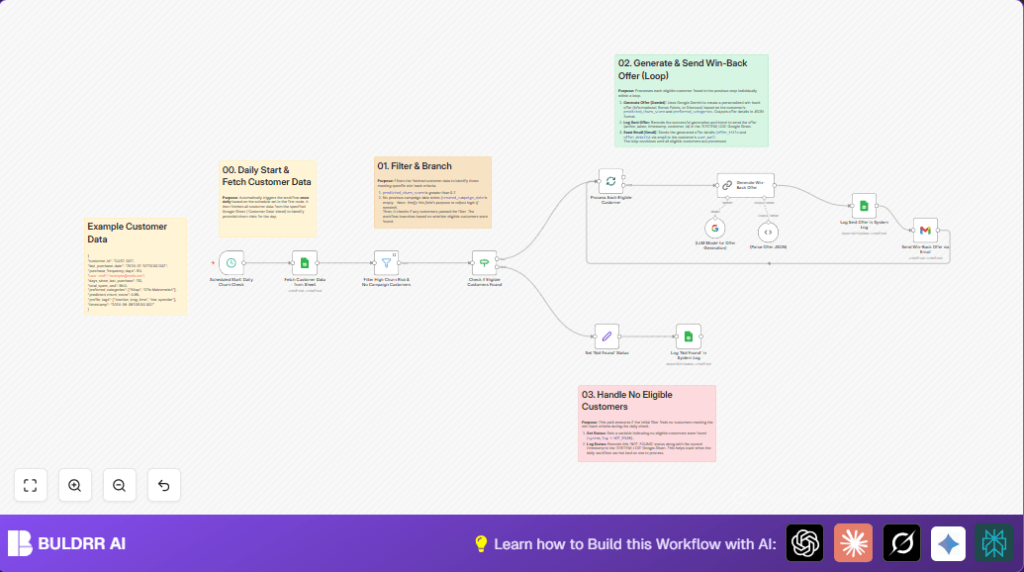
This workflow runs daily to check customers who might stop buying.
It finds those with high churn risk and no past campaigns, then creates custom offers using Google Gemini AI.
The offers get sent by email and logged to track actions.
This saves time, reduces mistakes and helps keep customers buying.
Tools and services this workflow uses
- Google Sheets: Stores customer data and system logs.
- Google OAuth credentials: Allow access to Google Sheets and Gmail.
- Google Gemini AI (PaLM API): Generates personalized win-back offers.
- Gmail API: Sends emails with the offers.
- n8n Workflow Automation: Runs the process steps automatically every day.
How this workflow works (Input → Process → Output)
Input
- Customer data from a Google Sheet named “Customer Data”.
- Includes customer email, churn risk score, product preferences, and past campaign date.
Processing Steps
- The workflow starts automatically every day via the Scheduled Start: Daily Churn Check node.
- It fetches all customer records from the “Customer Data” sheet using a Google Sheets node.
- A filter node selects customers with churn risk over 0.7 who have not received earlier campaigns (filtering by missing or empty campaign date is advised).
- An IF node checks if there are any eligible customers to continue.
- If none found, the system logs “NOT_FOUND” to the “SYSTEM_LOG” Google Sheet.
- If eligible customers found, they are processed in batches for API performance.
- Google Gemini AI generates personalized offers based on risk and preferences, with different offer types depending on churn level.
- Offers are parsed from AI output to JSON format for consistency.
- Sent offers are logged in the “SYSTEM_LOG” sheet with timestamps and customer IDs.
- Gmail node sends the offers by email, using customer email addresses and personalized content.
Output
- Emails with customized win-back offers sent to at-risk customers.
- System logs in Google Sheets recording sent offers and empty campaign days.
Beginner step-by-step: How to use this workflow in n8n production
Step 1: Import the workflow
- Click Download button on this page to save the workflow file.
- In the n8n editor, choose “Import from File” and select the workflow file you downloaded.
Step 2: Configure credentials and IDs
- Open the Google Sheets nodes and set the correct Google Sheets document ID and sheet names if different.
- Add Google OAuth2 credentials for Sheets and Gmail (check scopes to allow read, write, and send email).
- In the AI node Generate Win-Back Offer, add the Google Gemini API Key or credentials in the settings.
- Confirm the Gmail node has valid OAuth2 credentials for sending emails.
Step 3: Test the workflow
- Run the workflow once manually inside n8n to confirm data fetching, filtering, AI generation, logging, and email sending works.
- Check Google Sheets logs and receive test email.
Step 4: Activate for daily automation
- Activate the Scheduled Start: Daily Churn Check node so it runs every day without manual action.
- Monitor “SYSTEM_LOG” sheet and n8n execution history for any errors after deployment.
For more control and security, consider running a self-host n8n instance to handle credentials and workflows privately.
Common customization ideas
- Add filter condition in Filter High Churn Risk & No Campaign Customers to exclude customers where
created_campaign_dateis not empty to avoid repeat offers. - Change AI prompt and output to support SMS or push notifications, then add nodes to send messages via other platforms.
- Adjust churn score thresholds and offer types in the AI node prompt to tailor perks more closely to business needs.
- Modify batch size in the split batches node to balance API limits and processing speed.
- Use AI prompt language parameter or add locale data from customers to create emails in different languages.
What to watch out for (troubleshooting)
Issue: No data returned from Google Sheets node
Check if sheet names and document ID are exactly correct.
Make sure Google OAuth credentials have permission to access the spreadsheet.
Issue: AI node fails to generate or produces bad JSON
Review and correct the AI prompt format.
Ensure Google Gemini API keys are active and have available quota.
Use the JSON parsing node to handle AI output carefully.
Issue: Emails do not send after offer generation
Reauthorize or refresh Gmail OAuth credentials.
Check the customer email fields are valid and correctly mapped.
Summary of results
✓ The workflow runs daily and finds high-risk customers quickly.
✓ It creates personal offers by Google Gemini AI that match risk and interests.
✓ Offers are emailed automatically via Gmail with tracking in Google Sheets.
→ This saves lots of manual work and helps keep more customers buying through timely engagement.
