

Automate Customer Creation from Pipedrive to Stripe with n8n

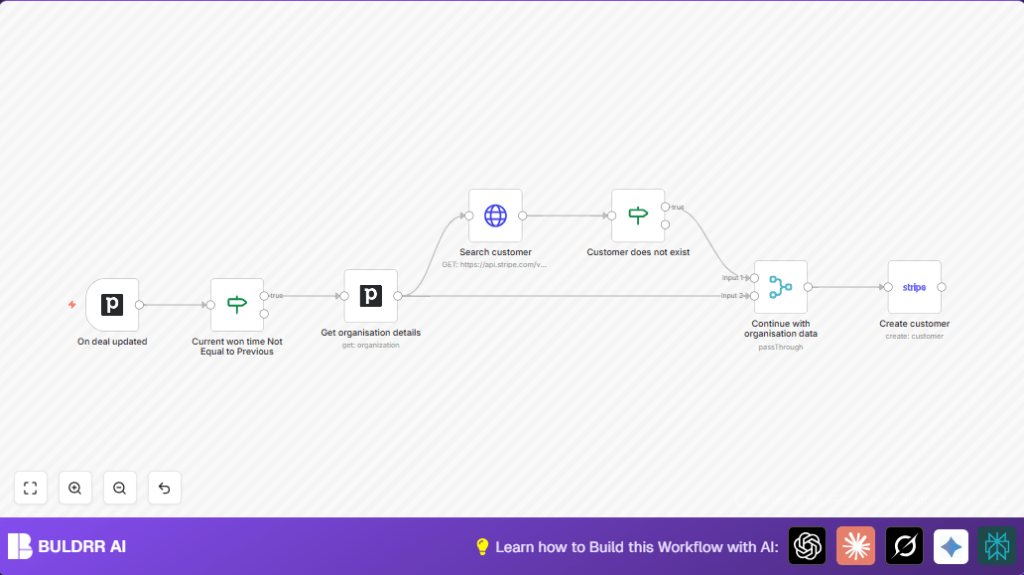
This workflow automates the process of creating Stripe customers from updated deals in Pipedrive when a deal’s won time changes, saving sales teams hours of manual data entry and reducing errors.
pipedriveTrigger
if
pipedrive
+2
Workflow Identifier: 1435
NODES in Use: Pipedrive Trigger, If, Pipedrive, HTTP Request, Stripe
Automate Pipedrive to Stripe with n8n

Press CTRL+F5 if the workflow didn't load.

Learn how to Build this Workflow with AI:

What this workflow does

This workflow updates Stripe customer records automatically when a deal is won in Pipedrive.
It stops users from doing manual work and making mistakes.
When a deal’s “won time” changes, it creates a customer in Stripe if one does not exist.
The result is faster billing and fewer errors.


Who should use this workflow

This workflow fits sales managers or teams who use Pipedrive to track deals and Stripe for billing.
It helps those who want to reduce manual data entry and prevent duplicate customer records.


Tools and services used

  • Pipedrive API: For deal updates and organization data.
  • Stripe API: To search and create customers.
  • n8n automation platform: To build and run the workflow.
  • Optional hosting: self-host n8n can be used for control over automation.

Input, processing, and output

Inputs

  • Deal update event from Pipedrive when any deal changes.
  • Fields “won time” and organization ID from the deal data.

Processing steps

  • Check if the deal’s “won time” changed using an If node.
  • Retrieve organization info from Pipedrive using the organization ID.
  • Search Stripe customers by organization name with an HTTP Request node.
  • Use another If node to verify if the customer exists.
  • If no customer exists, merge organization data and create a new Stripe customer with name and complete address.

Output

A new customer is created in Stripe matching the Pipedrive organization.
Duplicate customers are avoided.
Address and contact info are copied to Stripe.


Beginner step-by-step: How to use this workflow in n8n

Step 1: Import the workflow

  1. Download the workflow file using the Download button on this page.
  2. Inside the n8n editor, click “Import from File” and select the downloaded file.

Step 2: Add credentials

  1. Add your Pipedrive API Key in n8n credentials.
  2. Set up your Stripe API Key in n8n credentials.

Step 3: Update workflow settings

  1. Check the Pipedrive Trigger node is connected to your Pipedrive account.
  2. If necessary, update organization or pipeline IDs in expression fields.
  3. Verify the Stripe HTTP Request node and Stripe node use your Stripe credentials.

Step 4: Test the workflow

  1. In Pipedrive, change the “won time” of a deal.
  2. Check that the workflow runs in n8n and creates or finds a customer in Stripe.

Step 5: Activate for production

  1. Toggle the workflow on using n8n’s activation button.
  2. Monitor execution logs for errors.
  3. Option to set retry rules for failure handling.

Using the workflow import is easier than building from scratch.
For hosting needs, use self-host n8n.


Common customization ideas

  • Add phone number from Pipedrive organization to Stripe customer.
  • Send Slack message to sales team after new customer creation.
  • Filter deals by a certain pipeline ID before running customer creation.
  • Log created customer details with a Code node using JavaScript.

Handling errors and edge cases

  • If the Pipedrive Trigger node never gets data, check if the webhook is active.
  • If Stripe API returns 401 Unauthorized, double-check Stripe API Key and permissions.
  • If the If node comparing won times acts wrong, verify JSON path and expression syntax.
  • Be careful with address mapping. Missing street or city can cause Stripe creation to fail.

Summary of results

✓ Avoid manual customer creation in Stripe.
✓ Stop duplicate customers in billing.
✓ Keep Pipedrive and Stripe data in sync.
✓ Faster and accurate invoice processing.
➔ More time for sales and less billing errors.

Automate Pipedrive to Stripe with n8n

Visit through Desktop to Interact with the Workflow.

Frequently Asked Questions

The workflow monitors the deal “won time” field for any changes using the Pipedrive Trigger node and an If node.
Yes, the workflow can add a filter condition on the pipeline_id field to process specific pipelines.
The workflow uses Stripe’s customer search API and will not create a new customer if one is found.
Yes, users can use self-host n8n to run the workflow safely on their own infrastructure.
Author
Written By
Vikash Kumar
Building AI agents, n8n workflows and end-to-end automation for 30+ Brands across India, the US, Europe, Dubai & Australia. 7+ years of Experience saving founders real hours every week - no code required.

Related Workflows

Automate Twist Channel Creation and Messaging with n8n

This workflow automates creating and updating a channel in Twist and sending a personalized message to specific users. It eliminates manual setup errors and saves time managing Twist communications.

Automate Ideogram Image Generation with Google Sheets & Gmail

This workflow automates graphic design image generation via Ideogram AI, storing image data in Google Sheets and Google Drive, with email alerts via Gmail. It saves designers hours by automating image creation, remixing, review, and record-keeping.

Automate IT Support with Slack and OpenAI in n8n

Streamline IT support by automating Slack message handling using n8n and OpenAI. This workflow handles Slack DMs, filters bots, queries a Confluence knowledge base, and delivers AI-generated responses, improving support efficiency and response time.

Automate Crypto Analysis with CoinMarketCap & n8n AI Agent

Discover how this unique n8n workflow leverages CoinMarketCap’s multi-agent AI to deliver precise, real-time cryptocurrency insights directly via Telegram. Manage crypto data analysis efficiently with automated multi-source API integration.

Automate Gumroad to Beehiiv Subscriber Sync with n8n

Learn how to automatically add new Gumroad sales customers as Beehiiv newsletter subscribers using n8n automation. This workflow saves time by syncing sales data to Google Sheets CRM and notifying your Telegram channel instantly.

Generate On-Brand Blog Articles Using n8n and OpenAI

This workflow automates the creation of on-brand blog articles by analyzing existing company content using n8n and OpenAI. It extracts article structures and brand voice to produce consistent draft articles, saving significant content creation time.
1:1 Free Strategy Session
Your competitors are already automating. Are you still paying for it manually?

Do you want to adopt AI Automation?

Every hour your team does repetitive work, you're burning real money.
While you wait, faster businesses are cutting costs and moving quicker.
AI and automations aren't the future anymore — they're the present.

Book a live 1-on-1 session where we show you exactly which of your daily tasks can be automated — and what it’s costing you not to.