

What this workflow does
This workflow fetches data from CoinMarketCap’s API for crypto exchanges, market indexes, and community sentiment.
It solves the problem of spending hours checking multiple sources manually for token holdings, exchange info, index details, and market moods.
The result is fast, accurate, and easy-to-understand insights in JSON format that helps users decide better.
Who should use this workflow
This is for crypto portfolio managers or analysts who need quick exchange data and market sentiment without manual searching.
Users who want to automate API calls and get clear, structured results will find it handy.
Tools and services used
- n8n: Workflow automation platform to build and run the process.
- CoinMarketCap API: Source for exchange data, token holdings, indexes, and sentiment info.
- OpenAI GPT-4o Mini: Language model to interpret user questions and control API calls.
- HTTP Header Authentication: To securely access CoinMarketCap APIs using API keys.
Beginner step-by-step: How to use this workflow in n8n
Importing and setup
- Download the provided workflow file using the Download button on this page.
- Open the n8n editor and click on “Import from File” to upload the workflow.
- Make sure you add your CoinMarketCap API Key and OpenAI API credentials in the Credentials section.
- Check if any node IDs, emails, or channels need updating to match your environment.
Testing and activation
- Run the workflow once manually to confirm it returns data correctly.
- If all looks right, toggle the workflow Active to enable automatic triggering.
- Use the workflow by sending inputs like
{"message":"Show Binance exchange token holdings","sessionId":"abc123"}from other workflows or API calls.
This lets the workflow answer queries about exchanges and market sentiment fast and reliably.
For long-term use or multi-user support, keep an eye on session management and API limits.
Consider self-host n8n if privacy or scalability is important.
Workflow inputs, processing, and outputs
Inputs
- sessionId: Identifier to keep track of conversation context.
- message: User query text describing the data needed.
Processing steps
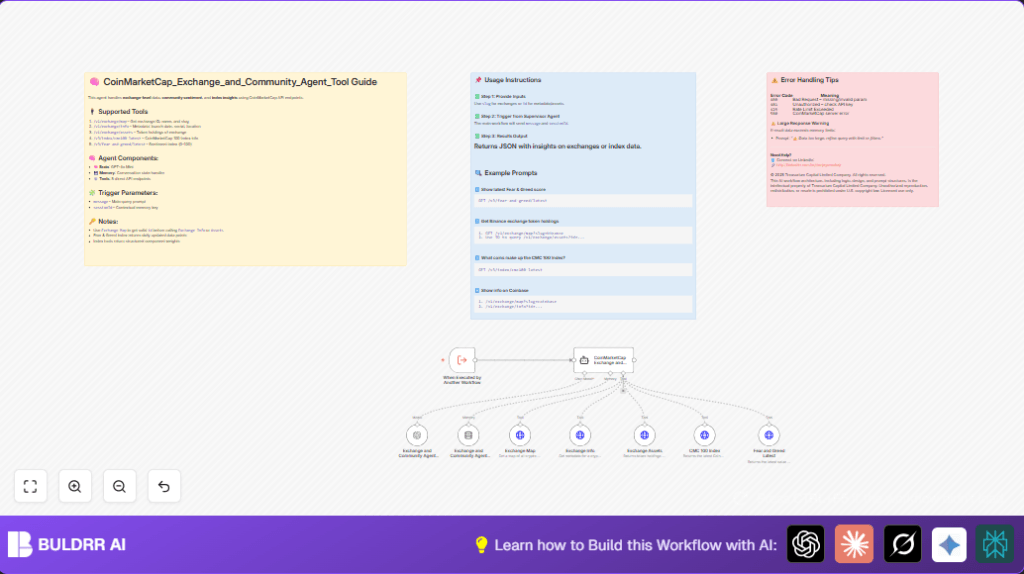
- The workflow triggers on new inputs via the When Executed by Another Workflow node.
- It sends the message to the LangChain Agent node configured with a system prompt explaining how to call CoinMarketCap APIs.
- Exchange and Community Agent Brain uses GPT-4o Mini to interpret the message and decide which APIs to call.
- The workflow manages conversation history with Memory Buffer Window using sessionId.
- API calls run in HTTP Request Tool nodes accessing CoinMarketCap endpoints: exchange map, info, assets, CMC 100 index, and Fear and Greed index.
- The LangChain Agent gathers API results and formats a JSON response based on user needs.
Output
The workflow returns a clean, structured JSON answer covering exchange details, token holdings, index composition, or crypto sentiment as requested.
This output can be used for dashboards, reports, or further processing.
Handling edge cases and failures
- 401 Unauthorized Errors: Happens if API key is invalid or expired. Fix by updating credentials in n8n.
- Data too large: GPT token limits reached. Fix by asking the user to limit results using filters like
limitorslug. - Memory Buffer issues: Conversation context lost if sessionId not linked correctly. Make sure sessionId flows into memory node.
Check logs after runs for any unusual errors.
Customization ideas
- Add extra CoinMarketCap API endpoints like ticker or historical data with new HTTP Request nodes.
- Change session timeout in the Memory Buffer Window to keep or clear context faster.
- Improve user messages on errors by modifying the system prompt in the LangChain Agent node.
- Enable multi-user support by including user IDs in the trigger input and routing memory accordingly.
- Format output JSON into reports or charts using transformation nodes before returning results.
Deployment guidance
After testing, set the workflow Active in n8n to start automatic runs.
Connect this workflow with supervisor workflows or external services to send message and sessionId inputs.
Use the n8n dashboard to watch for errors or performance problems.
For bigger setups or better data control, run self-host n8n.
Summary of benefits
✓ Saves hours of manual data gathering from coin exchange and market APIs.
✓ Delivers fast, accurate crypto exchange info, token holdings, indexes, and market sentiment.
✓ Returns clear JSON data for easy use in reports and dashboards.
→ Helps users make smarter investment choices with timely, relevant data.
