

Automate Clinic Appointment Rescheduling with n8n & OpenAI

Struggling with manual clinic appointment rescheduling and patient confirmations? This unique n8n workflow harnesses Telegram, Google Calendar, WhatsApp, and OpenAI to automate patient rescheduling, confirmation, and internal reminders, saving time and reducing errors.
agent
lmChatOpenAi
googleTasksTool
+14
Workflow Identifier: 2155
NODES in Use: lmChatOpenAi, agent, googleTasksTool, mcpClientTool, telegramTrigger, memoryPostgresChat, telegram, switch, openAi, evolution-api.evolutionApi, convertToFile, lmChatOpenRouter, webhook, set, scheduleTrigger, stickyNote, toolWorkflow
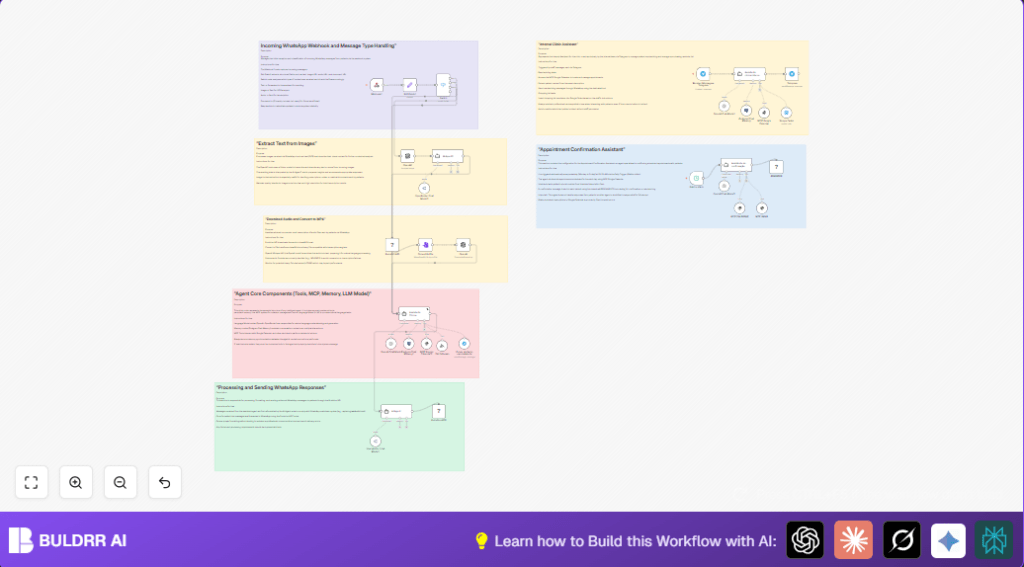
Automate clinic appointments with n8n and OpenAI

Press CTRL+F5 if the workflow didn't load.

Learn how to Build this Workflow with AI:

What This Automation Does

This workflow helps manage patient appointments and clinic reminders without manual checking.
It fixes problems like missed reschedules, double bookings, and forgotten reminders.
The system talks to staff on Telegram, reads Google Calendar events, and sends WhatsApp messages to patients.
It also records tasks for clinic supplies and keeps memory of conversations.
This saves time and reduces errors in clinic scheduling.


Tools and Services Used

  • Telegram Bot API: Receives staff messages.
  • MCP Google Calendar node: Accesses calendar events and patient info.
  • Evolution API: Sends and receives WhatsApp messages.
  • Google Tasks: Records internal shopping list reminders.
  • OpenAI Whisper: Transcribes audio messages.
  • OpenAI Vision model: Extracts text from images.
  • Postgres Database: Stores conversation memory.

Workflow Inputs, Processing, and Outputs

Inputs

  • Messages from clinic staff via Telegram.
  • Patient replies and media via WhatsApp received through Evolution API.
  • Scheduled triggers for daily appointment confirmations.

Processing Steps

  • Parse incoming messages for intent and content type.
  • Download and transcribe audio messages using OpenAI Whisper.
  • Extract text from image messages with OpenAI Vision.
  • Search Google Calendar for appointments linked to patients.
  • Send WhatsApp messages for reschedules or confirmations.
  • Add shopping reminders to Google Tasks when requested.
  • Store conversation context in Postgres database.
  • Escalate urgent cases to human agents when needed.

Outputs

  • WhatsApp messages sent to patients with appointment details.
  • Google Tasks entries for internal clinic shopping lists.
  • Logged conversation history for better response in ongoing chats.

Beginner Step-by-Step: How to Use This Workflow in n8n

Importing and Setup

  1. Download the workflow file using the Download button on this page.
  2. Open the n8n editor where you want to add the workflow.
  3. Click on Import from File and select the downloaded workflow file.

Configuration

  1. Add your Telegram Bot API credentials to the Telegram Trigger node.
  2. Insert Google Calendar API credentials in the MCP Google Calendar node.
  3. Configure your Evolution API keys and WhatsApp instance in the relevant Evolution API nodes.
  4. Update Google Tasks API keys for shopping list integration.
  5. Set up OpenAI API keys for Whisper and Vision nodes.
  6. Modify IDs such as calendar names, Telegram chat IDs, or database tables if needed.
  7. Check prompt texts or message format code in AI Agent nodes if you want to personalize messages.

Testing and Activation

  1. Manually trigger the workflow for a sample chat to check if messages send correctly.
  2. Monitor execution logs for any errors.
  3. Activate the workflow by toggling triggers to active for continuous running.

You are now ready to use the workflow in production to help manage clinic appointments and reminders.


Common Issues and How to Handle Them

  • Telegram not receiving messages: Check bot permissions and webhook URL.
  • Empty events from Google Calendar: Confirm calendar access and event details include patient contacts.
  • WhatsApp messages fail to send: Verify phone number format and Evolution API limits.
  • Audio transcription fails: Audio file may be too large; try smaller files or split audio.

Customization Ideas

  • Change clinic working hours in the calendar query parameters.
  • Add SMS sending nodes for patients without WhatsApp.
  • Personalize messages for confirmations and reminders.
  • Include language translation nodes for multilingual support.
  • Add new MCP tools to handle more clinic tasks like vaccine reminders.

Deployment Advice

After setup, activate triggers in the workflow to keep it running.
Watch logs to catch errors early.
Back up your workflow and database regularly.
Consider self-host n8n for extra control on hosting.


Summary

✓ Saves time by removing manual appointment tracking.
✓ Reduces errors in scheduling and reminders.
✓ Uses Telegram and WhatsApp for fast communication.
✓ Keeps conversation history for better interactions.
✓ Supports audio, image, and text patient messages.
✓ Adds internal task handling for clinic supplies.


Automate clinic appointments with n8n and OpenAI

Visit through Desktop to Interact with the Workflow.

Author
Written By
Vikash Kumar
Building AI agents, n8n workflows and end-to-end automation for 30+ Brands across India, the US, Europe, Dubai & Australia. 7+ years of Experience saving founders real hours every week - no code required.
Author
Written By
Vikash Kumar
Building AI agents, n8n workflows and end-to-end automation for 30+ Brands across India, the US, Europe, Dubai & Australia. 7+ years of Experience saving founders real hours every week - no code required.

Frequently Asked Questions

The workflow is designed for MCP Google Calendar but can be adapted for other calendars by creating custom MCP tools.
OpenAI API usage is moderate, focused on chat agents and transcribing audio and images. Optimizing prompts helps reduce usage.
Patient data security depends on correct credential management and secure API settings within n8n and connected services.
Postgres and n8n can handle dozens to hundreds of messages daily if infrastructure is sized properly.

Related Workflows

Automate Twist Channel Creation and Messaging with n8n

This workflow automates creating and updating a channel in Twist and sending a personalized message to specific users. It eliminates manual setup errors and saves time managing Twist communications.

Automate Ideogram Image Generation with Google Sheets & Gmail

This workflow automates graphic design image generation via Ideogram AI, storing image data in Google Sheets and Google Drive, with email alerts via Gmail. It saves designers hours by automating image creation, remixing, review, and record-keeping.

Automate IT Support with Slack and OpenAI in n8n

Streamline IT support by automating Slack message handling using n8n and OpenAI. This workflow handles Slack DMs, filters bots, queries a Confluence knowledge base, and delivers AI-generated responses, improving support efficiency and response time.

Automate Crypto Analysis with CoinMarketCap & n8n AI Agent

Discover how this unique n8n workflow leverages CoinMarketCap’s multi-agent AI to deliver precise, real-time cryptocurrency insights directly via Telegram. Manage crypto data analysis efficiently with automated multi-source API integration.

Automate Gumroad to Beehiiv Subscriber Sync with n8n

Learn how to automatically add new Gumroad sales customers as Beehiiv newsletter subscribers using n8n automation. This workflow saves time by syncing sales data to Google Sheets CRM and notifying your Telegram channel instantly.

Generate On-Brand Blog Articles Using n8n and OpenAI

This workflow automates the creation of on-brand blog articles by analyzing existing company content using n8n and OpenAI. It extracts article structures and brand voice to produce consistent draft articles, saving significant content creation time.
1:1 Free Strategy Session
Your competitors are already automating. Are you still paying for it manually?

Do you want to adopt AI Automation?

Every hour your team does repetitive work, you're burning real money.
While you wait, faster businesses are cutting costs and moving quicker.
AI and automations aren't the future anymore — they're the present.

Book a live 1-on-1 session where we show you exactly which of your daily tasks can be automated — and what it’s costing you not to.