
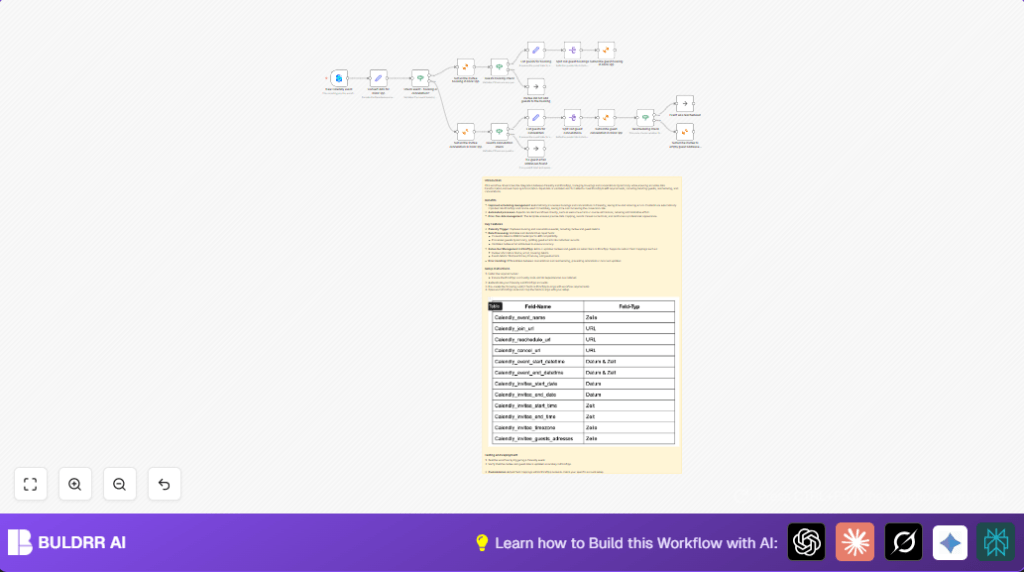

What this workflow does
This workflow moves booking and cancellation data from Calendly to KlickTipp automatically.
It adds or removes invitees and guests from the KlickTipp subscriber list.
It converts date and time info into the format KlickTipp needs.
The workflow handles multiple guests per booking and changes like rescheduling.
This saves time and keeps subscriber data correct without manual work.
Who should use this workflow
People who schedule webinars or sessions with Calendly.
Those who need to keep KlickTipp subscriber lists updated with bookings and cancellations.
Users that want to avoid manual data entry and reduce mistakes in subscriber info.
Tools and services used
- Calendly API: Triggers the workflow when someone books or cancels.
- KlickTipp API: To add or remove subscribers and update custom fields.
- n8n platform: Runs the automation workflow.
- KlickTipp community node: Provides KlickTipp integration inside n8n.
Inputs, processing steps, and output
Inputs
- Inbound webhook events from Calendly for new bookings (invitee.created).
- Inbound webhook events from Calendly for cancellations (invitee.canceled).
- Booking details including invitee name, email, event time, join URLs, and guest emails.
Processing Steps
- The workflow triggers on Calendly events for creating or canceling invitees.
- A Set node converts event time data into UNIX timestamps and prepares custom fields for KlickTipp.
- An If node checks if the event is a booking (active) or cancellation.
- For bookings, invitee details are added or updated as a KlickTipp subscriber with proper tags and custom fields.
- The workflow checks if there are guests in the booking; each guest email is split and subscribed separately in KlickTipp.
- For cancellations, invitee and guests are tagged as canceled in KlickTipp.
- The workflow detects rescheduling to avoid wrongly deleting guest emails.
- If not rescheduling, guest email fields are cleared from invitee subscribers after cancellation.
Output
The output is an updated KlickTipp subscriber list accurately reflecting new bookings, cancellations, and guest subscriptions.
The workflow reduces manual work and errors in subscriber data.
Beginner step-by-step: How to use this workflow in n8n
Step 1: Import the workflow
- Download the workflow file by clicking the Download button on this page.
- Open your n8n editor.
- Choose “Import from File” and select the downloaded workflow file.
Step 2: Add credentials
- In the Calendly Trigger, add your Calendly API Key under Credentials.
- In every KlickTipp node, add your KlickTipp API Key as credentials.
Step 3: Adjust workflow settings
- Check the tag IDs inside the KlickTipp nodes and change if your tags are different.
- Verify that custom field names and IDs match your KlickTipp account setup.
- Update any email, phone number, or URL fields in the Set nodes if needed.
Step 4: Test the workflow
- Create a test booking and cancellation in Calendly to trigger the workflow.
- Watch n8n run the workflow; check if subscriber info updates correctly in KlickTipp.
Step 5: Activate for production
- Once everything works, turn on the workflow in n8n to run automatically.
- Monitor executions and logs regularly to catch errors early.
If users prefer more control and security over automation, consider self-host n8n.
Customization ideas
- You can change KlickTipp tag IDs in nodes to sort contacts by event type or funnel.
- Add extra custom fields to capture more details about guests.
- Modify timezone handling code in the Set node if using different event zones.
- Use SMS numbers in KlickTipp nodes to send SMS alerts if enabled.
- Add new conditions in the booking/cancellation If node to manage other statuses.
Edge cases and failure points
- If the workflow does not trigger, check Calendly event types and webhook URL.
- Time mismatches often come from wrong timezone codes in the data conversion step.
- Guest subscription issues may happen if Split Out nodes target wrong array fields.
- Rescheduling events must be identified correctly so guest emails aren’t removed by mistake.
Summary of results
✓ Save many hours each week by removing manual data entry.
✓ Keep subscriber lists in KlickTipp accurate with all invitees and guests.
✓ Avoid errors that cause wrong emails going to canceled contacts.
→ Automate syncing Calendly bookings and cancellations in real time.
