

What This Automation Does
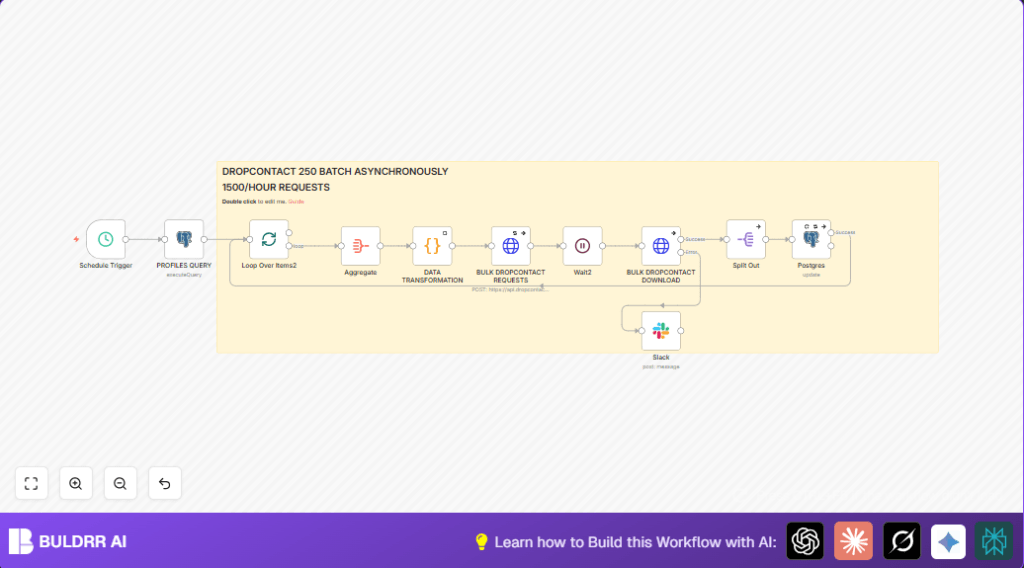
This workflow finds profiles missing emails in the Postgres database.
It groups profiles into batches of 250.
Each batch is sent asynchronously to Dropcontact API for enrichment.
After waiting 10 minutes for processing, enriched data is fetched.
The workflow updates the Postgres profiles with verified emails and phones.
This saves hours of manual work and improves contact accuracy for outreach.
Who Should Use This Workflow
This is for teams with lots of contacts missing emails or phones.
It fits companies using Postgres to store profiles and Dropcontact for data.
Users wanting to automate bulk contact cleaning and enrichments will benefit.
Tools and Services Used
- Postgres: Stores company and profile data.
- Dropcontact API: Enriches contacts asynchronously at scale.
- n8n: Automation platform to orchestrate workflow steps.
- Slack (optional): Sends error alerts to the team.
Input, Processing, and Output
Input
Profile records from Postgres missing email addresses.
Queries filter on title, domain, and enrichment status.
Processing Steps
- Query profiles with missing emails from database.
- Split the profiles into 250 record batches.
- Aggregate fields and transform for Dropcontact format using Python.
- Send each batch to Dropcontact API via HTTP POST.
- Wait 10 minutes for Dropcontact asynchronous processing.
- Download enriched results using request IDs.
- Split batch results into single profiles.
- Update Postgres profiles with new emails, phones, and status flags.
- Optionally notify Slack if errors occur.
Output
Profiles in Postgres updated with verified contact details.
Accurate data allows better outreach and sales efficiency.
Beginner Step-by-Step: How to Use This Workflow in n8n
Importing the Workflow
- Download the workflow file using the Download button on this page.
- Open your n8n editor where you want to run this automation.
- Click the menu, choose “Import from File”, and select the downloaded workflow file.
Configuring Credentials and IDs
- Add your Postgres database credentials in n8n under the Postgres node credentials.
- Enter your Dropcontact API Key in the HTTP Request node credentials for authorization.
- If using Slack notifications, add your Slack webhook or OAuth details to the Slack node.
- Update any table names, domain filters, or titles in the Postgres query node if needed.
Testing and Activating
- Run the workflow manually once to confirm it fetches, enriches, and updates data correctly.
- Check Postgres for updated emails and phone numbers.
- Enable the Schedule Trigger node to activate automated recurring runs.
- Monitor execution logs regularly and adjust batch sizes or wait times when scaling.
For users running n8n on their own servers, consider using self-host n8n for better control.
Troubleshooting Common Issues
- Invalid API Key: Double-check Dropcontact API key entered in n8n credentials. Refresh if expired.
- Too Many Requests: Reduce 250 batch size in SplitInBatches node. Increase Wait node duration.
- No Profiles Returned: Check SQL query syntax and database connection. Run test queries manually.
- Updates Not Saving: Verify Postgres update mapping uses correct
full_nameand fields.
Customizations for Different Needs
- Change job title filter easily by editing the SQL query’s
WHERE title = 'Bestuurder'condition. - Adjust batch size in the SplitInBatches node to fit different API limits.
- Modify the Python code in the Code node to add extra fields or change output format.
- Add or remove specific domain filters in SQL query to target best data.
- Connect the Slack error notification node to other events to customize alerts.
Summary
✓ Automates bulk enrichment of profiles missing emails using Postgres and Dropcontact API.
✓ Saves manual searching time and reduces data errors for outreach teams.
✓ Works in batches of 250 profiles, handles asynchronous processing with waits.
✓ Updates contact info accurately back into Postgres, keeping data fresh.
→ Enables scaling enrichment from hundreds to thousands of contacts per run.
select first_name, last_name, domain, full_name
from accounts a
left join profiles p on a.company_id = p.company_id
where title = 'Bestuurder' and p.email is null and a.domain != ''
and domain NOT IN ('gmail.com', 'hotmail.com', 'hotmail.be', 'hotmail%','outlook.com','telenet.be', 'live.be', 'skynet.be','SKYNET%', 'yahoo.com' , 'yahoo%', 'msn%', 'hotmail', 'belgacom%') and dropcontact_found is null
limit 1000
Use this SQL query in the Postgres node to find profiles needing emails.
import json

for item in _input.all():
  data = item.json

  output_data = {"data": [], "siren": True}

  first_names = data["first_name"]
  last_names = data["last_name"]
  domain = data["domain"]
  full_name = data["full_name"]

  transformed_data = []
  for i, (first_name, last_name, domain_name, full_name_value) in enumerate(zip(first_names, last_names, domain, full_name)):
    transformed_data.append({
      "first_name": first_name,
      "last_name": last_name,
      "website": domain_name,
      "custom_fields": {"full_name": full_name_value}
    })

  output_data["data"] = transformed_data

  return output_data
This Python script in the Code node formats the batch data for Dropcontact API.
https://api.dropcontact.io/batch
Use this URL in the HTTP Request node for batch uploads.
https://api.dropcontact.io/batch/{{ $json.request_id }}
Use this URL to GET batch processing results based on returned request_id.
