

Opening Problem Statement
Meet Sarah, the IT administrator for a mid-sized development company. Every week, she spends hours manually updating Bitwarden groups to ensure the right team members have proper access to shared passwords and credentials. The manual process is tedious, prone to mistakes, and leads to delays that impact team productivity and security compliance.
Imagine how much time Sarah wastes updating group memberships one member at a time, having to cross-check IDs and group permissions in Bitwarden’s web console. Errors in member assignments could expose sensitive credentials or block team members from tools they need. Sarah needs a way to automate group creation and membership management seamlessly to reduce errors and save time.
What This Automation Does
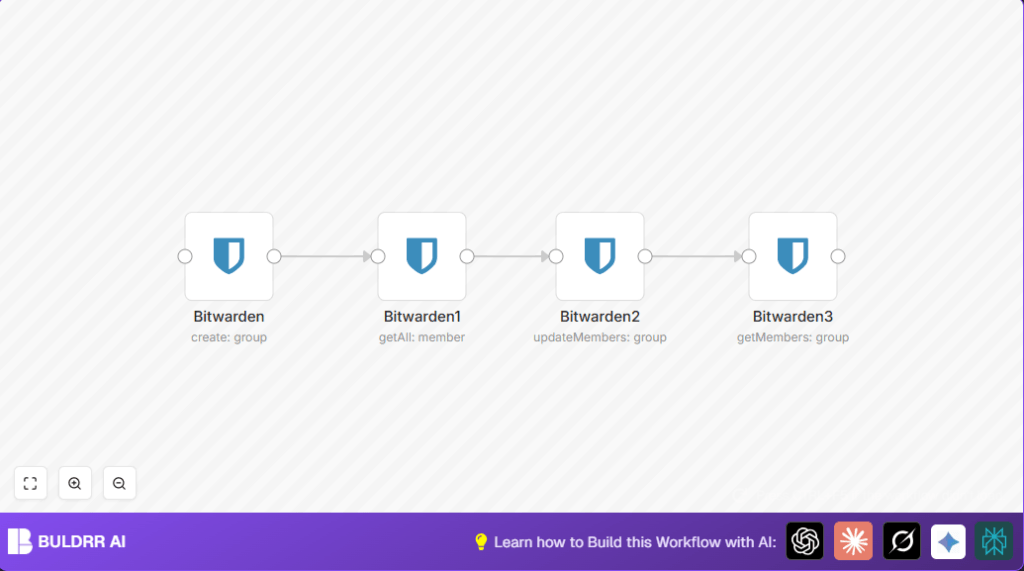
This n8n workflow automatically manages Bitwarden group members, freeing you from repetitive manual tasks. When the workflow runs, it:
- Creates a Bitwarden group named “documentation” if it doesn’t exist.
- Retrieves all Bitwarden members to find potential users to add.
- Adds members to the created group by updating their membership using their unique IDs.
- Fetches the current members of the group to confirm updates and ensure membership accuracy.
By automating these steps, you save hours every week previously spent on manual group member management, reduce human errors that risk security, and maintain an up-to-date team access list effortlessly.
Prerequisites ⚙️
- n8n account with access to create and run workflows
- Bitwarden account with API access enabled and credentials ready for API connection ????
- Bitwarden API credentials set up in n8n under the Bitwarden integration node ????
Step-by-Step Guide
Step 1: Create a Bitwarden Group
Navigate to your n8n dashboard, click New Workflow. Add the Bitwarden node configured to create a group.
Set parameters:
- Resource:
group - Operation:
create - Name:
documentation
You should see a successful creation message when you execute this node, outputting the new group’s details.
Common mistake: Forgetting to add Bitwarden API credentials results in authentication errors.
Step 2: Retrieve All Bitwarden Members
Add a second Bitwarden node, connect it to the first node’s output. Configure it to:
- Resource:
member - Operation:
getAll - Return All:
true
This retrieves all users you can add to the new group.
Common mistake: Not enabling Return All limits the member list to just a few users.
Step 3: Update Group Members
Add a third Bitwarden node to update group members.
Configure parameters as:
- Resource:
group - Operation:
updateMembers - Group ID: Use expression
{{ $node["Bitwarden"].json["id"] }}to get created group’s ID - Member IDs: Use expression
{{ $json["id"] }}to add each member fetched from the previous node
Connect this node to the output of the member getAll node.
Common mistake: Incorrect use of expressions leads to payload errors.
Step 4: Confirm Group Membership
Add a fourth Bitwarden node to get current members of the updated group.
Configure as:
- Resource:
group - Operation:
getMembers - Group ID:
{{ $node["Bitwarden"].json["id"] }}
This final step confirms the correct members were added to the “documentation” group.
Customizations ✏️
- Add Multiple Groups: In the first Bitwarden node, change the group name parameter from
documentationto other desired group names such asengineeringormarketingto create multiple groups. - Filter Members by Role or Email: Before updating members, add a Code node to filter members based on role or email domain and update only selected members to the group.
- Scheduled Automation: Use an n8n Cron Trigger node before the first Bitwarden node to run this workflow daily or weekly for automated updates.
Troubleshooting ????
Problem: “Authentication failed with Bitwarden API.”
Cause: Incorrect or missing API credentials.
Solution: Navigate to Credentials in n8n, verify and reauthenticate your Bitwarden API credentials.
Problem: “Failed to update members – Invalid group ID.”
Cause: Incorrect expression format or reference.
Solution: Double-check that the group ID expression references the correct node output using {{ $node["Bitwarden"].json["id"] }}.
Pre-Production Checklist ✅
- Ensure Bitwarden API credentials are valid and tested in n8n credentials page.
- Test each Bitwarden node independently to verify correct API responses.
- Run a workflow test with a small member subset to confirm members are added correctly.
- Backup existing Bitwarden group and member data before running bulk updates for rollback safety.
Deployment Guide
Activate the workflow in n8n with the toggle button. Consider scheduling with a Cron Trigger for continuous automated group management.
Monitor execution history from the n8n UI to ensure successful runs or troubleshoot failed executions.
FAQs
Q: Can I use other password managers instead of Bitwarden?
A: This workflow specifically uses the Bitwarden node for API calls. For other services, you’d need equivalent API integration nodes.
Q: Does this consume Bitwarden API rate limits?
A: Yes, each API call counts against your Bitwarden API limit. Keep this in mind for frequent automation.
Q: Is the data secure when running this workflow?
A: Yes, API credentials are stored securely in n8n, and data transmissions use Bitwarden’s secure endpoints.
Conclusion
By setting up this n8n workflow, you automated the tedious process of managing Bitwarden group members ensuring your team’s passwords and sensitive information are always accessible to the right people, reducing errors and saving you significant time every week.
Next, consider automating user onboarding processes with Bitwarden or integrating alerts via Slack whenever group memberships change.
With this automation, you step toward a secure, efficient credential management system with less hassle.
