
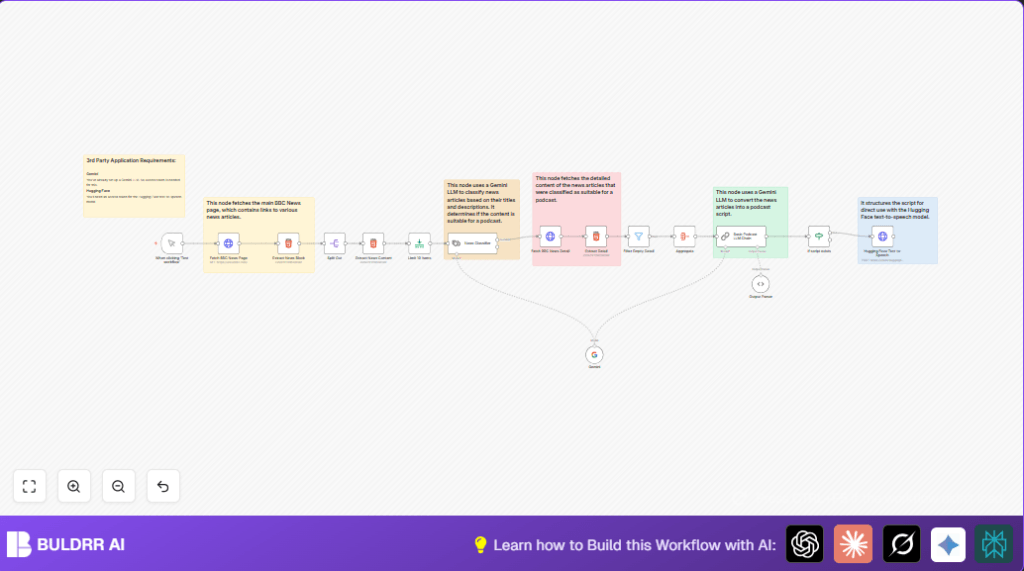

What This Workflow Does
This workflow fetches top news stories from BBC News, chooses good ones for a podcast, writes a friendly script, and makes an audio file from it.
It stops you wasting many hours every day writing news scripts and recording manually.
By running it, you get a ready-to-use podcast episode containing well-written news and natural sounding voice audio.
Workflow Inputs, Processing, and Output
Inputs
- BBC News homepage URL
- Google Gemini Language Model for news classification and script writing
- Hugging Face API for text-to-speech conversion
Processing Steps
- Get BBC News homepage HTML
- Extract news title blocks using CSS selectors
- Split news into individual items for processing
- Parse titles, links, and descriptions from each news block
- Limit the number of stories to 10
- Classify stories with Google Gemini LLM to select suitable podcast content
- Fetch full news article HTML for chosen stories
- Extract detailed article text from each
- Remove articles with empty details
- Combine all article texts into one input dataset
- Use Google Gemini to generate a warm and conversational podcast script
- Check if the podcast script exists and is not empty
- Send script text to Hugging Face text-to-speech API
- Produce an audio file of the podcast episode
Output
A podcast script in text form and an audio file ready to publish.
Who Should Use This Workflow
Anyone who records daily news podcasts and wants to save time scripting.
This helps content creators who need consistent, engaging news narration without manual hassle.
Also useful for people wanting easy automation of news-to-audio pipelines.
Tools and Services Used
- n8n: Runs the automation workflow.
- Google Gemini LLM: Classifies news and writes podcast scripts.
- Hugging Face Text-to-Speech API: Converts text scripts into audio.
- BBC News website: Source for news content.
How to Use This Workflow in n8n for Beginners
Step 1: Import the Workflow
- Download the workflow file by clicking the Download button on this page.
- In the n8n editor, open the menu and select Import from File.
- Choose the downloaded workflow file and import it.
Step 2: Configure Credentials
- Add your Google Gemini API key in the credentials section.
- Add your Hugging Face API key similarly.
- If asked, update URLs, email addresses, or channel names to fit your setup.
Step 3: Check Workflow Settings
- Look at each HTTP Request node to make sure URLs are correct.
- Check CSS selectors in HTML extraction nodes and update if BBC site changes.
- Review prompt texts in Gemini nodes to match the tone you want.
Step 4: Test and Activate
- Use the Manual Trigger node to run the workflow once and watch output.
- If output is okay, activate the workflow by toggling it to Active in n8n.
- Optionally, schedule the workflow using a cron trigger if you want automatic runs.
For users running self-host n8n, remember to safely store API keys and secure your instance.
Common Problems and How This Workflow Handles Them
- Empty or blocked HTTP requests resolved by verifying URLs and headers.
- Wrong news classification fixed by checking input expressions to Gemini nodes.
- No scripts generated prevented by tuning the filtering criteria and prompt clarity.
- Filtering out articles with no main content to avoid empty podcast sections.
Customization Ideas
- Change news source by updating the BBC URL to another news site in the fetch node.
- Change number of news items by adjusting the limit node’s max count.
- Modify Gemini classification categories or criteria to fit different editorial guidelines.
- Tweak the chatbot prompt to alter podcast script tone (more formal or casual).
- Replace Hugging Face with another text-to-speech API by updating endpoints and credentials.
Summary of Results
✓ Saves many hours daily by removing manual news script writing.
✓ Delivers consistent, well-structured podcast scripts and audio.
→ Lets users focus on creative tasks, not repetitive work.
→ Provides a clear, easy path for beginners to use automation in podcast production.
