
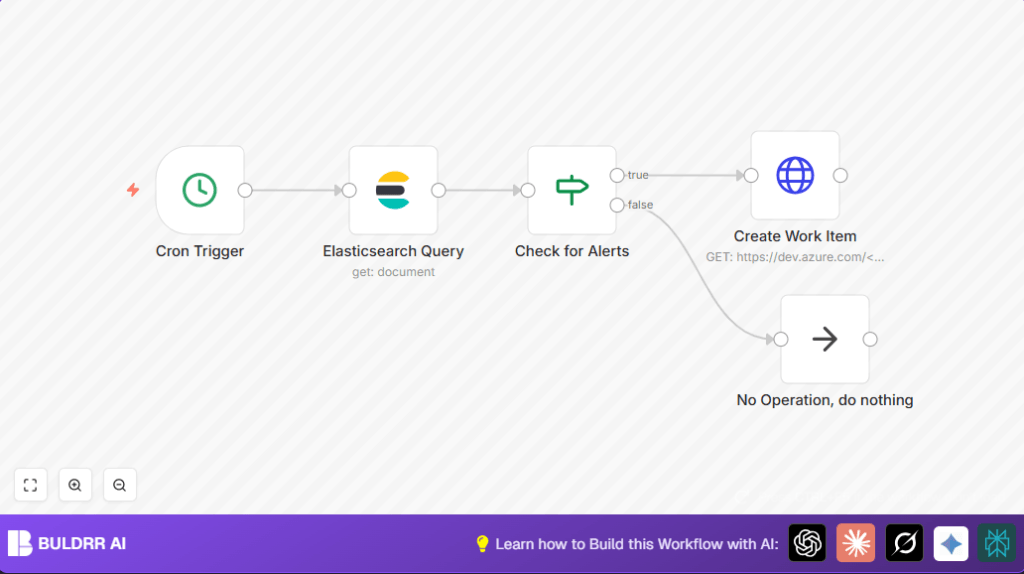

What This Workflow Does
This workflow checks Elasticsearch for alert counts every day at 12:15 PM and creates task work items in Azure DevOps when alerts exist. It helps stop the user from wasting time checking errors manually and reduces the chance of missing important alerts. The workflow runs on schedule, queries Elasticsearch, decides if alerts need attention, and creates a task only if needed.
Who Should Use This Workflow
This workflow is useful for anyone who monitors Elasticsearch logs and wants to automate creating follow-up tasks in Azure DevOps. It suits IT operations managers, DevOps teams, or anyone needing to reduce manual alert checking. Users who want to save daily time and avoid missing critical server issues will benefit most.
Tools and Services Used
- n8n: Workflow automation platform to build and run the integration.
- Elasticsearch: Source for logs and alert data queried daily.
- Azure DevOps: Task creation platform where alert-related work items are added.
Inputs, Processing Steps, and Output
Inputs
- Scheduled time trigger (cron) set to 12:15 PM daily.
- Elasticsearch index with recent alert logs accessible via query.
- Azure DevOps credentials and project information to create work items.
Processing Steps
- A Cron Trigger node starts the workflow automatically at set time.
- An Elasticsearch Query node runs a search to count alerts matching criteria.
- An If node checks if alert count > 0.
- If alerts exist, an HTTP Request node creates a task in Azure DevOps with alert details.
- If no alerts, a No Operation node ends the flow with no further action.
Output
Azure DevOps task is created only on alert detection. If no alerts, no task is created.
Beginner Step-by-Step: How To Use This Workflow in n8n
Importing the Workflow
- Download the workflow file using the Download button found on this page.
- Inside the n8n editor, click the menu and choose “Import from File”.
- Select the downloaded workflow file to import it.
Configuring the Workflow
- Set up your Elasticsearch credentials in n8n credentials manager.
- Add your Azure DevOps username and personal access token in the HTTP Request node authentication.
- Update Azure DevOps URL in the HTTP Request node: replace <organization> and <project> with your actual names.
- Adjust the Elasticsearch query if you want to narrow down which alerts to check.
Testing and Activation
- Run the workflow manually once to check connections and outputs.
- Check if the Azure DevOps task is created when alerts exist.
- Activate the workflow toggle to enable automatic daily runs.
If self hosting n8n, consider checking self-host n8n resources for control and privacy.
Customization Options
- Change Alert Threshold: Edit the If node to create tasks only when alert counts surpass a number bigger than zero.
- Modify Task Details: Adjust the Azure DevOps API payload in the HTTP Request node to set different titles, descriptions, assignees, or priorities.
- Schedule Frequency: Change the Cron Trigger time to run more or fewer times per day as needed.
- Process Alert Data: Add Function or Code nodes to filter or transform alert information before checking counts.
Common Edge Cases and Troubleshooting
- 401 Unauthorized Error in HTTP Request: Check Azure DevOps username and personal access token for accuracy and permissions.
- Error in If Node Expression: Ensure expression is exactly
= {{$json["hits"]["total"]["value"]}}to evaluate alert count. - No Task Created Despite Alerts: Confirm correct If node connections and that Elasticsearch query returns proper alert data.
- False Cron Trigger Timing: Make sure cron time matches correct timezone and is set to intended hour and minute.
Summary and Final Result
✓ Saves daily time by automating alert checks and task creation.
✓ Reduces missed alerts by running on schedule and creating necessary tasks.
→ Creates Azure DevOps tasks only when alerts exist in Elasticsearch.
→ Ends workflow gracefully when no alerts found, avoiding unnecessary tasks.
→ Easy to customize thresholds, task details, and run frequency inside n8n.
