
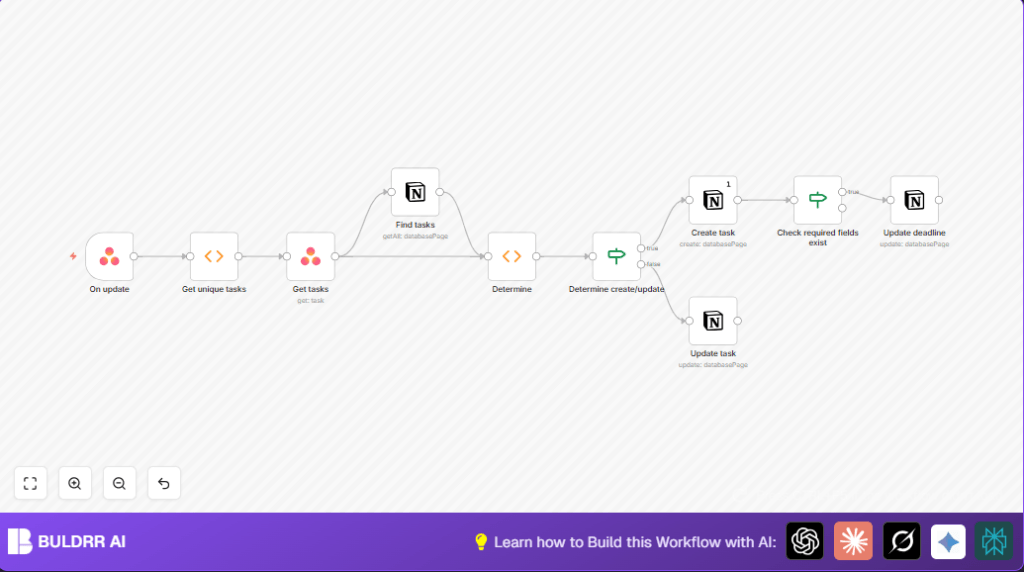

What this workflow does
This workflow connects Asana and Notion to keep tasks updated automatically.
It stops the user from spending hours each week typing task data twice.
The workflow listens for new or changed tasks in Asana and copies or updates those in Notion.
It makes sure titles, deadlines, and unique IDs match exactly between both platforms.
If a task is new, the workflow creates it in Notion.
If a task exists, it updates the title or deadline if they changed.
This stops missed deadlines and data mistakes caused by manual entry.
What tools and services this workflow uses
- n8n: Workflow automation platform to run and connect tasks.
- Asana API: To hear task updates, get task details.
- Notion API: To search, create, and update task entries.
Inputs, process, and output of the workflow
1. Inputs
- Asana task change events from the configured project webhook.
- Task details fetched by task GIDs (unique ids) from Asana.
- Existing Notion tasks searched by matching Asana GIDs.
2. Process
- Detect unique task GIDs from incoming messages, ignoring duplicates.
- Request detailed info on each task from Asana API.
- Search the Notion database for tasks with matching Asana GIDs.
- Compare which tasks need creating and which need updating in Notion.
- Separate tasks into two groups: those to create and those to update.
- For updates, verify if deadline exists before trying to update that field.
- Create new tasks in Notion with titles and store Asana GIDs for future matching.
- Update existing Notion tasks by page ID with new title or deadline.
3. Output
- New tasks appear in the Notion database with Asana details.
- Existing Notion tasks get updated with latest titles and deadlines.
- Task data remains consistent across Asana and Notion automatically.
Who should use this workflow
This is good for people managing projects in Asana who also track progress or notes in Notion.
Especially useful if manual task syncing wastes time or causes errors.
If missed deadlines or outdated task info hurts team work, this helps fix that.
Beginners using n8n who want a near-zero manual update process can use this with little setup.
Beginner step-by-step: How to use this workflow in n8n
1. Import the workflow
- Click the Download button on this page to get the workflow JSON file.
- Open n8n editor where the user wants to work.
- Click “Import from File” and select the downloaded file.
2. Configure credentials and IDs
- Set up Asana API credentials in the Asana Trigger node and any other Asana nodes.
- Set up Notion API credentials in the Notion nodes.
- Update the project ID (
1202718722261680) and workspace ID (1177253494675264) in the Asana Trigger node if needed. - Check the Notion database IDs and property names match those in your Notion workspace.
3. Test and activate
- Manually run the workflow once by simulating or triggering a task change in Asana.
- Watch the execution to verify no errors and tasks create or update in Notion.
- When confident, activate the workflow to run automatically live.
If running on a personal or company server, consider self-host n8n for better control and uptime.
Edge cases and error handling
The workflow checks if tasks have deadlines before updating those fields in Notion.
If a task has no deadline, the workflow skips deadline update to avoid errors.
If webhook does not trigger, check project and workspace IDs in the Asana Trigger node.
Permission errors with Notion usually mean the API key lacks access to the target database.
Make sure Notion shares database with API integration and permissions allow edits.
Customization ideas
- Add more properties to sync, like status or priority, inside the Notion create/update nodes.
- Filter specific projects or users by changing parameters in Asana Trigger node.
- Handle completed tasks by adding conditions and optionally archiving or deleting matching Notion entries.
Summary of benefits
✓ Save 2-3 hours weekly by automating task sync between Asana and Notion.
✓ Prevent errors and missed deadlines caused by manual task copy-pasting.
✓ Keep project task info accurate and up to date across tools.
✓ Simplify workflow management without heavy technical setup.
