
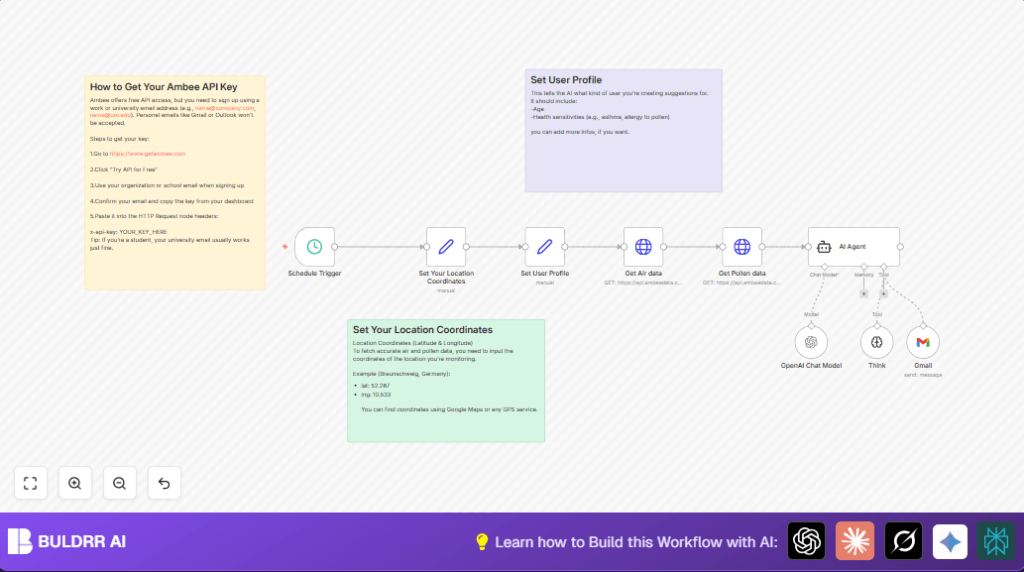

1. What This Workflow Does
This workflow runs every day at 7 AM and gets the air quality and pollen data for your location.
It sends an easy-to-read, personalized message to your email about how safe the environment is for your health.
This saves you time checking many sites and helps you plan your day without allergy surprises.
2. Who Should Use This Workflow
Anyone who wants daily updates about local air quality and pollen.
This is especially good for people with pollen allergies, asthma, or other health sensitivities.
3. Tools and Services Used
- n8n: For building and running the automation workflow.
- Ambee API: Provides real-time air pollution and pollen data using coordinates.
- OpenAI GPT-4: Analyzes data and user profile to write a friendly health update.
- Gmail with OAuth2: Sends personalized emails securely.
4. Beginner Step-by-Step: How to Use This Workflow in n8n
Download and Import
- Download the workflow file using the Download button on this page.
- Open the n8n editor where you want to deploy the workflow.
- Use Import from File option to load the workflow.
Configure Credentials and Settings
- Add your Ambee API Key in the HTTP Request nodes headers under “x-api-key”.
- Add your OpenAI API Key in the OpenAI Chat Model node credentials.
- Set up your Gmail OAuth2 credentials correctly in the Gmail node.
- Change location coordinates in the “Set Your Location Coordinates” node to your city’s latitude and longitude.
- Update the “Set User Profile” node with your age and health sensitivities if needed.
- Modify email recipient address(es) in the Gmail node to where you want the alerts sent.
Test and Activate
- Run the workflow manually once to check data fetching, AI summary, and email delivery.
- Fix any errors based on logs and messages.
- Activate the workflow to run automatically every day at the scheduled time.
- If self hosting n8n, see self-host n8n for setup help.
5. Inputs, Processing, and Outputs
Inputs
- Your location coordinates (latitude and longitude).
- User health profile data (age, allergies).
Processing Steps
- The workflow triggers every day at 7 AM automatically.
- It calls Ambee API twice: once for air quality, once for pollen data.
- The AI agent uses OpenAI GPT-4 to analyze data with your user profile.
- The AI writes a personalized summary telling you about air and pollen risks and health advice.
- The workflow sends the message to your Gmail inbox via OAuth2 authentication.
Outputs
- Daily email with a clear subject line.
- Message body with tailored, friendly explanation about air and pollen conditions.
6. Common Edge Cases and Failures
- 401 Unauthorized Errors: These happen if the Ambee API Key is wrong or missing. Fix by checking the “x-api-key” header.
- Email Sending Errors: Gmail node may fail if OAuth2 credentials aren’t set or authorized properly. Reauthenticate them.
- Incomplete AI Summaries: Caused by bad prompt variables or OpenAI downtime. Check JSON paths in AI Agent node and API key validity.
- Missing or Invalid Coordinates: Wrong lat/lng format can fail API calls. Make sure coordinates are strings and accurate.
7. Customization Ideas
- Change monitored location by updating coordinates in the corresponding node.
- Add health details like asthma to improve AI advice in the user profile node.
- Adjust daily trigger time to match your schedule (for example, 6 AM or 8 AM).
- Send emails to multiple addresses by listing them with commas in the Gmail node.
- Modify the AI Agent system prompt text to change tone, add safety tips or indoor plant advice.
8. Summary and Benefits
✓ Saves daily time spent checking multiple sites for air and pollen data.
✓ Gives a clear, personalized health message tailored to allergies and sensitivities.
✓ Automates the process with scheduled triggers, API calls, AI analysis, and email delivery.
✓ Helps plan outdoor activities safely and avoid allergy risks.
→ You get a daily morning email telling you the air and pollen status in your location.
→ You feel more confident about when it is safe to go outside.
9. Final Notes
Test the workflow on manual runs before activating the schedule to avoid errors.
Store API Keys and credentials securely in n8n.
Consider monitoring workflow runs with n8n logs to catch issues early.
