

Automate Ahrefs Keyword Research with n8n and Google Gemini AI

Discover how to streamline your SEO keyword research using n8n automation integrating Ahrefs API and Google Gemini AI. This workflow extracts, cleans, queries, and neatly formats relevant keyword data to save hours and improve SEO accuracy.
chatTrigger
lmChatGoogleGemini
httpRequest
+5
Workflow Identifier: 2239
NODES in Use: chatTrigger, lmChatGoogleGemini, httpRequest, code, aggregate, agent, memoryBufferWindow, stickyNote
Automate Ahrefs research with n8n and Google Gemini

Press CTRL+F5 if the workflow didn't load.

Learn how to Build this Workflow with AI:

What This Automation Does

This workflow helps get keyword data fast without mistakes from typos.
It takes words from chat messages, cleans them, fixes spelling, then asks Ahrefs API for keyword info.
It shows search numbers, competition info, and price costs in a neat summary.
This saves many hours and stops data confusion.


Who Should Use This Workflow

Anyone who wants quick and clear keyword research results.
Especially good for digital marketers who handle many SEO tasks and hate long data lists.


Tools and Services Used

  • Telegram Bot API: Receives user messages.
  • Google Gemini (PaLM) API: Fixes spelling and finds main keyword.
  • Ahrefs Keyword API via RapidAPI: Gives detailed keyword stats.
  • n8n automation tool: Runs and links all these steps together.

Beginner Step-by-Step: How to Use This Workflow in n8n

Step 1: Download and Import

  1. Download the workflow file using the Download button on this page.
  2. Open n8n editor where you want to use this.
  3. Click “Import from File” and select the downloaded workflow.

Step 2: Add Your Credentials and API Keys

  1. Fill in Google Gemini (PaLM) API Key in the Google Gemini Chat Model node credentials.
  2. Put RapidAPI key and host info in the HTTP Request node headers.
  3. Update any chat webhook URLs or channel IDs for your chat system if needed.

Step 3: Test the Workflow

  1. Send a test keyword as a chat message to check if the Webhook node receives it.
  2. Watch each node’s output inside n8n UI to make sure keywords clean well and data flows.

Step 4: Activate for Production

  1. Switch the workflow ON from the main n8n canvas screen.
  2. Make sure your chat service points to the webhook URL.
  3. Monitor the workflow for any errors at startup.

If doing self hosting of n8n, visit self-host n8n to help set up.


Inputs, Processing, and Outputs Explained

Inputs

  • Chat messages with keywords or search phrases enter via the chat trigger node.
  • These messages can be from Telegram, WhatsApp, or any webhook-compatible chat app.

Processing Steps

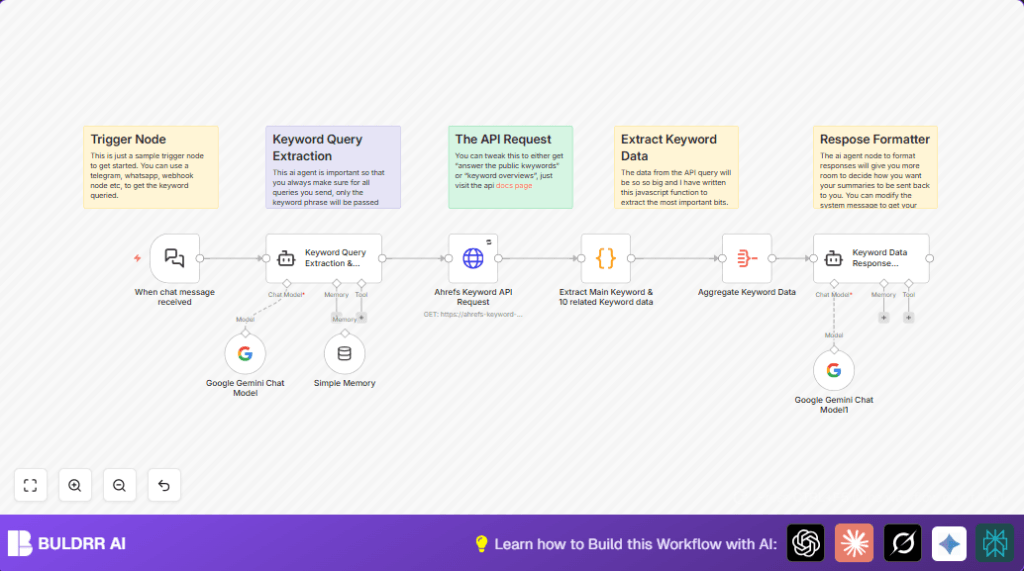
  • The Google Gemini AI model node extracts exactly one clean keyword from the message.
  • The HTTP Request node calls the Ahrefs API with that keyword to get data.
  • The Code node parses the API response, pulling main and related keyword metrics like volume and cost.
  • The Aggregate node combines all keyword entries into one dataset.
  • The LangChain Agent node formats the data into a clearly readable summary.

Output

  • A neat text summary with main keyword stats and related keywords details.
  • Summary includes search volume, competition level, and CPC values.
  • This formatted text can be sent back to chat or used elsewhere.

Common Errors and What to Look For

  • Incorrect API keys in the HTTP Request node cause no data returns.
  • Vague AI prompts in the Google Gemini node may output extra text or no keyword.
  • Wrong JSON data paths in the Code node can give blank or wrong results.
  • Webhook not connected properly means messages never start the workflow.

Check these points when troubleshooting.


Customization Ideas

  • Change chat input by replacing Chat Trigger with another webhook or Telegram node.
  • Switch between multiple Ahrefs API endpoints in the HTTP Request node URL for more data types.
  • Add more keyword metrics in the Code node by editing JavaScript extraction.
  • Update the LangChain Agent prompt to change the summary style or data depth.
  • Add conversational memory nodes for multi-turn chat keyword help.

Summary of Benefits and Results

✓ Saves many hours per SEO session.
✓ Fixes typing errors automatically.
✓ Gets accurate, detailed keyword data instantly.
✓ Gives friendly summaries easy to read and use.
✓ Requires less manual data sifting.


Automate Ahrefs research with n8n and Google Gemini

Visit through Desktop to Interact with the Workflow.

Frequently Asked Questions

Check RapidAPI key and host headers in the HTTP Request node are correct. Ensure network access is working and use retry settings for temporary issues.
The Google Gemini AI node prompt might need clearer instructions to output exactly one clean SEO keyword. Test with various inputs and adjust the prompt.
The Ahrefs API response structure may have changed. Inspect the raw data and update JavaScript code to use the correct JSON paths for the needed fields.
No, this workflow is designed for single keyword queries via chat messages. Bulk processing needs custom changes to handle arrays and batch API calls.

Promoted by BULDRR AI

Related Workflows

Automate Twist Channel Creation and Messaging with n8n

This workflow automates creating and updating a channel in Twist and sending a personalized message to specific users. It eliminates manual setup errors and saves time managing Twist communications.

Automate Ideogram Image Generation with Google Sheets & Gmail

This workflow automates graphic design image generation via Ideogram AI, storing image data in Google Sheets and Google Drive, with email alerts via Gmail. It saves designers hours by automating image creation, remixing, review, and record-keeping.

Automate IT Support with Slack and OpenAI in n8n

Streamline IT support by automating Slack message handling using n8n and OpenAI. This workflow handles Slack DMs, filters bots, queries a Confluence knowledge base, and delivers AI-generated responses, improving support efficiency and response time.

Automate Crypto Analysis with CoinMarketCap & n8n AI Agent

Discover how this unique n8n workflow leverages CoinMarketCap’s multi-agent AI to deliver precise, real-time cryptocurrency insights directly via Telegram. Manage crypto data analysis efficiently with automated multi-source API integration.

Automate Gumroad to Beehiiv Subscriber Sync with n8n

Learn how to automatically add new Gumroad sales customers as Beehiiv newsletter subscribers using n8n automation. This workflow saves time by syncing sales data to Google Sheets CRM and notifying your Telegram channel instantly.

Generate On-Brand Blog Articles Using n8n and OpenAI

This workflow automates the creation of on-brand blog articles by analyzing existing company content using n8n and OpenAI. It extracts article structures and brand voice to produce consistent draft articles, saving significant content creation time.
1:1 Free Strategy Session
Your competitors are already automating. Are you still paying for it manually?

Do you want to adopt AI Automation?

Every hour your team does repetitive work, you're burning real money.
While you wait, faster businesses are cutting costs and moving quicker.
AI and automations aren't the future anymore — they're the present.

Book a live 1-on-1 session where we show you exactly which of your daily tasks can be automated — and what it’s costing you not to.