
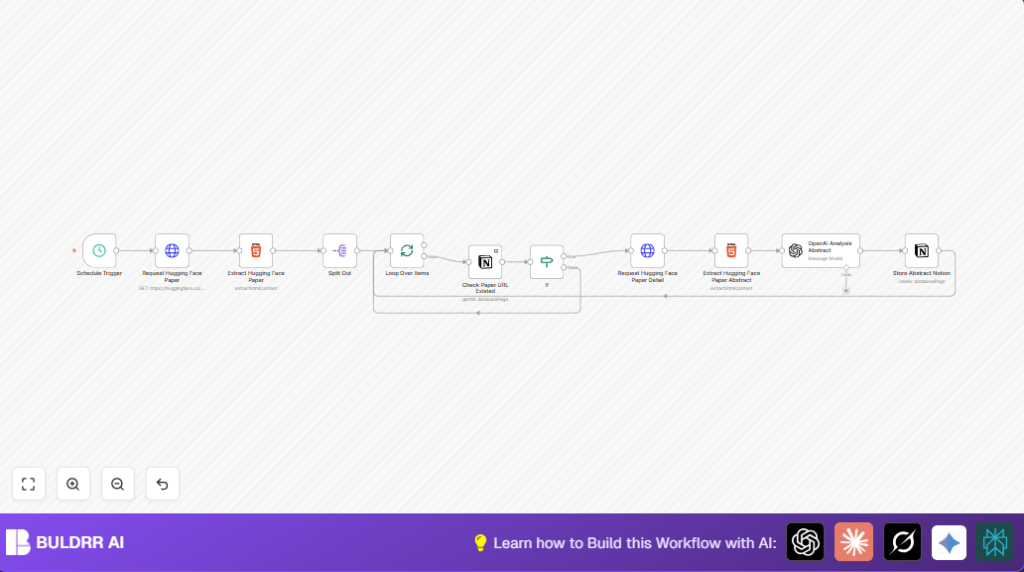

What This Automation Does
This workflow fetches new papers from Hugging Face every weekday morning and checks if the papers already exist inside a Notion database.
For new papers, it extracts titles and abstracts, then uses OpenAI to analyze abstracts and pull out key ideas and details.
Finally, it saves all this data into Notion, so the user gets well-organized, detailed summaries automatically without doing any manual copy-paste work.
Who Should Use This Workflow
This automation fits researchers or knowledge workers who check new AI papers often and want to skip the boring, manual process of gathering information.
If spending hours copying abstracts, typing notes, or hunting papers wastes time and causes mistakes, this workflow helps by doing it all automatically.
Tools / Services Used
- Hugging Face Papers Web Page: Source of new AI research papers.
- Notion API: Database to store paper details and summaries.
- OpenAI API (Via LangChain node): AI model to analyze abstracts and give structured insights.
- n8n Automation Platform: Runs the entire process with scheduled triggers and various nodes.
Input → Processing → Output
Inputs
- The date parameter set to yesterday to find new papers.
- HTML content from Hugging Face papers page.
- Existing entries from the Notion database to avoid duplicates.
Processing Steps
- Fetch paper list HTML for the specific date.
- Extract paper URLs from HTML using CSS selectors.
- Split paper URLs for easy item processing and batch handling.
- Check each URL against Notion to find if paper is new.
- Skip papers already in Notion, process only new ones.
- Download the detailed paper page HTML for new papers.
- Extract abstract and title using precise CSS selectors.
- Send abstract to OpenAI model with a custom prompt extracting key info in JSON format.
- Map AI output and paper metadata into Notion database entry.
Output
- New Notion pages with enriched metadata, summaries, keywords, and classifications.
- Elimination of manual copy-pasting and missed insights.
Beginner Step-by-Step: How to Use This Workflow in Production
Download and Import Workflow
- Download the workflow file using the Download button on this page.
- Open n8n editor where the workflow will run.
- Use the option “Import from File” to load the downloaded workflow into n8n.
Configure Credentials and IDs
- In n8n, add your OpenAI API key in the credential area for the LangChain node.
- Set up Notion credentials with integration token and select your Notion database ID correctly.
- If needed, update any hard-coded URLs, database fields, or parameters like date formatting to fit your setup.
Testing
- Run the workflow manually once to verify all nodes work correctly and data flows to Notion properly.
- Check your Notion database for new entries with correct metadata and AI summaries.
Activate for Production
- Toggle the workflow on from the n8n dashboard to make it run automatically on weekdays at 8 AM as scheduled.
- If you want to host this workflow yourself, consider self-host n8n for more control.
- Optionally monitor logs or add notifications for failure alerts.
Common Issues and Edge Cases
- No papers extracted: The CSS selector used may be outdated because website layouts often change. Fix by inspecting Hugging Face page and updating selector.
- Incorrect duplicate detection in Notion: Make sure URL strings match exactly and filter conditions in Notion nodes are set properly.
- OpenAI API failures: Check API key validity and if rate limits are exceeded. Add retry logic or space out batches.
Customization Ideas
- Change schedule timing in the Schedule Trigger node to better match paper release times.
- Add more data fields to extract, such as authors or publication dates, by updating HTML selectors.
- Improve the AI prompt in OpenAI LangChain node to gather more insights like potential paper uses or limits.
- Adjust batch sizes for better API request control and faster processing.
- Extend Notion database fields and map them in the Notion Create node to track citation counts or DOIs.
Conclusion
This workflow lets you get new AI research papers from Hugging Face every weekday, analyze abstracts smartly with OpenAI, and store neat summaries in Notion without manual work.
It saves you 5+ hours every week and reduces errors in note-taking.
Next steps can be adding citation fetch automation or connecting with other paper sources like arXiv.
Download and import the workflow, set it up, and let n8n run this helpful automation for you.
Sample OpenAI Prompt Used in LangChain Node
This prompt instructs the AI to extract main intro, keywords, results, technical details, and classification from each paper abstract, returning in JSON format.
{
  "role": "system",
  "content": "Extract the following key details from the paper abstract:\n\nCore Introduction: Summarize the main contributions and objectives of the paper, highlighting its innovations and significance.\nKeyword Extraction: List 2-5 keywords that best represent the research direction and techniques of the paper.\nKey Data and Results: Extract important performance metrics, comparison results, and the paper's advantages over other studies.\nTechnical Details: Provide a brief overview of the methods, optimization techniques, and datasets mentioned in the paper.\nClassification: Assign an appropriate academic classification based on the content of the paper.\n\nOutput as json:\n{...}"
}
