

What this workflow does
This workflow watches for changes in a Notion database page.
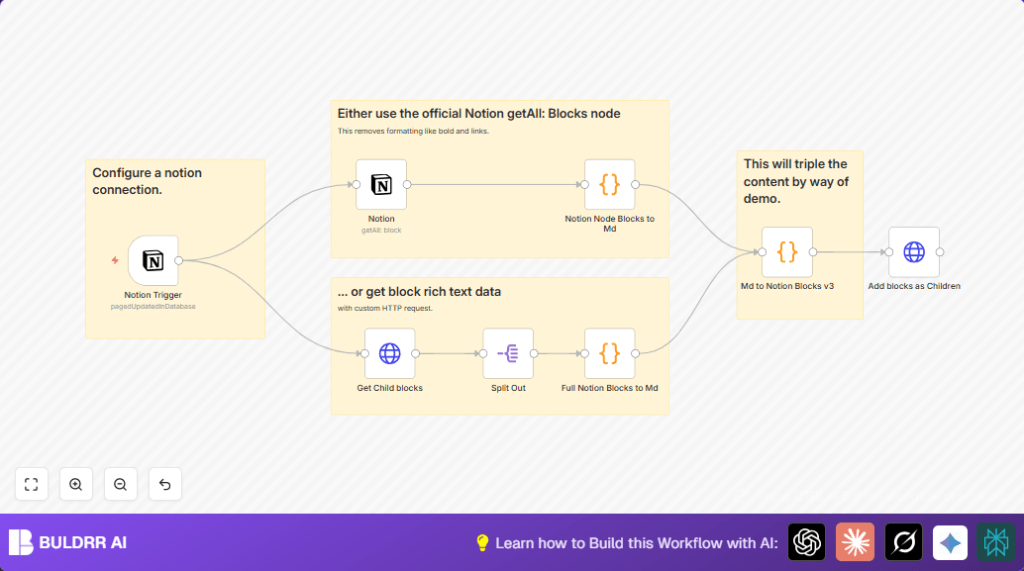
When a page updates, it grabs all content blocks and child blocks from that page.
It then turns these blocks into Markdown text, keeping formatting like bold and links.
The workflow changes the Markdown by tripling it as an example.
After that, it changes the Markdown back into Notion blocks with correct formatting.
Finally, it updates the original Notion page with the new blocks.
This saves time and stops mistakes from copying and pasting manually.
The workflow solves the problem of manually copying Notion content to Markdown and back, keeping things correct and easy.
It gives a fully updated Notion page with improved content after every update.
Who should use this workflow
This workflow fits content managers or anyone updating Notion pages often.
It helps users who want to switch between Notion’s blocks and Markdown without losing formatting.
If manual copying wastes hours or causes errors, this workflow can help.
Tools and services used
- n8n: For automating workflows.
- Notion API: Sends and receives Notion page and block data.
- HTTP Request node: To call Notion API endpoints directly.
- JavaScript Code node: Converts Notion blocks to Markdown and back.
Beginner step-by-step: How to build this workflow in n8n
Import the workflow
- Download the workflow file using the Download button on this page.
- Open the n8n editor where you want to run this workflow.
- Click “Import from File” and select the downloaded workflow.
Configure credentials and IDs
- Add or update the Notion API credentials inside n8n if not added.
- In the Notion Trigger node, update the Database ID to target your Notion journal or desired database.
- If needed, edit any email, channel, or folder IDs used in other nodes.
- Review the JavaScript code nodes for any hardcoded URLs or IDs and update if needed.
Test and activate
- Manually update a page in the linked Notion database to test triggering.
- Check the execution in n8n to verify blocks convert to Markdown and back with formatting intact.
- If tests succeed, activate the workflow by toggling it ON in the n8n editor.
- The workflow will now run every minute to detect and process updated pages.
Workflow inputs, processing, and output
Inputs
- Notifications when a page in a specified Notion database updates.
Processing Steps
- Fetch all content blocks of the updated Notion page.
- Retrieve child blocks for full content context via HTTP Request.
- Split child blocks to process them individually.
- Use JavaScript code to convert Notion blocks’ rich text formatting into Markdown.
- Demo step: triple the Markdown content to show manipulation.
- Convert the Markdown back into properly formatted Notion blocks using JavaScript.
- Update the Notion page by patching the new blocks as children using an HTTP PATCH request.
Output
- The original Notion page updated with reformatted blocks, preserving rich text and links.
Customization ideas
- Change the database ID in the Notion Trigger to monitor other databases.
- Edit the JavaScript in Code nodes to add support for more Notion block types like tables.
- Add a Function node after splitting blocks to filter unwanted content.
- Insert nodes after Markdown conversion to send content to other platforms or messaging apps.
- Improve back conversion code to handle nested lists or advanced formatting.
Troubleshooting common issues
- Notion Trigger not firing: Check if database ID is correct and API credentials are valid.
- Child blocks returning empty: Confirm HTTP Request URL uses dynamic page ID and integration permissions include reading page content.
- Markdown format lost or wrong: Review JavaScript parsing functions and add extra cases for unsupported blocks.
Pre-production checklist
- Make sure Notion API credentials have read and write access to the database.
- Test the workflow by updating a page manually, watch the trigger fire in n8n.
- Check HTTP requests return expected child blocks JSON.
- Verify code nodes convert Notion blocks to Markdown and back correctly.
- Backup important Notion pages before enabling this workflow in production.
Deployment guide
After verifying everything works, activate the workflow in n8n using the active toggle.
Monitor executions for any errors during the first runs to confirm processing is stable.
This can run on n8n’s cloud or self-host n8n for better control and data privacy.
Summary and benefits
✓ Saves time by automating Notion to Markdown conversions.
✓ Prevents formatting mistakes from manual copying.
✓ Keeps Notion pages fully updated with rich formatting.
✓ Opens possibilities to edit content in Markdown easily.
✓ Simplifies publishing workflows connected to Notion.
→ Runs every minute reacting to page changes in specified database.
→ Outputs reformatted and enriched Notion blocks on the original page.
