

What this workflow does
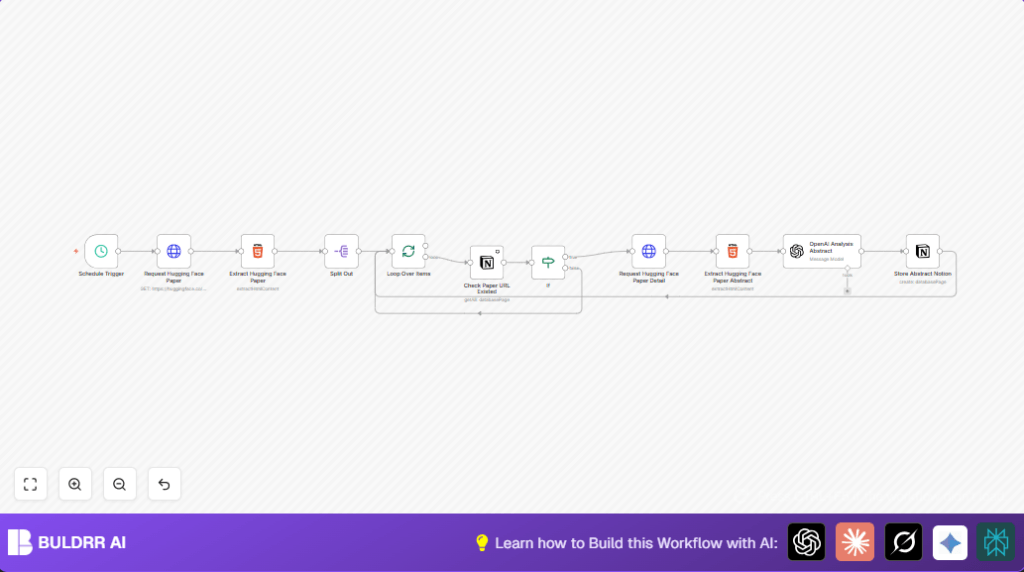
This workflow automatically gets new research papers from Hugging Face published the day before.
It pulls out links, titles, and abstracts from each paper page.
It checks a Notion database to skip papers already saved.
For new papers, it extracts detail and uses OpenAI’s GPT-4o model to analyze abstracts.
The workflow saves summaries and key info into the Notion database.
This helps avoid manual effort and gives clear, structured research notes.
Who should use this workflow
People who want to track AI research papers easily without hours of manual work.
It suits anyone using Notion and OpenAI, and who browses Hugging Face papers regularly.
Especially good for data scientists, researchers, or students wanting neat summaries.
Tools and services used
- n8n platform: New workflow automation.
- Hugging Face website: Source of academic papers.
- OpenAI API with GPT-4o: Analyzes and summarizes abstracts.
- Notion API: Stores paper info and results.
Inputs, processing steps, and output
Input
The workflow starts with the date input for yesterday’s papers from Hugging Face.
It receives HTML page data listing papers.
Processing steps
It extracts paper URLs using CSS selectors.
Each URL is checked against Notion to find duplicates.
New papers trigger a detailed data fetch (title, abstract).
OpenAI GPT-4o analyzes abstracts, producing structured JSON with core details.
Finally, the enriched data is saved to Notion database properties.
Output
A structured Notion database with new papers, enriched summaries, keywords, and analysis.
Beginner step-by-step: How to build this in n8n
Import and setup workflow
- Download the workflow JSON file using the Download button on this page.
- Inside n8n editor, click Import from File and upload the downloaded workflow.
- Add your API credentials: OpenAI API key for GPT-4o node and Notion integration keys.
- Update Notion database ID with your own database identifier in relevant nodes.
- Check and update URLs or parameters if needed, especially the Hugging Face URL for fetching papers.
Test and activate workflow
- Run the workflow once manually to check if data extraction and saving work correctly.
- Look for errors or empty results in any node output.
- Fix any API or selector issues, then test again.
- When tests pass, switch workflow toggle to Active for automatic weekday runs at 8 AM.
- Monitor executions tab for logs and check Notion for new paper entries.
For users wanting to run on their own server, visit self-host n8n.
Edge cases and failures
- No papers found: Check date format matches Hugging Face query parameter.
- OpenAI returns no data: Confirm API key validity and correct GPT-4o model ID.
- Notion filters fail: Validate database ID and URL filter designs.
- HTML selectors miss content: Inspect Hugging Face page changes and update CSS selectors accordingly.
Customization ideas
- Change Schedule Trigger to run more or less often based on research needs.
- Add extra AI prompt fields in OpenAI node to extract author info, citation counts, or future application notes.
- Include workflow steps to download paper PDFs and save to Google Drive or other storage.
- Extend Notion properties with tags, publication venue, or more metadata.
- Add keyword filters to only process papers with topics of interest using an If node.
Summary of results
✓ Automatic daily collection of new Hugging Face research papers.
✓ Duplicate papers filtered out to keep data clean.
✓ Abstracts analyzed with GPT-4o to get structured summaries.
✓ All paper details saved in Notion with consistent formatting.
→ Saves more than 10 hours weekly versus manual work.
→ Delivers reliable, clear, and searchable research notes.
