
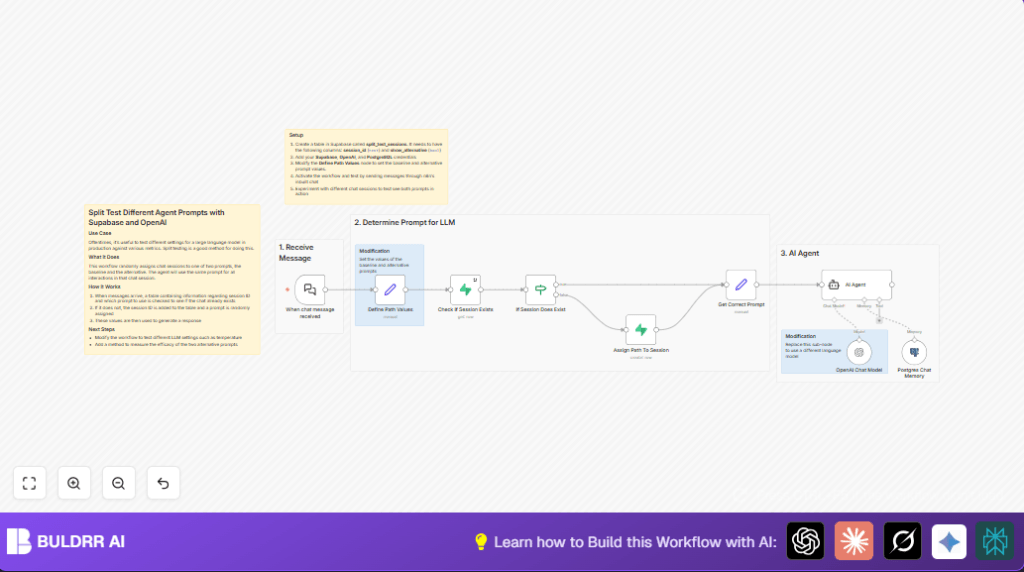

What this workflow does
This workflow helps you test two different chat prompts in an AI chat app.
It assigns one prompt per chat session and keeps it same for all messages in that session.
This stops manual work and errors in prompt testing.
You get clear, correct data to compare prompts and improve chat answers faster.
Who should use this workflow
Use this if you want to compare two prompts for an AI chat app.
It is for product managers, developers, or anyone managing chat prompts and testing AI answers.
Tools and services used
- n8n Automation Platform: Runs the chat workflow and nodes.
- Supabase: Stores which prompt goes to which chat session.
- OpenAI API (GPT-4o-mini): Generates AI chat responses using the selected prompt.
- PostgreSQL with LangChain Memory: Saves chat history for each session.
Inputs, Processing, and Output
Inputs
- User chat messages received live through LangChain Chat Trigger.
- Session ID to track each conversation.
Processing Steps
- Check if session already has a prompt assigned in Supabase.
- If no prompt assigned, assign one randomly and save to Supabase.
- Use the correct prompt (baseline or alternative) for that session.
- Send chat input and prompt to OpenAI GPT-4o-mini to get AI response.
- Store chat messages and responses in PostgreSQL via LangChain Memory to keep session context.
Output
- Correct AI chat response using consistent prompt per session.
- Reliable data on which prompt works better.
Beginner step-by-step: How to use this workflow in n8n
Import and setup
- Download the workflow file using the Download button on this page.
- Open n8n editor where you want to run the workflow.
- Import the workflow using n8n’s Import from File option.
Configure credentials and settings
- Add Supabase credentials: project URL and API key.
- Add OpenAI API Key for GPT-4o-mini.
- Add PostgreSQL credentials for chat memory.
- Update any table names, session ID fields, or prompt values if needed.
- Check the Define Path Values node to see or edit the baseline and alternative prompt texts.
Test and activate
- Send a test chat message using the LangChain Chat Trigger webhook URL.
- Watch the workflow run and confirm prompt assignment and responses.
- Fix issues if any appear in the logs.
- Activate the workflow for live production use.
For hosting the workflow, check self-host n8n if running on a server.
Edge cases and failures
- If Supabase query returns no data, check table name and API permissions.
- If chat messages do not trigger the workflow, verify webhook URL and payload.
- OpenAI requests fail if API key is wrong or usage limits reached.
- Keep session IDs unique to avoid wrong prompt reuse.
Customization ideas
- Change baseline and alternative prompt texts in the Define Path Values node.
- Use different OpenAI models by updating the OpenAI Chat Model node.
- Adjust prompt assignment chances in the Assign Path to Session node code with Math.random()
- Add more columns to Supabase for tracking extra data like timestamps.
Sample prompt assignment code
Use this JavaScript expression in the node that assigns new session prompts randomly:
Math.random() < 0.5This returns true or false to decide which prompt variant to assign.
Summary
✓ Saves 8-10 hours weekly by automating prompt assignment.
✓ Prevents errors in manually tracking prompts per chat.
✓ Keeps prompt consistent for each chat session.
✓ Stores chat history for rich AI context.
✓ Produces clean, reliable data for prompt testing.
→ Enables faster and clearer AI chat quality improvements.
