

What this workflow does
This workflow checks if a URL is dangerous or abused by using Cortex security tools.
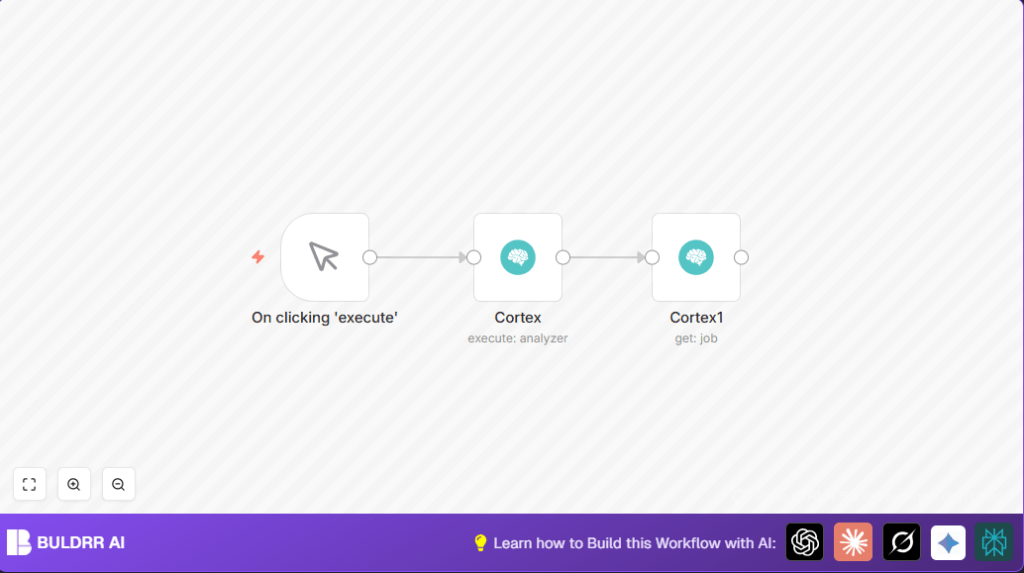
User inputs a URL. The workflow sends this to Cortex Abuse Finder analyzer. Cortex runs its checks and gives a job ID.
Then, workflow asks Cortex for full details about that job. It saves info about the URL’s risk and problems found.
This saves a lot of repeated manual work. It stops errors from typing wrong job IDs and helps react faster to bad URLs.
Tools and services used
- n8n: Automation platform to link steps and run workflow.
- Cortex: Security platform that analyzes URLs with Abuse Finder.
- Cortex API: Enables n8n to securely ask Cortex for analysis and job details.
How the workflow works (Input → Process → Output)
Input
User gives a URL to check, like https://n8n.io.
Processing
1) Sends URL to Cortex “Abuse Finder” analyzer.
2) Cortex processes and produces a job with ID.
3) Uses that job ID to ask Cortex for detailed results.
Output
The workflow shows full job report with info on threats or abuse detected.
Beginner step-by-step: How to use this workflow in n8n production
Import the workflow
- Download workflow from this page using the Download button.
- Open your n8n editor. Click “Import from File” and select the downloaded workflow file.
Configure after import
- Add Cortex API credentials in n8n Credentials if not already set.
- Check the first Cortex node uses the right Abuse Finder 3.0 analyzer ID:
f4abc1b633b80f45af165970793fd4fd::Abuse_Finder_3_0. - Update the URL to analyze if needed or keep the example https://n8n.io.
Test and activate
- Click Manual Trigger and press “Execute Workflow” to run a test.
- Check the output shows the Cortex job details for the URL.
- Toggle the workflow to Active to enable for real use.
Consider self-host n8n if you want to run this workflow on your own server.
Common mistakes to avoid
- Wrong Cortex API credentials cause errors. Check credentials carefully.
- Incorrect job ID reference in second Cortex node breaks job details fetching.
- Wrong analyzer ID or observable type stops analysis from starting.
Customization ideas
- Analyze other kinds of data like IP addresses or file hashes by changing observable type and value.
- Use different Cortex analyzers by replacing analyzer ID for other threat checks.
- Add notifications via email or Slack if dangerous URLs are found.
Troubleshooting common problems
Authentication failed with Cortex API
Means API key is wrong or expired.
Fix by re-entering correct API key in n8n credentials and testing connection.
JobId expression returns empty or undefined
Means the first Cortex node did not send correct job ID.
Check execution logs. Make sure _id field exists and reference {{$node["Cortex"].json["_id"]}} is correct.
Pre-production checklist
- Confirm Cortex API credentials are active in n8n.
- Verify Abuse Finder analyzer ID matches your Cortex setup.
- Test with valid URLs you want to analyze.
- Ensure nodes connect as: Manual Trigger → Cortex Analyze URL → Cortex Get Job Details.
Deployment guide
After testing, switch workflow on by toggling Active.
Use Manual Trigger to run on demand, or switch to HTTP Webhook node for automatic URL inputs.
Watch workflow logs in n8n to track successful runs and errors.
Summary and results
✓ Saves manual URL threat checking time every day.
✓ Reduces mistakes by linking job IDs automatically.
→ Gives full detailed security reports on URLs quickly.
→ Lets user react faster to malicious URL risks.
