

Analyze Email Headers for IP Reputation & Spoofing with n8n

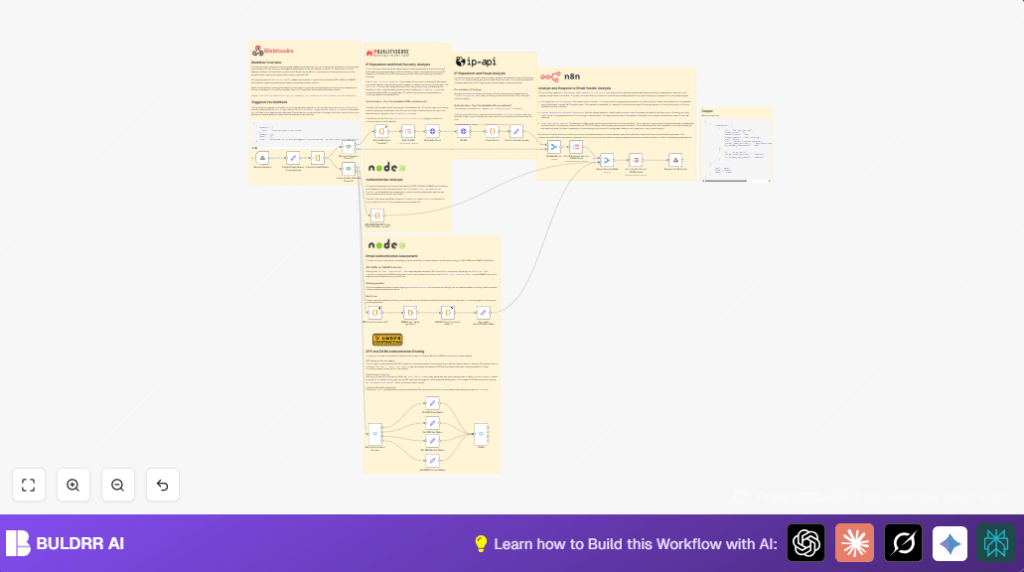
This n8n workflow analyzes email headers to identify IPs and assess their reputation using IP Quality Score and authentication results like SPF, DKIM, and DMARC, helping detect spoofing and phishing threats effectively.
webhook
httpRequest
code
+6
Workflow Identifier: 2144
NODES in Use: Webhook, Set, Code, If, Item Lists, HTTP Request, Merge, Switch, Respond to Webhook
Analyze email headers with n8n and HTTP Request

Press CTRL+F5 if the workflow didn't load.

Learn how to Build this Workflow with AI:

What this workflow does

This workflow takes an email header string as input and checks it for fake senders and bad IP addresses quickly.

It finds IP addresses inside the header and looks up if those IPs have bad reputations using online services.

It also checks if the email passed security checks like SPF, DKIM, and DMARC.

After all checks, it sends back a clear report showing if the email is safe or suspicious.


Who should use this workflow

The user who gets lots of suspicious emails and wants to save time finding bad senders can use this.

No need to look at raw headers and guess the risks anymore.

It helps people checking email security faster and more accurately.


Tools and services used

  • n8n: For building and running the automation workflow.
  • IP Quality Score API: Checks IP addresses for fraud and abuse risks.
  • IP-API: Returns location and ISP info for IP addresses.
  • Webhook endpoint: To start the workflow with email header data.

Input, processing, and output

Input

User sends an email header text to the webhook URL in n8n as a POST request.

Processing

  • The workflow splits the header into parts and finds IP addresses.
  • Each IP address is checked using IP Quality Score for bad behavior.
  • IP-API adds more info about the IP’s location and ISP.
  • The workflow reads security checks from the header (SPF, DKIM, DMARC).
  • All data is joined into one report.

Output

A JSON object showing IP reputations, location details, and authentication results is returned to the webhook caller.


Beginner step-by-step: How to use this workflow in n8n production

Download and import the workflow

  1. Find and click the Download button on this page to save the workflow file to your computer.
  2. Open your n8n editor where you build flows.
  3. Click the menu and choose “Import from File”.
  4. Select the downloaded workflow file and import it.

Configure the workflow

  1. Open the imported workflow to see all nodes.
  2. Enter your IP Quality Score API Key in the node named HTTP Request node called IP Quality Score. Replace the placeholder with your real key.
  3. Check if any IDs, URLs, or email addresses used in the nodes match your real environment. Edit them if needed.

Test and activate

  1. Send a test email header as a POST request to the URL of the Webhook node named Receive Headers.
  2. Look at the workflow run to confirm the output includes IP checks and authentication results.
  3. If all looks good, turn on the workflow’s toggle switch to activate it for real use.

You can now send real email headers to this webhook and get detailed safety reports back automatically.

If self hosting n8n, remember to secure the webhook URL and keep API Keys private. Learn more about self-host n8n.


Customizations

  • Add deeper DKIM checks to confirm signature validity and alignment.
  • Make a whitelist of safe IPs to skip some fraud checks.
  • Add more IP Quality Score parameters to catch VPNs or anonymizers.
  • Setup logging for suspicious IPs and fails using Google Sheets or file writing nodes.
  • Add alerts to Slack channel when bad IPs or authentication failures are found.

Possible problems and fixes

  • If the IP Quality Score node shows 401 errors, check if the API Key is correct and not expired.
  • If the webhook never receives data, make sure to use the POST method and the correct URL path.
  • Too many requests to IP-API can cause rate limiting; slow down query speed or batch IPs.

Summary

✓ Automatically parses email headers to find all IP addresses found in received headers.

✓ Looks up IP quality and reputation to highlight risky senders.

✓ Checks SPF, DKIM, and DMARC authentication results from header data.

✓ Creates one easy-to-understand JSON report of IP risk and email auth.

→ Greatly cuts manual checking time and mistakes in email security analysis.

→ Helps quickly surface spoofing or phishing risk from suspicious emails.

✓ Can be extended with alerts, logging, or whitelisting for custom security needs.


Analyze email headers with n8n and HTTP Request

Visit through Desktop to Interact with the Workflow.

Author
Written By
Vikash Kumar
Building AI agents, n8n workflows and end-to-end automation for 30+ Brands across India, the US, Europe, Dubai & Australia. 7+ years of Experience saving founders real hours every week - no code required.
Author
Written By
Vikash Kumar
Building AI agents, n8n workflows and end-to-end automation for 30+ Brands across India, the US, Europe, Dubai & Australia. 7+ years of Experience saving founders real hours every week - no code required.

Frequently Asked Questions

The webhook expects a plain text POST request containing the full raw email header string.
IP addresses are extracted by parsing the Received header lines and using a regular expression to find IPv4 addresses.
The HTTP Request node will return a 401 Unauthorized error causing the workflow to fail at the IP check step.
Yes, the workflow can be imported and configured on a self-hosted n8n instance. See buldrr.com/hosting for more details.

Related Workflows

Automate Twist Channel Creation and Messaging with n8n

This workflow automates creating and updating a channel in Twist and sending a personalized message to specific users. It eliminates manual setup errors and saves time managing Twist communications.

Automate Ideogram Image Generation with Google Sheets & Gmail

This workflow automates graphic design image generation via Ideogram AI, storing image data in Google Sheets and Google Drive, with email alerts via Gmail. It saves designers hours by automating image creation, remixing, review, and record-keeping.

Automate IT Support with Slack and OpenAI in n8n

Streamline IT support by automating Slack message handling using n8n and OpenAI. This workflow handles Slack DMs, filters bots, queries a Confluence knowledge base, and delivers AI-generated responses, improving support efficiency and response time.

Automate Crypto Analysis with CoinMarketCap & n8n AI Agent

Discover how this unique n8n workflow leverages CoinMarketCap’s multi-agent AI to deliver precise, real-time cryptocurrency insights directly via Telegram. Manage crypto data analysis efficiently with automated multi-source API integration.

Automate Gumroad to Beehiiv Subscriber Sync with n8n

Learn how to automatically add new Gumroad sales customers as Beehiiv newsletter subscribers using n8n automation. This workflow saves time by syncing sales data to Google Sheets CRM and notifying your Telegram channel instantly.

Generate On-Brand Blog Articles Using n8n and OpenAI

This workflow automates the creation of on-brand blog articles by analyzing existing company content using n8n and OpenAI. It extracts article structures and brand voice to produce consistent draft articles, saving significant content creation time.
1:1 Free Strategy Session
Your competitors are already automating. Are you still paying for it manually?

Do you want to adopt AI Automation?

Every hour your team does repetitive work, you're burning real money.
While you wait, faster businesses are cutting costs and moving quicker.
AI and automations aren't the future anymore — they're the present.

Book a live 1-on-1 session where we show you exactly which of your daily tasks can be automated — and what it’s costing you not to.