
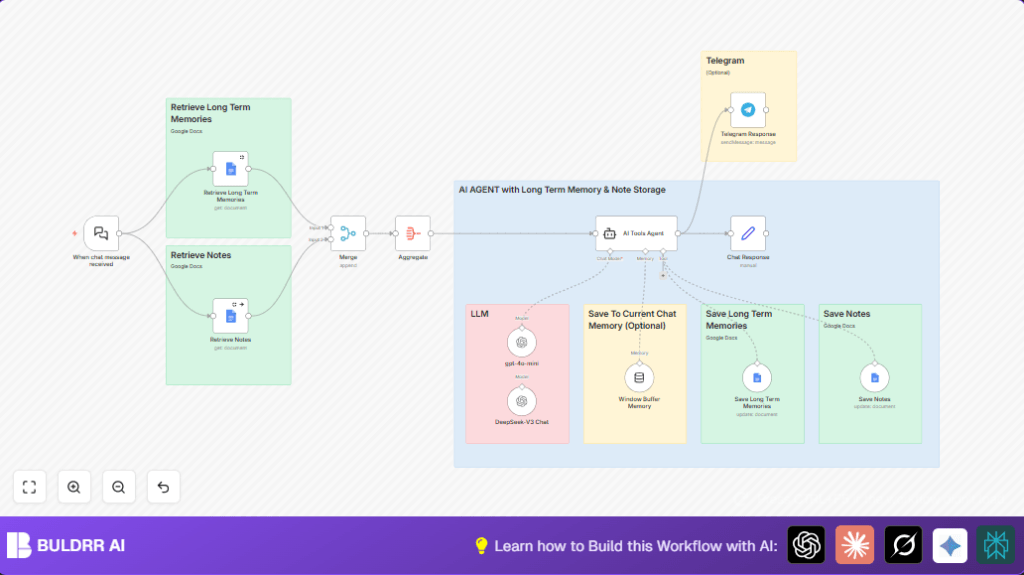

What This Automation Does
This workflow helps you turn Telegram chats into smart conversations that remember important info and notes over time.
It solves the problem of forgetting past details and wasting time on manual tracking.
The result is a Telegram AI assistant that recalls memories, manages notes, and replies with personal context automatically.
The bot uses Google Docs as storage for long-term memories and notes.
It also keeps recent chats in a sliding window for smooth conversations.
By combining input from Telegram with AI powered by OpenAI, it gives useful, human-like responses.
Who Should Use This Workflow
This workflow is good for entrepreneurs, small team leads, or anyone needing smart chat assistants.
It helps users who want to save time remembering client details and managing notes inside chat.
Users who want an automatic way to track useful info shared across chat sessions will find it helpful.
Tools and Services Used
- Telegram Bot API: Receives user messages.
- OpenAI API: Provides AI language models for chat replies.
- Google Docs API: Stores and retrieves long-term memories and notes.
- n8n Automation Platform: Runs the workflow and integrates all services.
- LangChain Nodes in n8n: Manage chat triggers, agent logic, and memory buffers.
How This Workflow Works: Input → Process → Output
Inputs
- Messages sent by Telegram users to the bot.
- Stored long-term memories and notes from Google Docs.
- Recent chat context from the sliding window buffer memory.
Processing Steps
- LangChain Chat Trigger listens for incoming chat messages.
- Google Docs nodes fetch memories and notes separately.
- Merge combines these two data sets.
- Aggregate groups merged data for AI use.
- Memory Buffer Window keeps last 50 chat messages per session.
- LangChain Agent runs AI tools using OpenAI models, input data, and buffer memory to generate replies.
- New memories or notes derived from the AI agent’s processing are saved back to Google Docs.
Outputs
- The generated AI reply is sent back to Telegram users.
- New or updated memories and notes are added to Google Docs.
Beginner Step-by-Step: How to Use This Workflow in Production
Step 1: Download and Import
- Click the Download button on this page to save the workflow file.
- Open the n8n editor.
- Select “Import from File” and choose the downloaded file.
Step 2: Configure Credentials
- Add OpenAI API Key under credentials.
- Set Telegram Bot Token with your bot’s API token.
- Authenticate Google Docs with proper OAuth credentials.
Step 3: Update Identifiers
- Check Google Docs nodes and update the document URLs or IDs for both memories and notes.
- Update Telegram chat ID if using a fixed chat target.
- Verify prompt or system message code in AI Tools Agent matches your desired instructions.
Step 4: Test the Workflow
- Send a message to the Telegram bot.
- Watch the workflow triggers and confirm the AI reply in Telegram.
Step 5: Activate for Production
- Switch the workflow toggle to Active.
- Monitor logs for errors.
- Adjust settings if needed and retest.
Optionally, consider self-host n8n for more control and stability.
Customizations
- Change the AI Tools Agent system message to give the AI your preferred personality or rules.
- Replace Telegram node with Slack or Discord nodes for using this workflow on other chat platforms.
- Swap Google Docs nodes for Google Sheets nodes to organize memories and notes as tables.
- Increase the Memory Buffer Window size to keep longer recent chat history.
- Make memory session keys user-specific to keep separate chat histories per user.
Troubleshooting
Webhook Not Triggering on Telegram Message
The LangChain Chat Trigger webhook might be inactive or set up wrong.
Check the webhook URL is active in n8n.
Test the webhook by sending messages to your Telegram bot.
Also verify the Telegram webhook is registered properly with Botfather.
Google Docs Node Shows Authentication Error
Google Docs OAuth token may be expired or lacking permissions.
Re-authenticate the Google Docs credentials in n8n.
Confirm Docs API is enabled in Google Cloud Console.
AI Agent Fails to Respond or Returns Error
OpenAI API key may be missing or invalid.
Check the API key validity and usage limits.
Renew or upgrade subscription if needed.
Pre-Production Checklist
- Confirm LangChain Chat Trigger webhook is activated and connected correctly.
- Test connections for Google Docs nodes both retrieving and saving memories and notes.
- Verify OpenAI API keys are correct and have enough quota.
- Send test messages to the Telegram bot to ensure full response cycle.
- Watch workflow logs for any errors or dropped requests prior to live usage.
Deployment Guide
Turn on the workflow by switching activation toggle to Active in n8n.
Check the execution logs regularly to confirm no problems.
Set up alerts or notifications in n8n or external tools to flag any errors.
Keep stable internet connection since APIs need to respond properly.
Summary
✓ Automates Telegram chats with AI that remembers long-term info.
✓ Saves time by managing notes and memories automatically.
✓ Produces replies based on stored knowledge and recent chat context.
✓ Uses Google Docs to keep data safe and organized.
✓ Easy to deploy inside n8n with clear input, processing, and output steps.
